EN
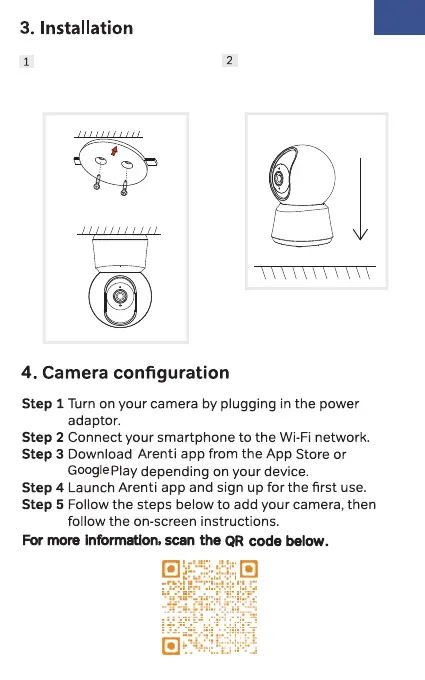
Use the included mounting
bracket to fix the camera to
a clean surface.
Or, put the camera on a
flat surface.
3. Installation
1 Use the included mounting
bracket to fix the camera to
a clean surface.
O
En
2 Or, put the camera on a
flat surface.
4. Camera configuration
Step 1 Turn on your camera by plugging in the power
adaptor.
Step 2 Connect your smartphone to the Wi-Fi network.
Step 3 Download Arenti app from the App Store or
GooglePlay depending on your device.
Step 4 Launch Arenti app and sign up for the first use.
Step 5 Follow the steps below to add your camera, then
follow the on-screen instructions.
For more information, scan the QR code below.



 To Next Page