8
DEUTSCHENGLISH FRANCAIS
ESPAÑOL
POLSKI ITALIANO
简体中文 繁體中文
SYSTEM SETTINGS (SETTINGS)
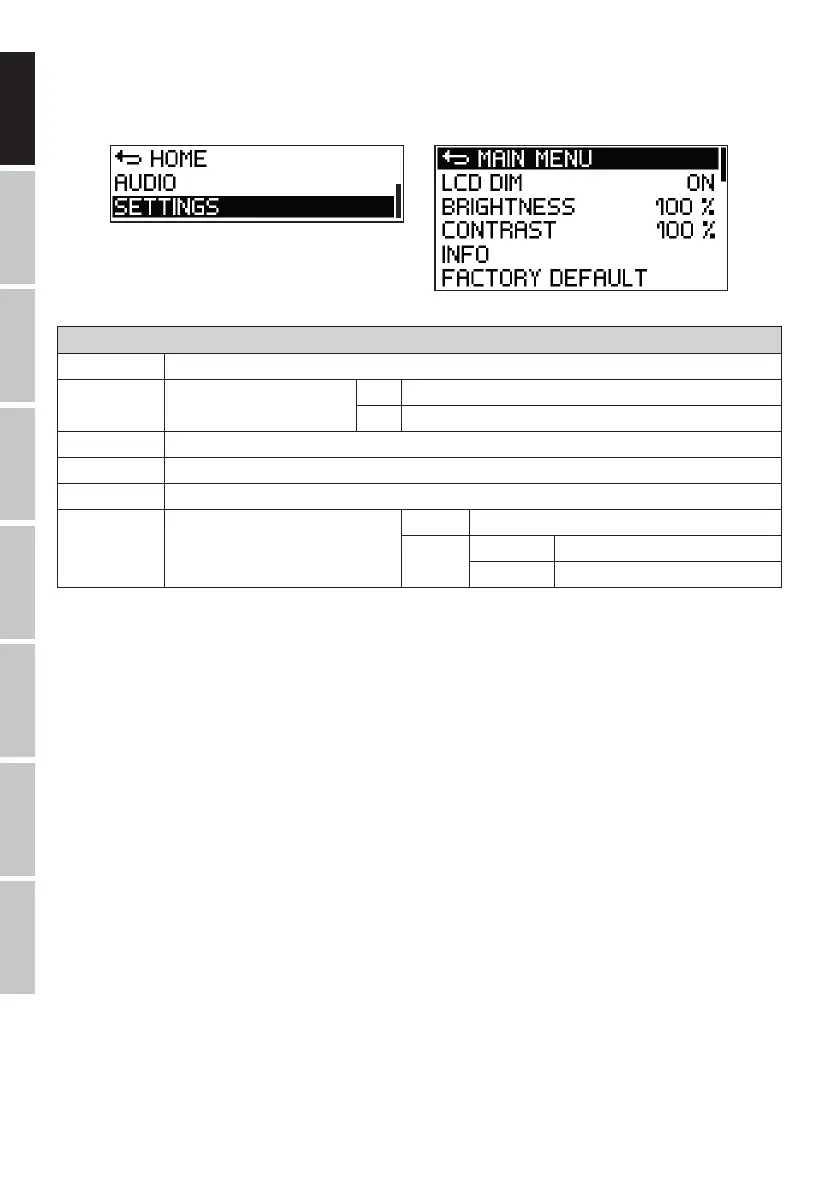
Press the rotary-push encoder to access the main menu and then turn the encoder to select the menu item SETTINGS (dark background). Press the
encoder again to access the submenu and then turn the encoder to select the desired submenu item. Confirm the selection by pressing the
encoder.
Refer to the table below for the submenu items and the relevant setting options:
SETTINGS (Change value or status = turn encoder, conrm value or status change or request information = press encoder)
MAIN MENU Return to main menu
LCD DIM Automatic display dimming ON Display is dimmed after approx. 20 seconds of inactivity
OFF Automatic display dimming switched off
BRIGHTNESS Setting the display brightness (0–100%)
CONTRAST Setting the display contrast (0–100%)
INFO Display of model number and software version
FACTORY DEFAULT Reset to factory default
(AUDIO + SETTINGS)
CANCEL Cancel reset
RESET SURE? YES Execute reset
CANCEL Cancel reset
In the submenu, select MAIN MENU and press the encoder to return to the main menu. In the main menu, select HOME and then press the en-
coder to confirm this selection and return to the main menu. The main menu will automatically be displayed after approx. 20 seconds of inactivity.


 To Next Page