6
CONNECTIONS, CONTROLS AND INDICATORS
1
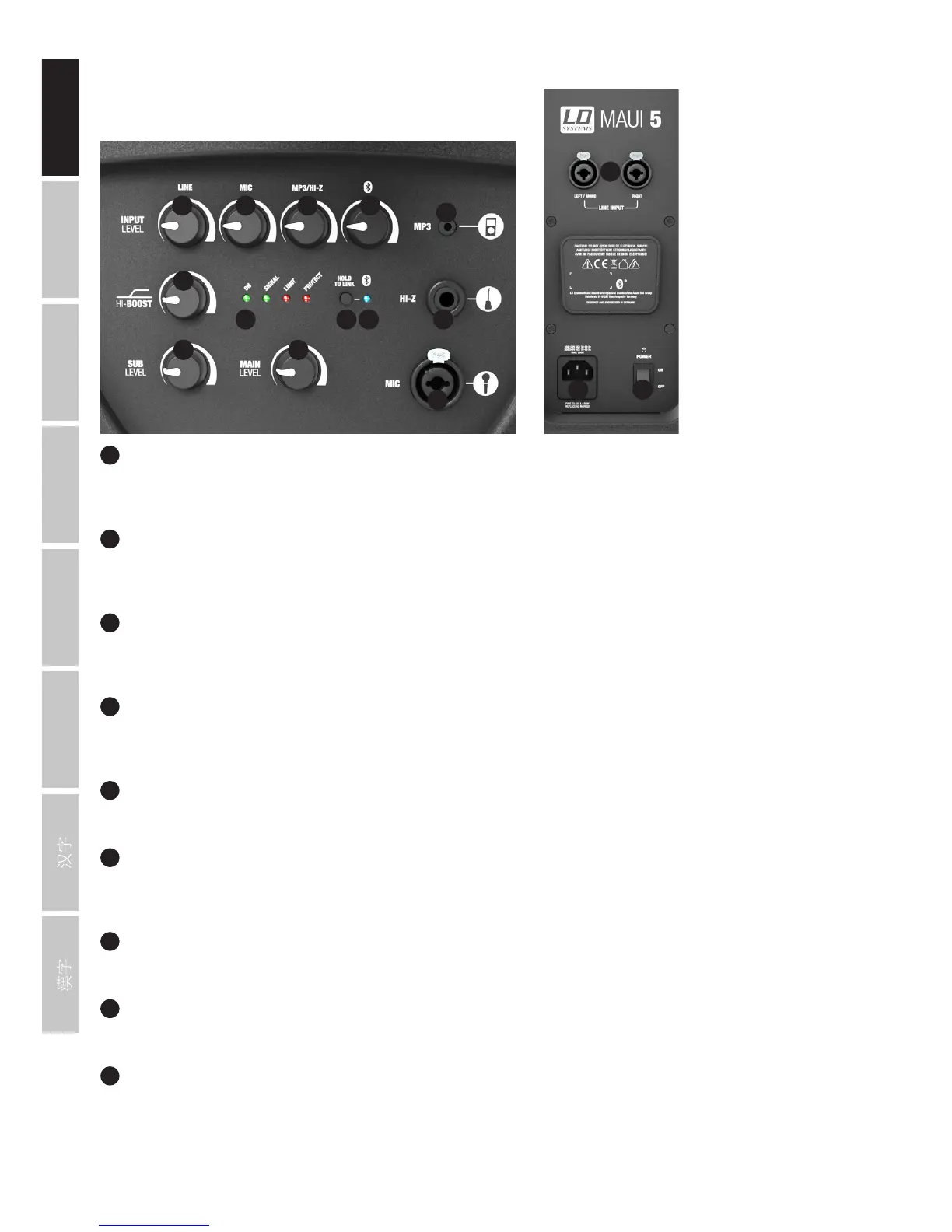
MIC INPUT
Balanced microphone input (XLR / 6.3 mm jack combo) It is also possible to use an unbalanced microphone cable (mono jack). The microphone
input has a built-in 100 Hz subsonic filter to suppress low-frequency noise. NOTE: There is no phantom power on the microphone input.
2
HI-Z INPUT
Mono input with 6.3 mm jack socket for acoustic or electric guitar. Both MP3 and HI-Z inputs can be used simultaneously; the volume ratio
must be set on the instrument, or on the player.
3
MP3 INPUT
Stereo line input with 3.5 mm jack socket for an MP3 player or other playback device. An incoming stereo signal is mono summed internally.
Both MP3 and HI-Z inputs can be used simultaneously; the volume ratio must be set on the instrument, or on the player.
4
LINE
Volume controller for the line channel (line inputs on the rear panel of the subwoofer). Turning the dial to the right increases the volume and
turning it to the left decreases it.
5
MIC
Volume controller for the microphone channel. Turning the dial to the right increases the volume and turning it to the left decreases it.
6
MP3 / HI-Z
Volume controller for the MP3 or instrument channel Turning the dial to the right increases the volume and turning it to the left decreases it.
Both MP3 and HI-Z inputs can be used simultaneously; the volume ratio must be set on the instrument, or on the player.
7
BLUETOOTH
®
Volume controller for the Bluetooth
®
unit. Turning the dial to the right increases the volume and turning it to the left decreases it.
8
HI-BOOST
High shelf filter to adjust the treble to the room acoustics (left stop = neutral sound, right stop = increase treble).
9
SUB LEVEL
Adjusting the volume ratio of the subwoofer to the column loudspeaker.
4 5 6 7
3
2
1
11 13 12
8
9 10
14
15 16


 To Next Page