CD PLAyeR:
08
ENGLISHDEUTSCHFRANCAIS
9
7 5
3
11
10
8 6
4 2
12
1
1
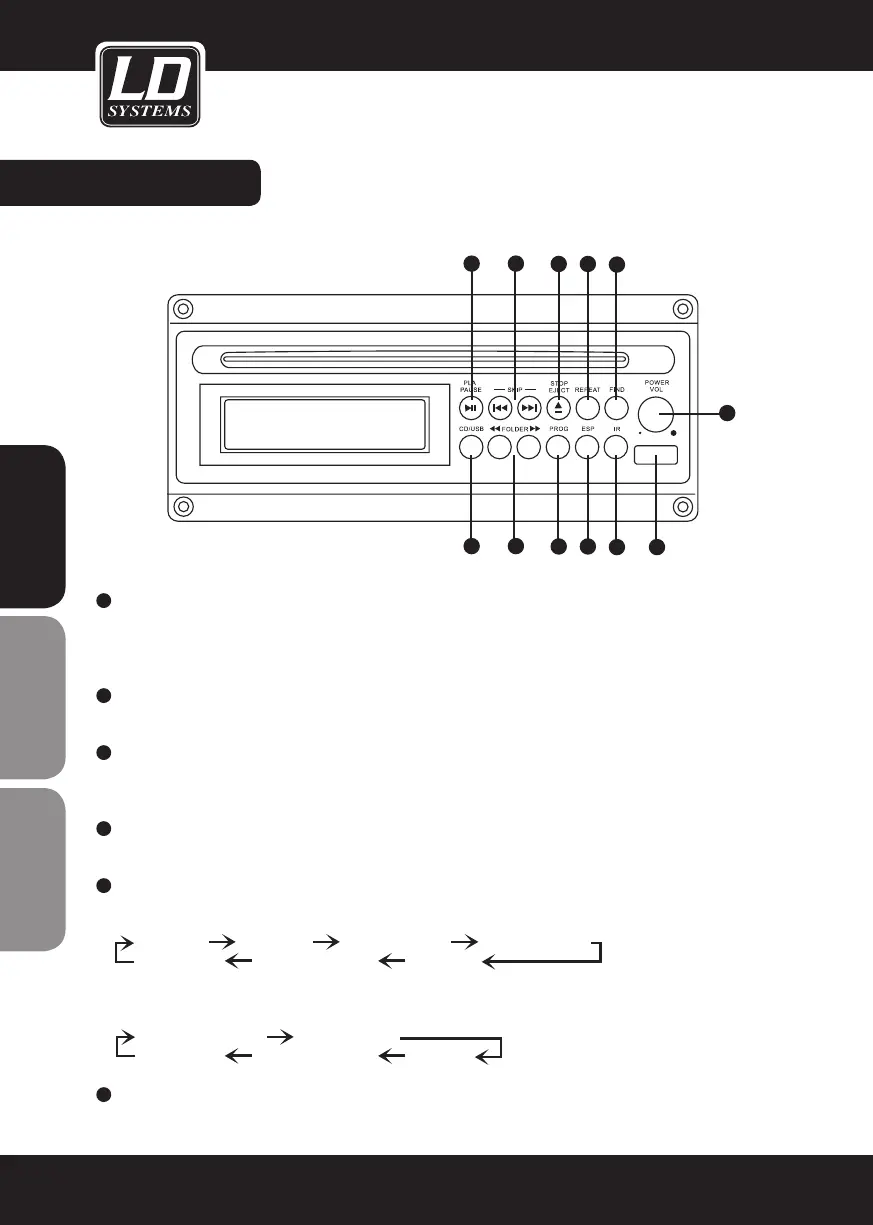
POWER / VOLUME BUTTON
To switch the CD Player On, press shortly on the button. Keep the button pressed to switch it off.
Vol down: Turn this button towards left to decrease the volume (1 dB less per step)(min 0 dB)
Vol Up: Turn this button towards right to increase the volume (1 dB more per step)(max 30 dB)
2
USB SOCKET
USB 1.1 Input. Supports MP3 and WMA files. Only for USB Memory Sticks.
3
FIND
In USB & MP3 CD Mode pressing this button will show you the music folders available (on the USB Stick or on the
MP3/WMA CD).
4
IR
Infrared receiver for the remote control
5
REPEAT
IN USB & MP3 CD Mode the repeat modes are shown in this order
PLAY ALL
RANDOM REPEAT TRACK REPEAT FOLDER
REPEAT ALL
RANDOM REPEAT PLAY ALL
In Audio CD Mode the repeat modes are shown in this order
PLAY ALL RANDOM
REPEAT TRACK
REPEAT ALL
RANDOM REPEAT PLAY ALL
6
ESP
Available only in Audio CD Mode. Press this button to activate the ESP anti-shock function. Display shows “40
SEC CD”. Press again to deactivate the ESP anti-shock function. Display shows “ESP Off”.
y


 To Next Page