

EasyManua.ls Logo

LDT DigitalBooster DB-4-G - User Manual

LDT DigitalBooster DB-4-G
20 pages
Print Icon
To Next Page IconTo Next Page
Loading...
Littfinski DatenTechnik (LDT)
Bühler electronic GmbH
Ulmenstraße 43
15370 Fredersdorf / Germany
Tel.: +49 (0) 33439 / 867-0
Multi-Digital
Manual
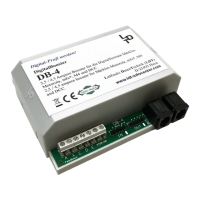
DigitalBooster DB-4
The DigitalBooster DB-4 is a short-circuit protected
Power-Amplifier (Booster) for digital Model Railway
Layouts from the Digital-Professional-Series!
The DB-4 amplifies the digital formats of Märklin-
Motorola, mfx
®
, M4 and DCC.
DB-4-G
Part-No.:
080073
>> finished module in a case <<
The DigitalBooster DB
-
4 provides a
maximum digital current of 2.5 or 4.5
Ampere and amplifies the digital
formats of Märklin-Motorola,
mfx
®
, M4
and DCC.
The DB-4 can operate with several
digital command stations by using the
5-poles booster bus, the CDE booster
bus or the Roco-booster bus.
The DigitalBooster DB-4 receives the
power supply not from a classical
model railway transformer but from
the switched mode mains power
supply DB-4 PowerSupply. On this
unit is the stabilized digital track
voltage adjustable between 15 and 24
Volt, suitable for all track gauges.
This product is not a toy! Not suitable for children under 14 years. Improper use will imply danger or injuries due to
sharp edges and tips! Please store this instruction carefully.
CE Part-No.:
1370365
BU1
+
S1
DCCMM
JP1
JP2
JP3
JP4
OFFON
Auto Go
RailCom
ShortReport
red brown
LED1 LED2
GO STOP
+
Littfinski DatenTechnik (LDT)
KL1
K J
4,52,5
JP5
OUTIN
ST1 ST2
Rev. 1.4
DB-4
BU3
BU2
C D E
STOP/GO
KL2
KL4 KL3
Feedback
A
T
2,5 / 4,5 Ampere Booster für die Digitalformate Märklin-
Motorola, mfx®, M4 und DCC.
2,5 / 4,5 ampere booster for Märklin-Motorola, mfx®, M4
and DCC.
DB-4
DigitalBooster
Multi-Digital
Littfinski DatenTechnik (LDT)
www.ldt-infocenter.com
Digital-Profi werden!
Question and Answer IconNeed help?

Do you have a question about the LDT DigitalBooster DB-4-G and is the answer not in the manual?

Summary

Preface and Safety Instructions

Pre-Installation Safety Check

Critical instruction to switch off drive voltage before installation.

Connections to Command Station and Boosters

5-poles Boosterbus Connection

Connects the DB-4 to command stations or other boosters using the 5-poles Boosterbus.

CDE-Boosterbus Connection

Connects the DB-4 to command stations using the CDE-Boosterbus.

Roco-Boosterbus Connection

Connects the DB-4 to command stations using the Roco-Boosterbus.

Power Supply Connection

DB-4 Power Supply Unit

Connects the DB-4 to the DB-4-PowerSupply for power, not a classical transformer.

Own Track Section Connections

3-Conductor Track System Setup

Connects DB-4 to track with common ground and isolated center conductor.

Booster Keep Separate Module (BTM-SG)

Alternative module for electrical separation of booster sections.

2-Conductor Track System Setup

Connects DB-4 to track, isolating rails at cross over joints.

Booster Operation

LED Indicators and Status

Explains the meaning of the red and green LEDs during operation.

Short Circuit and Overload Handling

How the DB-4 reacts to short circuits and overloads, including automatic shutdown.

Operation Modes and Jumpers

Maximum Digital Current Selection

Configures the maximum output current to 2.5A or 4.5A using Jumper J5.

Data Format for WatchDog;On-Off Switch

Sets the data format (Märklin-Motorola or DCC) for WatchDog and On/Off functions.

RailCom*-Cutout Configuration

Enables or disables RailCom®*-cutout creation via Jumper J3.

Short Circuit Reporting

Configures reporting of short circuits to the command station via Jumper J1.

WatchDog and On-;Off Switch Addresses

Automatic Switch-On (Auto Go)

Enables automatic track power restoration after short circuit elimination via Jumper J2.

Address Assignment Overview

Explains how accessory addresses control WatchDog and On-/Off functions.

Address Configuration Details

Common Address Configuration

Assigns a single four-fold address block for WatchDog and On-/Off functions.

Separate Address Configurations

Assigns separate four-fold address blocks for WatchDog and On-/Off functions.

Address Programming Procedure

WatchDog Communication with Software

WatchDog Functionality

How the WatchDog function ensures layout control and reacts to software communication loss.

On;Off Control Methods

On;Off Control via Accessory Address

Details on switching the DB-4 On/Off using accessory (turnout) addresses.

On;Off Control via External Push Button

Wiring and functionality of external Stop/Go keys for emergency shutdown.

Booster-Management Feedback

Feedback via RM-88-N (s88-feedback bus)

Connects DB-4 to RM-88-N for feedback reporting on the s88 bus.

Feedback via RS-16-O (RS-feedback bus)

Connects DB-4 to RS-16-O for feedback reporting on the RS bus.
PC Board Assembly Plan

LDT DigitalBooster DB-4-G Specifications

General IconGeneral
BrandLDT
ModelDigitalBooster DB-4-G
CategoryAmplifier
LanguageEnglish