The LD-TF3.0 Five-Stage Dispenser is a UAV airdrop device developed by Leader Aerial, designed for use with DJI M300RTK drones and potentially other third-party UAVs. Its primary function is to facilitate multi-stage payload delivery, offering precise and stable operation.
Function Description:
The device is a five-stage airdrop mechanism that allows for the sequential release of up to five items. It integrates with DJI drones via the OSDK interface, which is a key advantage as it does not occupy the gimbal interface, eliminating the need for a dual gimbal kit. This OSDK communication control ensures stable and reliable operation. For third-party UAVs, the dispenser can be controlled via a PWM interface, requiring an external receiver and a PWM signal line.
The main body of the dispenser is constructed from carbon fiber and aviation aluminum materials, processed with CNC, anodizing, and laser engraving for durability, waterproofing, and rustproofing. It features a TYPE-C interface and an anti-misplug design for the UAV OSDK interface connection. Manual buttons are provided on the module itself to control the opening and closing of the projector claw, enabling quick mounting tasks. When used with the company's quick-release carrier frame, various equipment can be rapidly swapped. The design prioritizes placing the payload under the drone's center of gravity to ensure maximum safety and stability during flight. This setup allows for high-definition observation with cameras like the H20 series while enabling multiple, accurate, and safe deliveries.
Important Technical Specifications:
- Product Size: 62mm x 62mm x 92mm
- Outer Packing Box: 252mm x 217mm x 121mm
- Weight: 295g
- Electrical Interface: OSDK (for DJI M300RTK), PWM (for third-party UAVs)
- Rated Power: 18W
- Supply Voltage: Input voltage of Type-C port 5~24V
- Control Mode: OSDK + APP control (for DJI M300RTK), PWM signal control (for third-party UAVs)
- Control Distance: Same as UAV communication distance (M300RTK); depends on the remote control for third-party UAVs.
- Installation Method: Quick-release type
- Number of Mounts: 5
- Single Claw Load: 5kg (subject to aircraft load)
- Total Hanging Weight: 25kg (subject to aircraft load)
- Mount Sequence: Sequential mount
- Release Order: Sequential release
- Release Function: Single point release
- Operating Ambient Temperature: -20°C to 45°C
- Expand Functions: Supports PWM signal control of third-party UAVs (contact sales in advance).
- Supported Models: M300RTK (for other models, contact sales first).
- PWM Interface Specification: DuPont 2.54mm 3P, provides 5V2A DC power supply.
- PWM Signal Frequency: 1.0ms ~ 2.0ms 50Hz two-step switching signal. Note: Do not use a voltage higher than 5V for the PWM interface.
Usage Features:
- Installation: The dispenser is installed by first attaching quick-release pylons to the drone, replacing the gimbal pylon's fixing screws. The five-segment injector then aligns and pushes into the quick-release pylon until a "click" confirms it's locked.
- OSDK Cable Connection: A special OSDK cable connects the drone's OSDK interface to the dispenser's OSDK interface. It's crucial to pay attention to the direction of the single slot on the drone's interface (facing outwards) and ensure both ends are firmly plugged in before powering on the drone. The OSDK interface is not hot-swappable to prevent damage.
- APP Installation: The accompanying "Lide" APP is installed on the remote control via a TF card. Users navigate to "File Management," select the SD card, and click on "Lide.apk" to install.
- APP Permissions and Login: After installation, the APP requires location access and floating window permissions. Users must grant these permissions and then click "GO" to log in. If login is not immediately successful, returning to the application interface and re-entering the APP can resolve it.
- Signal Mode Switching: For DJI M300RTK drones, a signal selection knob on the dispenser must be turned to the "OSDK" direction. For third-party drones, the knob is set to "PWM," and an external receiver connects to the PWM interface.
- Mount Item Operation: After the drone and dispenser are powered on and connected, the dispenser automatically enters its initial position. Items are mounted by tapping the physical button on the dispenser. Each tap opens a casting claw, allowing the item's rope to be placed within the locking range. Tapping five times in turn mounts five drop items.
- Remote Control Operation: During flight, the SW1 icon in the floating APP window controls delivery. When the drone is above the mission target, tapping SW1 (which turns blue) initiates the drop. Tapping it again (which turns gray) resets the state. After returning to the take-off point, new items can be mounted using either the physical buttons or the SW1 icon on the APP.
Maintenance Features:
- Damage Prevention: Users are explicitly warned against live plugging or unplugging the OSDK cable with power, as this can damage the OSDK interface, leading to loss of device control.
- Repair: If the OSDK interface is damaged, the drone must be returned to the factory for repair.
- Proper Handling: The manual emphasizes careful reading and proper storage of the book. For any questions, users are directed to contact sales personnel.
- Voltage Caution: When using the PWM interface, it is critical not to connect a voltage higher than 5V to prevent damage.

 Need help?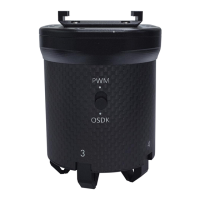

 To Next Page
 General