EasyManua.ls Logo

Leader LTC-905 - Troubleshooting Procedure; Troubleshooting Chart

Leader LTC-905
8 pages
Print Icon
To Next Page IconTo Next Page
To Previous Page IconTo Previous Page
Loading...
o
Set
the
POLARITY
switch
to
PNP.
o
Adjust
PNP
STEP
ADJ
(VR103)
for
amplitude
of
3-5Vp-p
with
seven
steps
as
shown
in
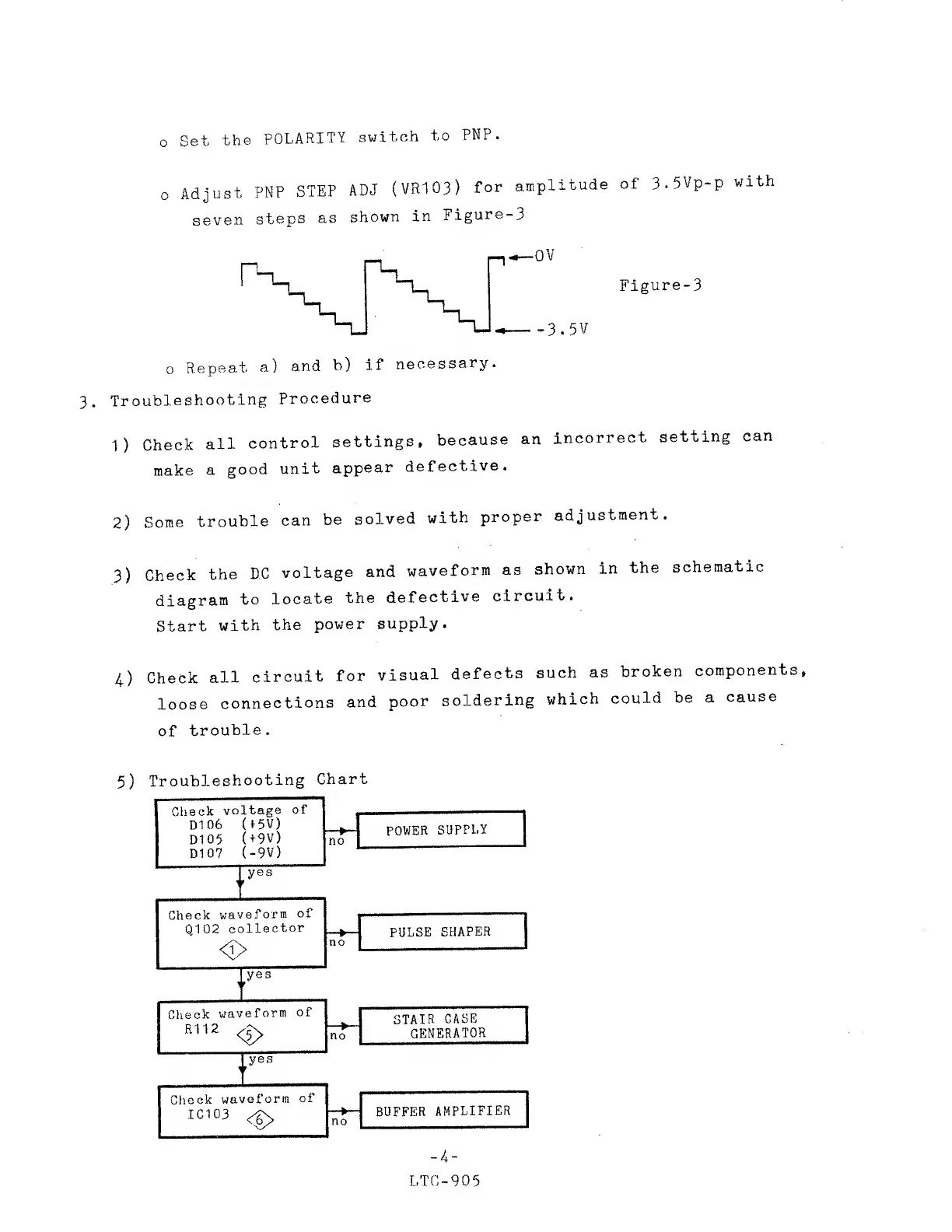
Figure-3
Figure-3
o
Repeat
a)
and
b)
if
necessary.
3.
Troubleshooting
Procedure
1)
Check
all
control
settings,
because
an
incorrect
setting
can
make
a
good
unit
appear
defective.
2)
Some
trouble
can
be
solved
with
proper
adjustment.
3)
Check
the
DC
voltage
and
waveform
as
shown
in
the
schematic
diagram
to
locate
the
defective
circuit.
Start
with
the
power
supply.
4)
Check
all
circuit
for
visual
defects
such
as
broken
components,
loose
connections
and
poor
soldering
which
could
be a
cause
of
trouble.
5)
Troubleshooting
Chart
-
4
LTC-905

Other manuals for Leader LTC-905