Leap Professional Stopwatch Manual
Model: TF-C300
PART I FEATURES:
1. Time and calendar
2. 12/24- hour format.
3. Alarm and chime, can set an alarm time.
4. 300 dual memory, measure up to 10 hours with 1/100 second.
5. Dispaly LAP/ SPLIT/CHRONO.
6. Recall fastest (FS), Slowest (SL) and average (AV) lap times and each memory. A sequence of measurement data obtained from
race start to finish is recorded as a group of data namely “ BLK” , up to 100 blocks of data can be stored in memory without
deleting the previous data.
7. Record once a completed countdown, the maximum record of 9999 times.
8. Frequency of 10-320 beats/ minute prompt.
9. Through the three "paddle" cycle, the stoke rate per minute can be calculated automatically. Number of measurement(1-10).
10. Low battery notice.
PART II PUSHBUTTONS INSTRUCTION
【A】—START/STOP 【D】—MODE
【B】—RESET/LAP, SPLIT 【C】---RECALL
PART III OPERATION INSTRUCTION
3.1 Switching between modes
Press【D】switch between modes as the following sequence :
Time/Calendar → Alarm → CHRONO → Countdown → Pacer → Stroke Rate
3.2 Time/Calendar operation and settings
While in Time/Calendar mode, press【C】for 2 seconds to enter the setting【Time/Calendar】. The “Year" starts to flash and then
press【B】to display “ Year-Month-Day-12/24-Hour-Minute-Second” successively and repeatedly . Press【A】add 1 during the
flashing , add quickly by hold this button. After setting ok, press【C】to exit the setting mode.
3.3 Alarm settings
While in Time/Calendar mode, press 【D】to display the alarm mode, and then press and hold 【C】for 2 seconds to enter the alarm
setting. Press 【B】 when “Hour” starts to flash, “Hour-Minute” display successively and repeatedly. Press【A】to add 1 and add
quickly by hold this button. After setting ok, press【C】to exit the alarm setting mode.
While in alarm mode, turn on /off the alarm function by pressing 【A】. Display “on”means the alarm function is active, “-”means
is without alarm. When it goes up preset time, the alarm will last for 15 second. You may silence the alarm by pressing any
pushbutton.
4. CHRONOGRAPH MODE (Stopwatch)
4.1 Stopwatch Setting
After enter the chronograph, press【A】to start or stop “CHRONO”.
If stopwatch is running, press【B】to record the time for each lap.
If stopwatch is paused, press【B】to reset and save the previous memories as a group of data.
If stopwatch is the state of resetting (all zero appear), the current memory displays means the left space of the memory, and will
appear “MEM” (Memory).
If stopwatch is running or pause mode, the memory display means the current lap number, and will not appear “MEM”
(Memory).
If the memory is full, and then it cannot save the update data, the “Memory number” will flash to notice the memories need to
be removed.
4.2 How to recall of the stored data
A sequence of measurement data obtained from race start to finish is recorded as a group of data namely “ BLK” , up to 100 blocks
of data can be stored in memory without deleting the previous data.
Press【C】 to enter the recall mode (if no memory and then no recall) when the stopwatch is running/ stopped/reset, “RECALL”
appears as the above image. Then press【C】to recall any “memory group” data, long press to recall quickly .“BLK-001→BLK-002
→BLK-003…” When recall the “memory group” you need, press【A】to enter the data. And each press【A】 to recall the Fastest
(FS), Slowest (SL) and Average (AV) time and each memory time of this memory group, long press to recall quickly. After finish
the memory recall of one group, press【C】back to “BLK” group number, repeat the above operation to recall other group’s data.
Press【D】to return to the Chrono mode at any time.
4.3 How to clear the stored data
During the any time of memory recall, press【B】and then appear “Clear all data” image with the warning beep “Di-Di”. Keeping
Week
Year
Hour:Minute second
Months-Day
AM
-- LAP
-- SPLIT
-- CHRONO

 Need help?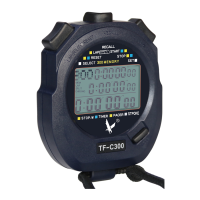

 To Next Page
 General