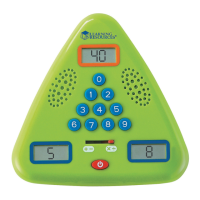
Screen 1
Screen 2
Screen 3
Power button
Selector switch
Example:
4 + 2 = 6
Got a minute? The Minute Math Electronic Flash Card
™
is a great
way to practice math skills. Choose addition/subtraction or
multiplication/division “skill drills.”
Ficha didáctica electrónica, un minuto de matemáticas • Carte Flash électronique
Minute de maths • Minute Math- Elektronisches Mathe-Spiel
To Operate:
Press the red POWER button to turn the unit on.
Press and hold the POWER button to mute the sound and play in silence. Press the
POWER button again to restore the sound. Press POWER button again to turn the
g a m e o .
Slide the selector switch to choose addition/subtraction or multiplication/division
drills.
Level Select
Press 1, 2 or 3 to select a skill level. The selected level will display in Screen 1.
Skill Level 1 – This level tests early addition and subtraction of numbers 0–10, or
multiplication tables 1, 2, 3, 5, and 10.
Skill Level 2 – This level increases the di culty by featuring numbers 10–20 in
addition/subtraction, or multiplication tables 3–12.
Skill Level 3 – Play this level for a real challenge. Addition/Subtraction features
equations with multiples of 2, 3, 4, 5, and 10, all the way up to 150, and
multiplication tables 0–12.
The Minute Math drill begins after a fi ve-second countdown. Players now have
sixty (60) seconds to solve as many equations as they can by fi lling in the missing
number. The missing number may appear in any one of the three display screens.
NOTE – The number in Screen 1 will ALWAYS be the largest of the three numbers
in any of the equations. See example above.
The unit makes a “positive” sound for correct answers and a “negative” sound
for incorrect answers. In MUTE mode, the screen will fl ash to indicate correct
answers.
At the end of 60 seconds, the unit will display a score. Screen 2 will display the
number of problems answered correctly, and Screen 3 will display the total
number of equations.
To play again, press any button to return to the Level Select screen.
Note – To disable the 60-second timer, when selecting a skill level, press and
hold button (1, 2 or 3). The screen will fl ash briefl y and the timer will be disabled
for the game. This is a great way to practice solving unlimited math equations. To
restore the timer function, select a new game by sliding the selection switch.
To save battery power, The Minute Math Electronic Flash Card
™
will power down
automatically if there is no activity after 3 minutes.
Battery Information
Installing or Replacing Batteries
WARNING! To avoid battery leakage, please follow these instructions carefully.
Failure to follow these instructions can result in battery acid leakage that may cause burns,
personal injury, and property damage.
Requires: 3 x 1.5V AAA batteries and a Phillips screwdriver
• Batteries should be installed or replaced by an adult.
• Minute Math Electronic Flash Card
™
requires (3) three AAA
batteries
• The battery compartment is located on the back of the unit.
• To install batteries, fi rst undo the screw with a Phillips
screwdriver and remove the battery-compartment door.
Install batteries as indicated inside the compartment.
• Replace compartment door and secure with screw.
Battery Care and Maintenance Tips
• Use (3) three AAA batteries.
• Be sure to insert batteries correctly (with adult
supervision) and always follow the toy and battery
manufacturer’s instructions.
• Do not mix alkaline, standard (carbon-zinc), or
rechargeable (nickel-cadmium) batteries.
• Do not mix new and used batteries.
• Insert batteries with the correct polarity. Positive (+)
and negative (-) ends must be inserted in the correct
directions as indicated inside the battery compartment.
• Do not recharge non-rechargeable batteries.
• Only charge rechargeable batteries under adult supervision.
• Remove rechargeable batteries from the toy before charging.
• Only use batteries of the same or equivalent type.
• Do not short-circuit the supply terminals.
• Always remove weak or dead batteries from the product.
• Remove batteries if product will be stored for an extended period of time.
• Store at room temperature.
• To clean, wipe the surface of the unit with a dry cloth.
• Please retain these instructions for future reference.
Instruction Guide
Guía de instrucciones • Mode d’emploi • Anleitung
LER 6965
ages
años
ans
jahre
6
+
grades 1+
© Learning Resources, Inc., Vernon Hills, IL, US
Learning Resources Ltd., Bergen Way,
King’s Lynn, Norfolk, PE30 2JG, UK
Learning Resources B. V., Kabelweg 57,
1014 BA, Amsterdam, The Netherlands
Please retain the package for future reference.
Made in China. LRM6965-GUD
Hecho en China. Conserva el envase para
futuras consultas.
Fabriqué en Chine. Veuillez conserver l’emballage.
Hergestellt in China. Bitte Verpackung gut
aufbewahren.
Learn more about our products
at LearningResources.com
This device complies with Part 15 of the FCC Rules.
Operation is subject to the following two conditions:
(1) This device may not cause harmful interference, and
(2) this device must accept any interference received,
including interference that may cause undesired operation.
TM


 To Next Page
 Need help?
 General