01
03
06
09
04
10
02
05
12
11
07
08
A B C
D
E F G
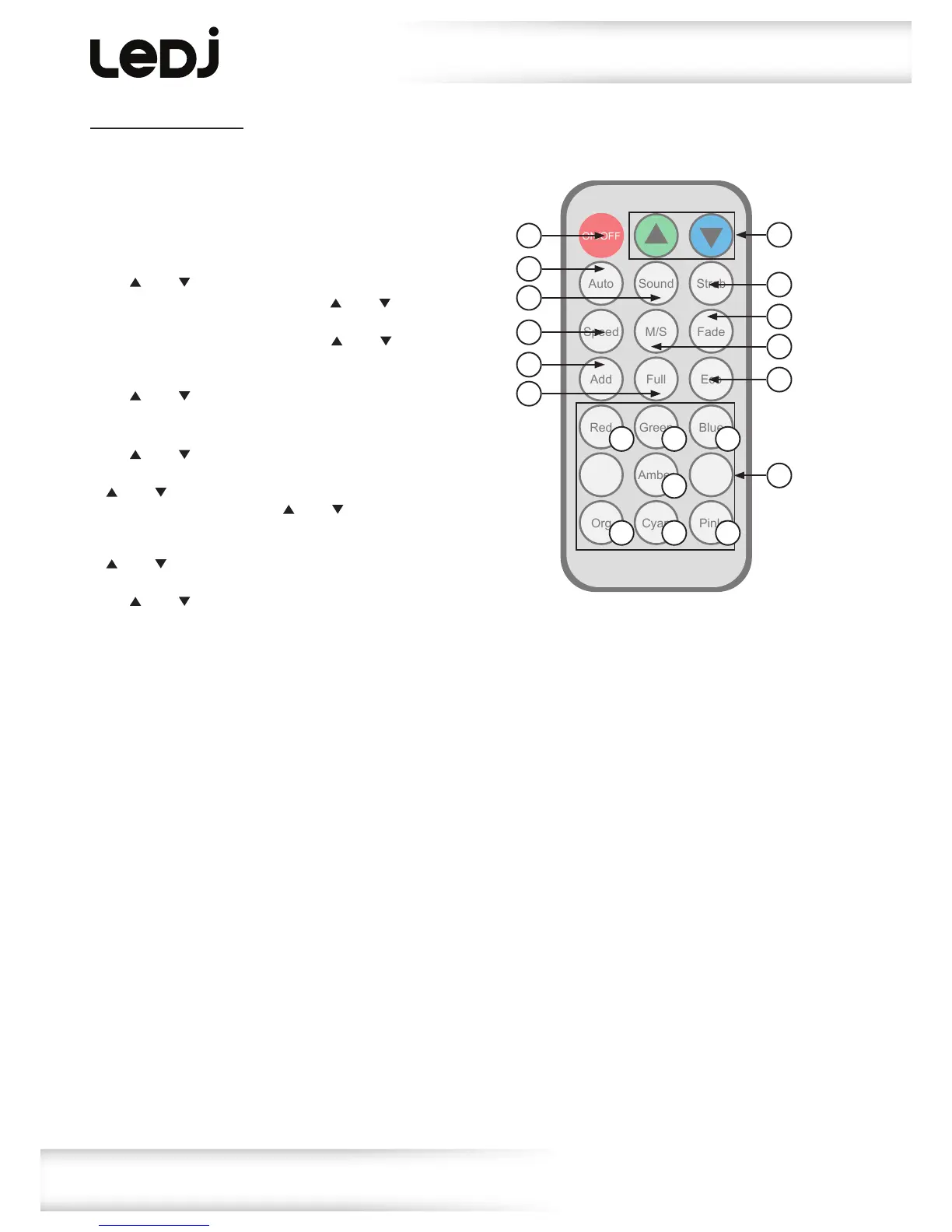
IR remote functions:
01-Setstheunitintoblackoutoff/on(LEDon/off)
02-Setsthestaticcolour(seechartkeyforcolours)
03-Runstheautomode,usethe‘Speed’buttonfollowedby
the‘’and‘’buttonstoadjusttheautospeed
04-Runsthesoundprogram,usethe‘’and‘’buttons
toadjustthesoundsensitivity
05-Runsthestrobeprogram,usethe‘’and‘’buttonsto
adjustthestrobespeed
06-Setstheauto/fadespeed.Pressthisbuttonfollowedby
the‘’and‘’buttonstoadjusttheprogramspeed
07-Setstheunitineithermasterorslavemode
08-Runsthefademode,usethe‘Speed’buttonfollowedby
the‘’and‘’buttonstoadjustthefadespeed
09-SetstheDMXaddress.Pressthisbuttonfollowedbythe
‘’and‘’buttonstoadjusttheDMXaddress.Pressthis
buttonagainfollowedbythe‘’and‘’buttonstoadjust
theDMXchannel
10-Setstheunitinfullon.Pressthisbuttonfollowedbythe
‘’and‘’buttonstoadjustbrightness(000-255)
11-SetstheunitinEcomode.Pressthisbuttonfollowedby
the‘’and‘’buttonstoturnecomodeon/off
12-Adjuststheauto,fadeandstrobespeed,sound
sensitivity,DMXaddress/channel,fullonbrightnessand
turnstheecomodeon/off.
A-Red
B-Green
C-Blue
D-Amber
E-Orange
F-Cyan
G-Pink


 To Next Page