Need help?
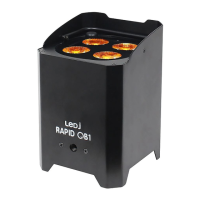
Do you have a question about the Ledj Rapid QB1 and is the answer not in the manual?
Lists the available order codes for the LEDJ Rapid QB1 uplighter.
Crucial safety instructions and warnings for safe operation and maintenance.
Key operational do's and don'ts to prevent damage and ensure safety.
Guidelines on handling temperature changes, proper use, and servicing.
Highlights rapid QB1's features like RGBA LEDs, DMX, battery life.
Details power, fuse, battery, dimensions, weight, and order codes.
Identifies all ports and controls on the fixture.
Lists everything included in the product box.
How to set the starting DMX address for fixture control.
Explains selection of 4, 6, or 11 channel modes.
Configures fixture behavior when DMX signal is lost.
Setup and pairing for wireless DMX control.
Accessing software version, fixture run time, and battery status.
How to enable eco mode and check fixture temperature.
How to set addresses and link fixtures for DMX operation.
Detailed breakdown of functions for 4, 6, and 11 channel modes.
Step-by-step guide for wireless DMX setup and management.
Options for handling DMX signal loss (Hold, Blackout, Auto).
How to select and adjust individual RGB&A colour levels.
Guides for static colour, fade, auto, sound, and strobe programs.
How to set up units for master/slave operation.
Accessing software version, run time, and battery charge levels.
Interpreting battery charge indicator LED colors and charging times.
How to enable eco mode for extended battery life.
How to turn IR remote function on/off.
Detailed explanation of each IR remote button's function.
How to set the DMX start address and link fixtures.
Information on DMX protocol and required data cables.
Details on 3-pin XLR pinouts and cable construction.
Importance of line termination and 5-pin to 3-pin XLR conversion.
Guidelines for correct disposal of electrical and electronic equipment.
 General
| Control | DMX, Auto, Sound Active, Master/Slave |
|---|---|
| Pan | 540° |
| Tilt | 270° |
| Light Source | LED |
| Operating Modes | Auto, Sound Active, Master/Slave |
| Voltage | 100-240V AC, 50/60Hz |

 To Next Page