Need help?
Do you have a question about the ledlenser MH11 and is the answer not in the manual?
Demonstrates sequences like 'Hold 5s' for mode activation and the Boost function.
Illustrates color-coded indicators for battery level or status.
Details how to switch between App, White, and RGB modes using button hold sequences.
Shows how to connect and disconnect the headlamp from the smartphone app.
Explains Optisense, Low Power, Mid Power, Power, and Blink settings in White mode.
Details how to select Red, Green, and Blue light modes in RGB mode.
Illustrates the process for charging the headlamp using a USB power source.
Provides regulatory information regarding FCC rules and RF exposure.
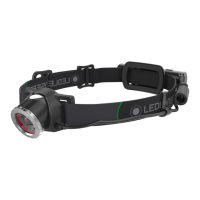
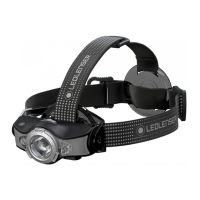
The Ledlenser MH11 is a high-performance headlamp designed for versatile use in various outdoor and professional settings. It offers a comprehensive range of lighting modes, smart control features, and robust construction, making it a reliable companion for adventurers, workers, and anyone needing hands-free illumination.
The MH11 operates primarily as a headlamp, providing powerful and adjustable light for hands-free operation. Its core function is to illuminate the user's immediate environment, offering both focused beams for long-distance visibility and wide floodlights for close-range tasks. The device is powered by a rechargeable 18650 battery, ensuring extended usage times and convenient recharging.
A key feature of the MH11 is its advanced lighting system, which includes multiple light functions and colors. Users can switch between various power levels, including Optisense, Low Power, Mid Power, and Power modes, to suit different lighting needs and conserve battery life. The Optisense mode is particularly innovative, as it automatically adjusts the light output based on ambient light conditions, providing optimal illumination without manual intervention. In addition to white light, the MH11 also offers red, green, and blue light options, which are useful for preserving night vision, map reading, or signaling without disturbing wildlife or other people.
The headlamp is equipped with a boost function, allowing users to temporarily access maximum brightness for critical moments when extra illumination is required. This function is typically activated with a quick double-press and provides a significant surge in light output.
The MH11 incorporates smart technology through its connectivity with a dedicated mobile application. This app allows users to customize various settings, including light modes, brightness levels, and even create personalized light profiles. This remote control capability enhances the user experience by offering greater flexibility and fine-tuning options beyond the physical controls on the device. The app also enables users to monitor battery status and receive updates, ensuring they are always aware of the headlamp's operational readiness.
The MH11 is designed for intuitive and flexible usage, catering to a wide range of activities.
The headlamp features a single button for most operations. A short press typically cycles through different light modes (e.g., Power, Mid Power, Low Power). Holding the button for a few seconds allows access to more advanced functions or mode alterations. For instance, holding the button for 8 seconds can activate App Mode, 10 seconds for White Mode, and 12 seconds for RGB Mode, indicated by specific blink patterns (1x, 2x, or 3x blinks, respectively).
Users can easily switch between different operational modes:
The MH11 includes a memory function that remembers the last used light setting (whether from App, White, or RGB mode). This means that when the headlamp is turned back on, it will resume the previously selected mode and brightness level, saving users the hassle of reconfiguring their preferred settings each time.
The device provides visual feedback on its battery status. During operation, a series of blinks (e.g., 2x, 4x blinks) can indicate the current charge level. When charging, a green, yellow, or red indicator light shows the charging progress, with green indicating a full charge, yellow a partial charge, and red a low charge.
The MH11 comes with an adjustable headband that ensures a comfortable and secure fit for various head sizes. The lamp head itself is pivotable, allowing users to direct the light beam precisely where it's needed, whether looking straight ahead, down at a map, or up at a climbing route.
A quick double-press of the main button activates the boost function, providing maximum brightness for a short period. This is ideal for quickly scanning a large area or identifying distant objects.
To prevent accidental activation and battery drain during transport, the MH11 features a transportation lock. This is typically engaged by holding the button for a specific duration (e.g., 5 seconds) until a confirmation blink pattern is observed. Disengaging the lock involves a similar process.
The headlamp is rechargeable via a standard USB connection (5V 1A). The charging port is easily accessible, and the charging process is indicated by a light that changes color (red for charging, green for fully charged).
The Ledlenser MH11 is designed for durability and ease of maintenance, ensuring a long lifespan and consistent performance.
The device uses a rechargeable 18650 battery, which can be easily replaced if necessary. The ability to replace the battery extends the product's life beyond the typical lifespan of integrated battery devices. Proper charging practices, as indicated by the device's charging lights, help maintain battery health. The device also provides warnings for low battery levels, prompting users to recharge before the battery is fully depleted.
The headlamp's robust construction allows for easy cleaning. The exterior can be wiped down with a damp cloth to remove dirt, dust, or mud accumulated during outdoor activities. The lens should be cleaned carefully with a soft, lint-free cloth to maintain optimal light output and clarity.
As a smart device, the MH11 may receive firmware updates through its mobile application. These updates can improve performance, add new features, or fix bugs, ensuring the headlamp remains current with the latest technological advancements.
When not in use for extended periods, it is recommended to store the MH11 with a partially charged battery in a cool, dry place. Engaging the transportation lock during storage prevents accidental power-on and conserves battery life.
The manual provides basic troubleshooting steps, such as checking battery connections or resetting the device, to address common issues. For more complex problems, users are directed to contact customer support.
The device is designed to be durable and resistant to various environmental conditions, making it suitable for outdoor use. However, it is important to follow guidelines regarding water resistance and temperature limits to ensure longevity. The product also includes information on proper disposal of electronic waste and batteries, promoting environmental responsibility.
 General
| Max Lumens | 1000 lm |
|---|---|
| Min Lumens | 10 lm |
| Max Beam Distance | 320 m |
| Min Beam Distance | 30 m |
| Max Battery Life | 100 hours |
| Weight | 179 g |
| Battery Type | Rechargeable Lithium-ion |
| Water Resistance | IP54 |
| Beam Distance | 320 m |
| Adjustable Headband | Yes |
| Focus Adjustment | Advanced Focus System |
| Battery | 1 x 18650 3.7V |
| Modes | Boost / Power / Low Power / Blink / S.O.S. / Strobe |
| Charging Time | 6 hours |

 To Next Page