This document describes the LEDWOOD SWEET MACARON (LD-i9W) wireless stereo earphones.
Function Description
The LEDWOOD SWEET MACARON (LD-i9W) is a high-quality wireless stereo headset designed for an immersive audio experience. It features high definition sound, isolation, and noise reduction, utilizing a piston-type design. The earphones support hands-free phone calls through a built-in microphone. They are waterproof and antiperspirant, making them suitable for various activities. The design prioritizes comfort and lightness for in-ear wear.
A key feature is the automatic boot-up and matching function when the charging box is opened. The earphones automatically turn off and begin charging when placed back into the charging box. This product also supports wireless charging.
Important Technical Specifications
- Play Time: Approximately 4 to 5 hours.
- Product Functions: Automatic switching between master and slave headphones, call function, and music playback.
- Material Technology: ABS Environmental Protection Material.
- Charging Port Type: USB-C.
- Power Supply: Built-in lithium battery / USB-C charging port.
- Available Colors: 6 conventional colors.
- Earphone Dimensions: 18.2 x 19.8 x 28.4mm.
- Product Size (Charging Case): 26 x 57mm.
- Net Weight: Single earphone 3g, machine (total) 36g.
- Wireless Version: 5.0.
- Play Format: A2DP1.3/ HFP1.6/ HSP1.2/ AVRCP1.6/ D11.3.
- Bayonet Horn Specification: Composite membrane Ø6mm.
- Distortion Rate: THD < 1%.
- Wireless Distance: Effective Transmission Distance (> 15M).
- Frequency Response: 20Hz-20KHz.
- Sensitivity: 107 B SPL+/-3dB.
- Charging Parameters: Earphone: 5V40mA; Charging seat: 5V330mA.
- Battery Capacity: Headphones: 55mAh; Charging seat: 300mAh with belt protection.
Usage Features
Operation Instruction: The earphones turn on automatically upon opening the charging bin.
Wireless Pairing:
- Open the charging bin; the two headphones will automatically match. If they don't self-match (they are pre-matched from the factory), place them back in the charging bin for 5 seconds to initiate automatic matching.
- On your phone, navigate to settings > Wireless.
- Click the product search code to connect the headset.
- Once connected, the wireless earphones will be successfully paired.
- Find "Macaron" in your phone's wireless list and click to connect. A voice prompt will confirm successful connection after about 5 seconds, indicated by a "bang" light tone.
- For subsequent use with the same phone, simply remove the earphone from the charging bin for automatic connection. For a different mobile phone, repeat the pairing steps.
Charging Instructions:
- A green work indicator light signifies sufficient power.
- Orange lights indicate insufficient electricity.
- An orange light flickering indicates low power.
- A white light indicates headphone discharge.
- An orange LED indicates charging.
Power Off: The earphones automatically shut down when placed in the charging bin.
Call Control:
- Connect: 1 tap on either earbud.
- Hang Up: 1 tap on either earbud.
- Refuse to Accept: Long press on either earbud.
Music Playback Control:
- Play/Pause: 1 tap on either earbud.
- Previous Track: 2 taps on the left earbud.
- Next Track: 2 taps on the right earbud.
- Activate Siri: 3 taps on either earbud.
Troubleshooting:
If you have trouble connecting the headset and smartphone:
- Ensure earphones are fully charged and powered on.
- Confirm earphones and mobile wireless are paired and the wireless device function is enabled.
- Ensure earphones and mobile device are within 15m, and there are no walls or obstructions between them that might affect wireless reception.
- If you want to use only the right earphone, remove it from the charging bin, place the left earphone in the charging bin, and close it. Wait 2 minutes for the smartphone to detect the right earphone device name "Macaron".
- If the two earphones are unpaired, reset them: first, turn off the smartphone's wireless connection. Charge both earphones in the charging bin for 10 seconds. Remove them when they flash red and blue, indicating successful pairing. Then, connect wirelessly.
- To restore factory settings: If the earphone is "dead" or won't power on, remove it from the warehouse and touch the contact for 8 seconds.
Maintenance Features
Safety Instructions:
- Read all safety warnings and cautions carefully to ensure personal safety and prevent property damage.
- Check local laws and regulations regarding earphone use, especially while driving.
- Keep earphones out of reach of children due to small parts that could cause choking hazards.
- Avoid using earphones in areas with potential interference (hospitals, airports, explosive areas, gas stations).
- Do not leave earphones in a car or high-temperature environments, as the lithium battery may swell or ignite.
- Avoid direct sunlight, water, and other liquids.
- Do not open or damage the earphones or charging case battery.
- Dispose of batteries according to safety regulations; they are not household waste.
- Do not use abrasive cleaners or sharp objects that could scratch or damage the device.
- Do not insert anything into the slot of the machine to avoid damaging internal circuits.
- Do not attempt to repair, disassemble, or replace the machine.
- Do not use in high altitude or very low humidity.
- Do not throw into fire, as it may explode and cause injury or death.
FCC Warning:
- Unauthorized modifications or repairs will void the customer warranty service.
- Ensure all power supplies (package, charging box, and headset) are turned off when not in use to prevent wireless frequency interference with Bluetooth devices.
Warranty Voucher:
- The product is covered by national regulations.
- Warranty exceptions include: outside the warranty period, damage caused by not following instructions, user disassembly, lack of warranty certificate or purchase proof, unauthorized modifications, not following warranty instructions, lack of factory name/production date on product qualification certificate, and natural disasters.

 Need help?
 General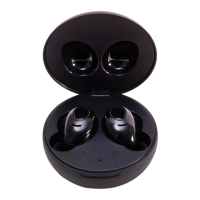

 To Next Page