PHOTOGRAPHY ▸ EXPOSURE
136
EXPOSURE MODES
There are four exposure modes available to adjust the rendering of
the object or to create the desired pictorial composition:
– Automatic program (P)
– Aperture priority mode (A)
– Shutter speed priority mode (S)
– Manual setting (M)
SELECTING A MODE
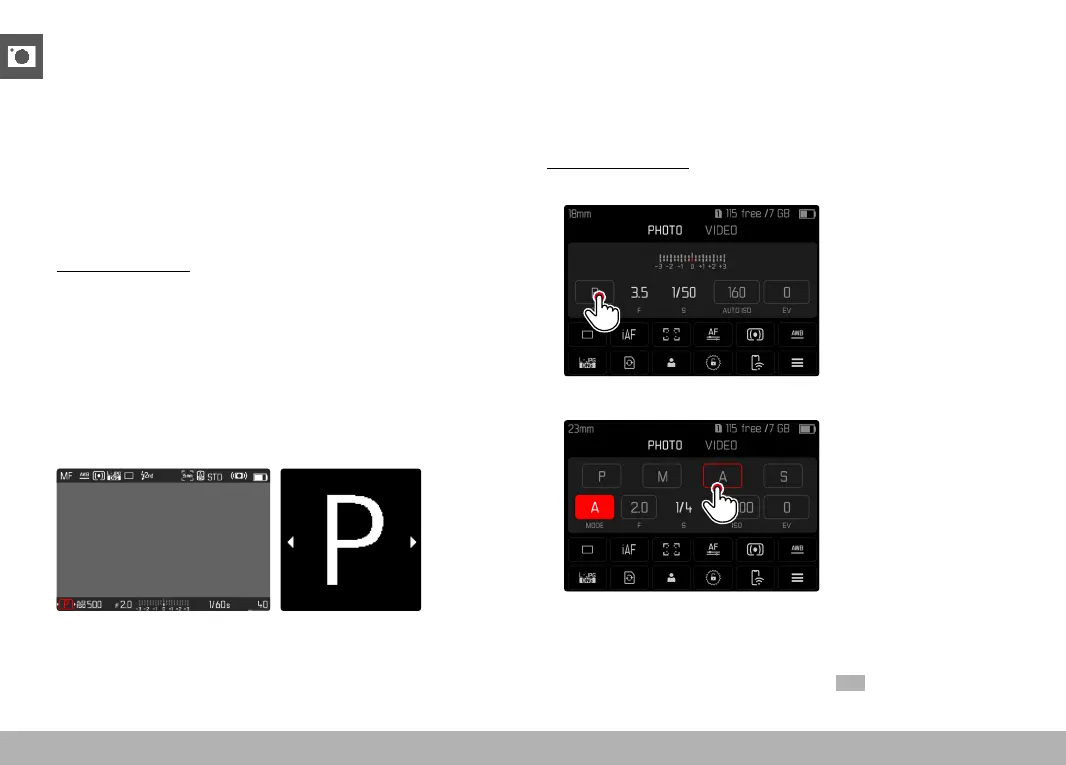
Via the thumbwheel
▸ Press the thumbwheel
• The currently selected mode is shown in the top display. The
currently selected mode is marked in red on screen.
▸ Turn the thumbwheel to select the desired mode
• The mode display changes in the top display and on screen. All
modes can be reached by turning the wheel in either direction.
• The selected mode will be applied automatically approx. 2 s
after the thumbwheel is moved the last time.
Applying the selected mode immediately
▸ Press the joystick/thumbwheel
or
▸ Tap the shutter button
Via the status screen
▸ Tap the control panel
▸ Tap the desired exposure mode
Note
• When using a lens with an aperture ring (e.g. Leica M lenses), only
the exposure modes A (aperture priority) and M (manual setting)
will be available. Where that is the case, F0.0 is displayed as the
aperture value.



 To Next Page