

EasyManua.ls Logo

LEITZ mini mobile - User Manual

LEITZ mini mobile
196 pages
Print Icon
To Next Page IconTo Next Page
Loading...
User Guide
EN
DE
FR
IT
ES
PT
NL
DK
NO
SV
FI
ET
LV
LT
PL
UK
RU
KK
CS
SK
HU
RO
GR
TR
MINI MOBILE
BLUETOOTH SPEAKER
LEITZ COMPLETE

Table of Contents

Question and Answer IconNeed help?

Do you have a question about the LEITZ mini mobile and is the answer not in the manual?

Summary

Features of the Speaker

Microphone

Microphone for hands-free talking via a mobile phone.

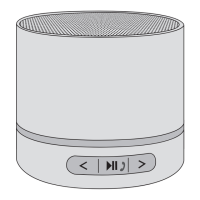
Previous track;Volume - button

Button to select previous track or decrease volume.

Play;Pause;Phone Button

Button for playing, pausing, and managing phone calls.

Next track;Volume + button

Button to select next track or increase volume.

Speaker Grille

The protective cover for the speaker.

microSD Card Slot

Slot for inserting microSD cards for audio playback.

Main Switch

Controls power and selects operating mode (MP3/OFF/Bluetooth).

Status Indicator (LED Ring)

LED ring indicating the speaker's operational status.

Mini USB Connector

Connector for charging and audio input (AUX IN).

Important Safety Information

Charging the Internal Battery

Status Indicator Meanings

Explains LED colors and states for charging and connectivity.

Pairing the Speaker with a Device

Playing Back Audio Files from a microSD Card

Controlling Audio Reproduction

Audio Reproduction Over Wire Connection

Connects the speaker using a cable for audio playback.
Controlling Mobile Phone Calls

Troubleshooting

Technical Data

Guidelines for Electromagnetic Compatibility

Disposal

LEITZ mini mobile Specifications

General IconGeneral
BrandLEITZ
Modelmini mobile
CategorySpeakers
LanguageEnglish