
 Need help?
Do you have a question about the LEKATO SMK-25 and is the answer not in the manual?
Connects keyboard to Windows/Mac via USB for recognition and charging.
Enables wireless connection by pressing the BT button until the light stays on.
Connects via Wireless Adapter B to Windows/Mac; successful when both lights are on.
Connects via Bluetooth to Windows/Mac/iOS/Android by selecting SMK-25.
Sets pedal to MIDI OUT for using the back port as a MIDI OUT.
Uses Five-Pin wireless MIDI adapter A for MIDI IN connection to synthesizers.
Details the power switch, USB-B port, and sustain pedal connection.
Controls pitch bend by sliding; center is original pitch, releasing returns to original.
Shows current settings and information on the digital display.
Controls DAW playback (Play, Stop, Rec) and selects modes (BT, ARP, SC/CH, KNOB-B, PAD-B).
Switches between knob/pad sets and edits velocity curve.
Adjusts pitch range; hold with Transpose knob to shift pitch by note.
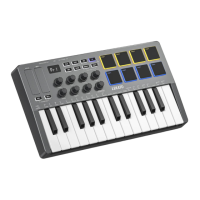
Eight assignable encoders sending Aftertouch, MIDI CC, or Pitch information.
Eight velocity-sensitive, RGB back-lit pads supporting Note, MIDI CC, Program Change.
25 velocity-sensitive keys; ARP/SC/CH button + key changes mode settings.
Defines arpeggiator modes like Up, Down, Incl, Excl, Random, Order, Repeat.
Shifts arpeggiator octave range and keeps arpeggiation active after key release.
Sets note length, adjusts tempo via tap, swing, and tempo +/- controls.
Synchronizes tempo with DAW and sets note rate based on tempo divisions.
Selects scales by holding a button and pressing notes C-B; determines major/minor tonality.
Selects chord types (Triad, 7th, 9th, Random) and major/minor tonality.
Download "Cubesuite" via QR code for iOS/Android or PC, or from the website.
Specifies the physical dimensions (321x178x46mm) and weight (750g) of the keyboard.
Details keys (25 velocity-sensitive), pads (8 RGB), knobs (8), and touch stripes.
Lists output ports (Sustain, USB-B) and wireless connectivity, plus power source (2000mAh battery/USB).
Warns against unauthorized modifications and describes FCC compliance for Class B digital devices.
 General
| Brand | LEKATO |
|---|---|
| Model | SMK-25 |
| Category | Electronic Keyboard |
| Language | English |

 To Next Page