9
2. Press SKIP+ or SKIP - button to set the hours.
3. Use the VOL - /AL.1 button to confirm the Settings.
4. Press SKIP+ or SKIP - button to select set minutes.
5. Use the VOL - /AL.1 button to confirm the Settings.
6. Press SKIP+ or SKIP - button to select desired alarm sound source, (Buzz) or (Radio) to play.
7. Press the VOL - /AL.1 button to confirm the Settings.
8. Press SKIP+ or SKIP - button to select the desired alarm volume. (No this function)
9. Use the VOL - /AL.1 button to confirm the Settings. (No this function)
When the alarm clock on the radio activates, the volume gradually increases:
Alarm sound source from BUZZ, volume is fixed (not accepted, should be from small to large)
To set a second alarm, perform steps 1 through 9
Repeat using the VOL+/AL.2 button
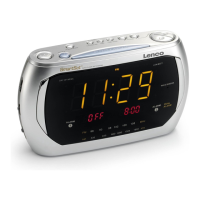
The display (LED) shows which alarm is activated
Turn on/off the alarm
1. Press the VOL - /AL.1 or VOL+/AL.2 button repeatedly to enable or disable the alarm.
• Display displays the current display alert Settings. (Alarm indicator lights on/off)
Stopping the Alarm
- Alarm repetition (SNOOZE)
When the alarm sounds, Press the SNOOZE/DIMMER button, the alarm stops, and the alarm will trigger again
in 9 minutes.
- Alarm stop
When the alarm sounds, press the button and the alarm will turn off. the alarm will sound again the next
day at the same time.
Display brightness adjusts/ off
Display brightness can be set to three levels (bright, dim, off) can be set.
1. Press the SNOOZE/DIMMER button repeatedly to select the (LED) display bright, dim, off
Sleep timer setting
The sleep timer can be set between 5 and 120 minutes.
1. Press and hold the SLEEP/LED button until the sleep time is displayed.
2. Press the SLEEP/LED button repeatedly until the desired shutdown time is displayed.
• select <120, 110, 100, 90... 5 minutes, or OFF>.
• After a few seconds, the device changes and the normal display is restored.
The activated sleep timer appears on the display. (Indicator lights up)
To cancel the sleep function, press SLEEP/LED button repeatedly until OFF is displayed; also. You can press
and hold the button to turn off the radio.


 To Next Page