10
MP3:youcanselectSingle/RepeatOne/RepeatFolder/Folder/Shuffle/Random
25. SLOW
Press Slow button repeatedly to enter slow playback, and cycle between different speeds. The speeds
are1/2,1/4,1/8,1/16andnormal.
26. PROGRAM
DVD/VCD:The program function enables you to store your favourite tracks from the disc. Press PROGRAM
button, thenPROGRAM MENU will appear on
screen, now you can use the number key to direct input the
titles,chaptersortracksnumberandselectPLAYoption.TOresumenormalplayback,pressPROGRAMandselect
clearprogramoptionontheprogrammenu,pressPROGRAMagaintoexitprogrammenu.
27. ZOOM
DVD/VCD:UseZOOMtoenlargeorshrinkthevideoimage.
1. Press ZOOM during playback or still playback to activate the Zoom functio n. The square frame appears
brieflyintherightbottomofthepicture.
2. Each press of the ZOOM button changes the TV screen in the following sequence:2X size‐>3X size‐>4X
size‐>1/2size‐>1/3size‐>1/4size‐
>normalsize
JPEG:UseZOOMtoenlargeorshrinkthepicture.
1. Press'ZOOM'.
2. Used""toenlarge,or""toshortenthepicture.
Usethe buttontomovethroughthezoomedpicture.
SETUPMenuSetting
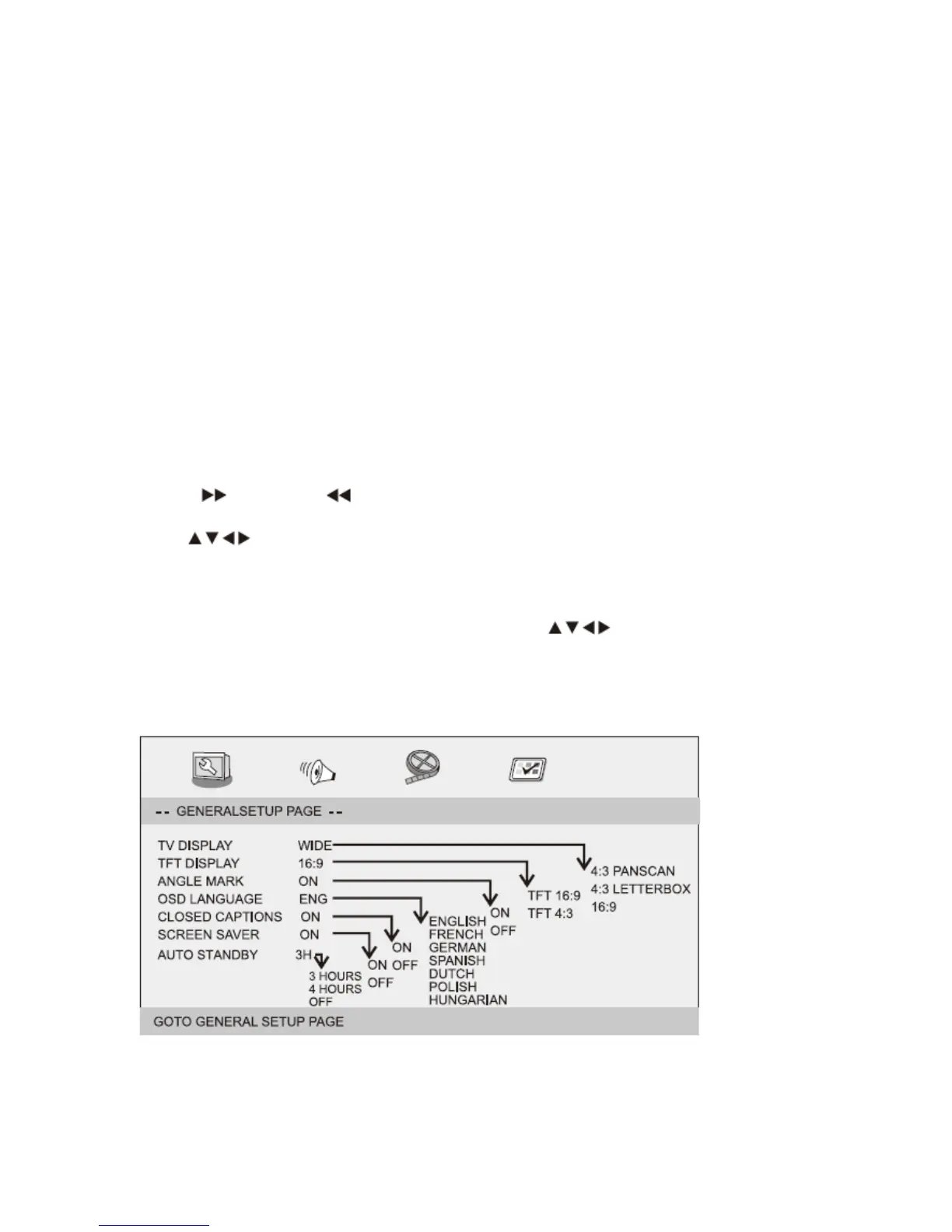
GeneralSetupPage
PressSETUPbuttontogetthesetupmenu.Usedirectionbuttons
toselectthepreferreditem.After
finishingsettings,pressSETUPagaintonormaldisplay.
Thefollowingmenuitemscanbechanged:
GeneralSetupPage
TVDISPLAY:selectstheaspectratiooftheplaybackpicture.
4:3PANSCAN:ifyouhaveanormalTVandwantbothsidesofthepicturetobetrimmed
orformattedtofityour


 To Next Page