PROGRAM
DVD/VCD: The program function enables you to store your favorite tracks from the disc. Press
PROGRAM button; then PROGRAM MENU will appear on screen, now you can use the number key to
direct input the titles, chapters or tracks number and select PLAY option. To resume normal playback,
press PROGRAM and select clear program option on the program menu, press PROGRAM again to exit
program menu.
MP3: Press PROGRAM button, it will go back to the file list.
Press PROGRAM button again, it will go back to the MP3 folder.
ZOOM
DVD/VCD: Use ZOOM to enlarge or shrink the video image.
1. Press ZOOM during playback or still playback to activate the Zoom function. The square frame
appears briefly in the right bottom of the picture.
2. Each press of the ZOOM button changes the TV screen in the following sequence: 2X size 3X size
4X size 1/2 size 1/3 size 1/4 size normal size
JPEG: Use ZOOM to enlarge or shrink the picture.
1. Press ‘ZOOM’.
2. Used to enlarge, or “ ” to shorten the picture.
Use the ▲ ▼ ◄ ► button to move through the zoomed picture.
3. SETUP Menu Setting
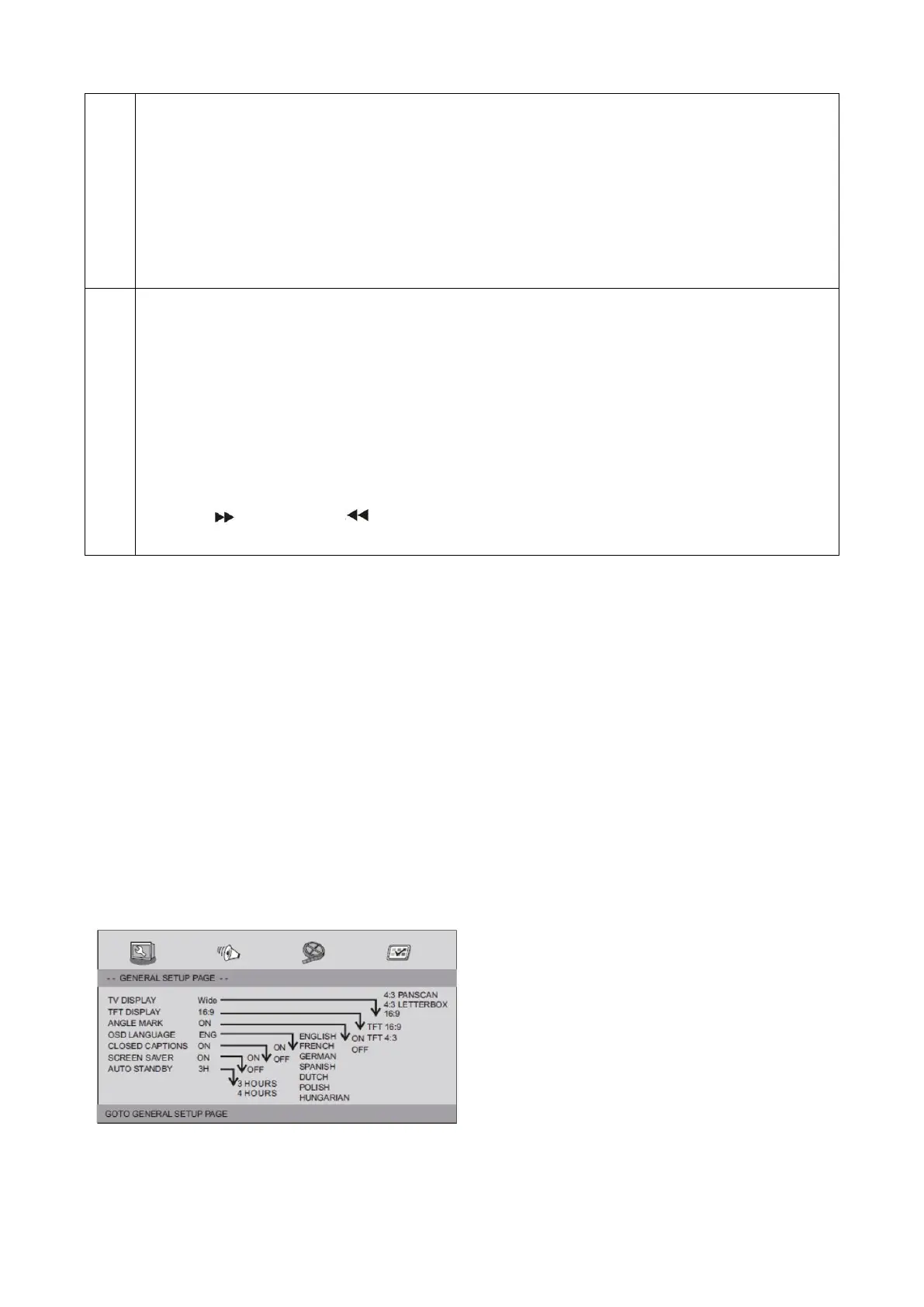
General Setup Page
Press SETUP button to get the setup menu. Use direction buttons ▲ ▼ ◄ ► to select the preferred item.
After finishing settings, press SETUP again to normal display.
The following menu items can be changed:
GENERAL: selects the GENERAL PAGE menu.
AUDIO: selects the AUDIO PAGE menu.
VIDEO: selects the VIDEO PAGE menu.
PREFERENCE: selects the PREFERENCE PAGE menu.
General Setup Page
TV DISPLAY: selects the aspect ratio of the playback picture.
4:3 PAN SCAN: if you have a normal TV and want both sides of the picture to be trimmed or formatted to fit
your TV screen.


 To Next Page