4
MP3/WMA/MPEG4 PLAYING
A
V
I
M
p
3
M
p
4
P
h
o
t
o
W
M
A
XV
ID
R
e
p
e
a
t
o
f
f
M
o
d
e
N
o
r
m
a
l
F
i
l
t
e
r
J
P
E
G
P
r
e
v
i
e
w
A
u
d
i
o
1
/
7
1
2
1
0
1
1
0
2
1
0
3
1
0
4
1
0
5
0
0
:
0
0
:
1
5
R
e
p
e
a
t
o
f
f
M
o
d
e
N
o
r
m
a
l
F
i
l
t
e
r
M
u
s
i
c
P
l
a
y
i
n
g
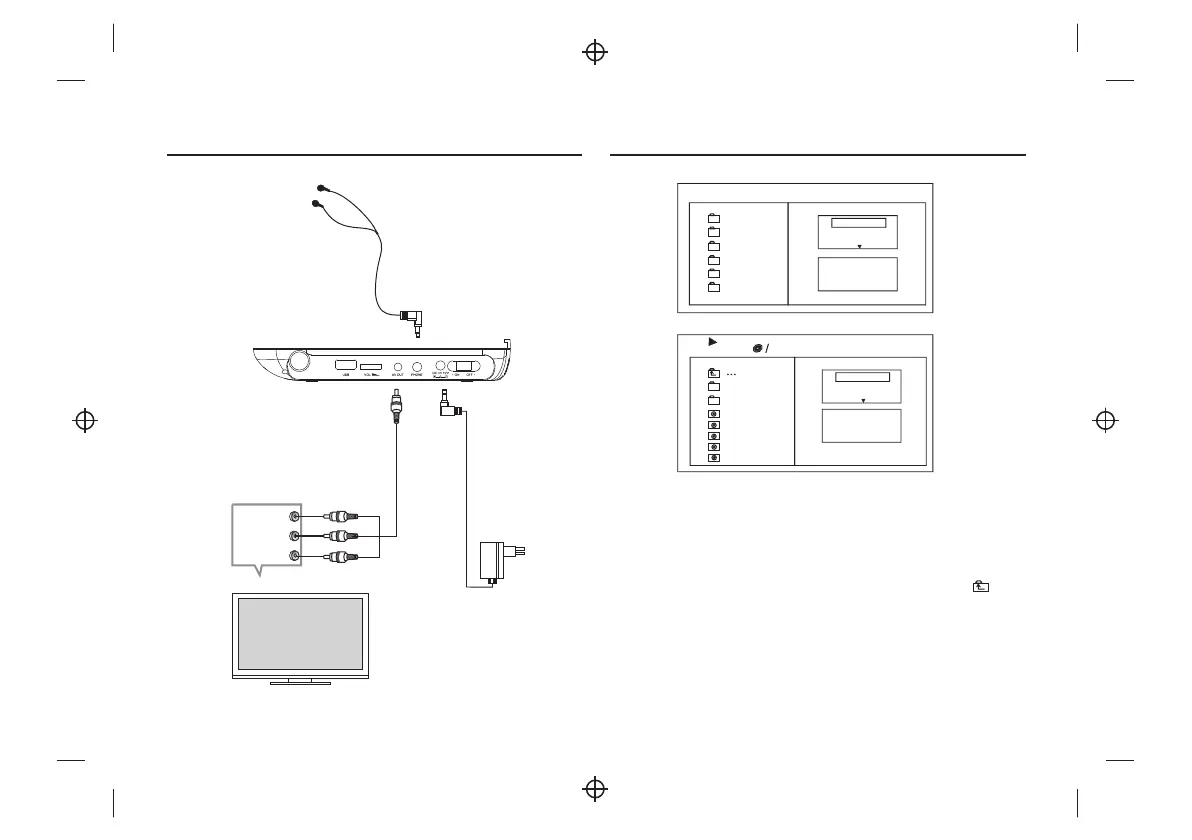
The MP3/WMA/MPEG4 disc has such a directory structure as shown .
Press Direction key to choose the root directory and then press ENTER button to
enter into the sub directory.
Press Direction key to choose the desired track and then press ENTER or PLAY to
enjoy the music or movie.
If you want to return to the upper menu, press Direction key to choose
the icon and press ENTER button.
Filter: Allows selecting the categories of files displayed in the browser list.
This selection is done among the 3 categories: Audio, Photo and Video.
Repeat: To switch different repeat playing mode.
picture above
Mode: Select different playing mode.
L
R
CVBS
Red
White
Yellow
VIDEO IN
AUDIO IN
TV
EARPHONE
ADAPTOR
Connecting to a TV set


 To Next Page