REMOTE CONTROL
8
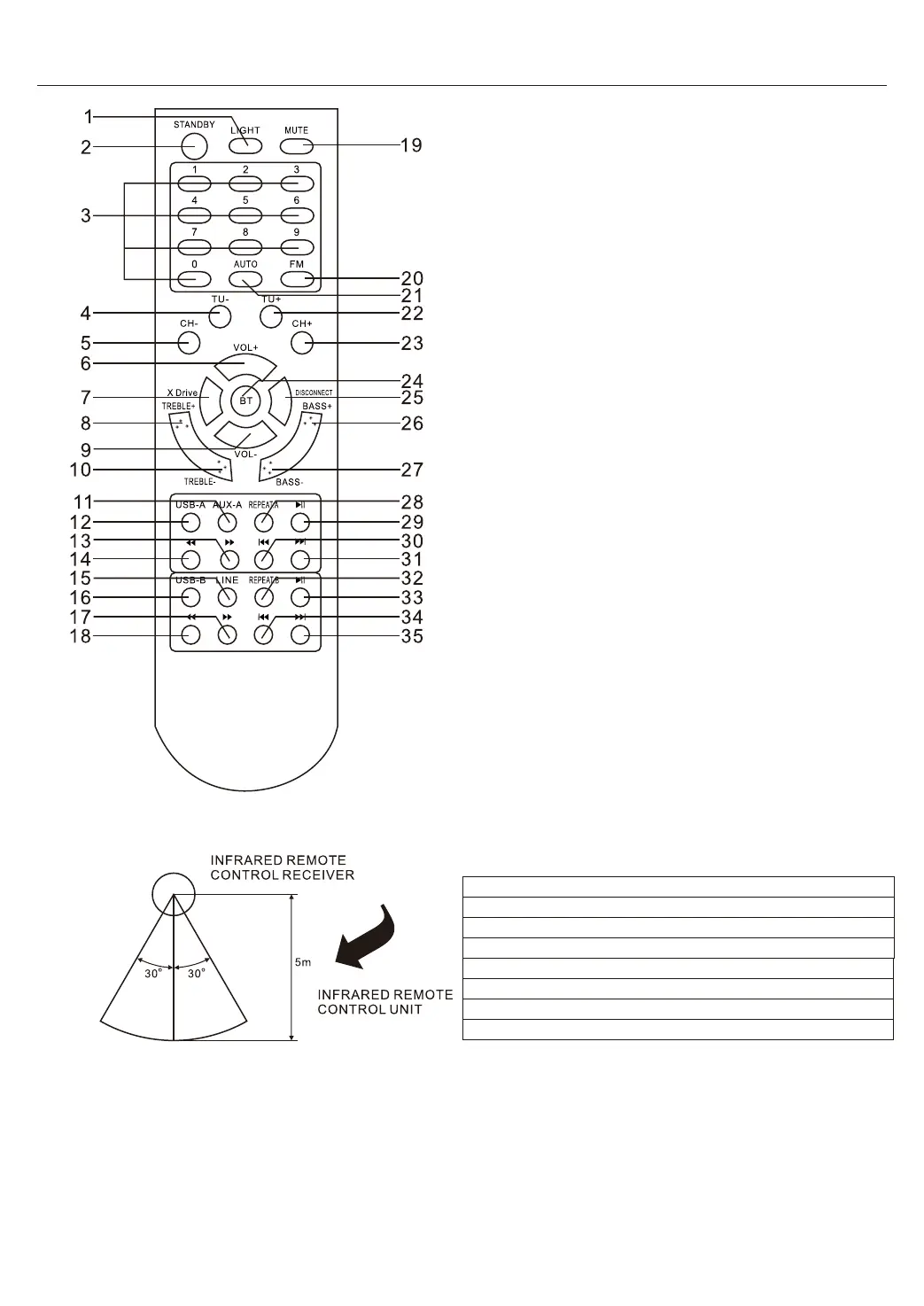
1. LIGHT
2. STANDBY
3. NUMBER BUTTON
4. TUNING-
5. CHANNEL-
6. VOLUME+
7. X DRIVE
8. TREBLE+
9. VOLUME-
10. TREBLE-
11. AUX-A
12. USB-A
13. USB-A F.WARD
14. USB-A B.WARD
15. LINE
16. USB-B
17. USB-B F.WARD
18. USB-B B.WARD
19. MUTE
20. FM
21. AUTO
22. TUNING+
23. CHANNEL+
24. BT
25. DISCONNECT
26. BASS+
27. BASS-
28. INPUT-A REPEAT
29. INPUT-A PAUSE
30. INPUT-A PREVIOUS
31. INPUT-A NEXT
32. INPUT-B REPEAT
33. INPUT-B PAUSE
34. INPUT-B PREVIOUS
35. INPUT-B NEXT
EN
EN
INFRARED REMOTE CONTROL RECEIVER
INFRARED REMOTE CONTROL RECEIVER
5m
5m
INFRARED REMOTE CONTROL UNIT
INFRARED REMOTE CONTROL UNIT
REMOTE CONTROL OPERATION:
□ If the remote control conflicts with other devices, the operaon will be affected.
□ Do not simultaneously press buons on the unit and the remote control.
□ Avoid using two remote controls at the same me as this wiII cause a malfuncon.
□ Use only UM-4 ‘AAA’ size baeries. Do not mix old baeries with new ones.
□ If the baeries Ieak, clean the remote control thoroughly before replacing baeries
□ Do not short two t
erminals of the baeries. Dispose old baeries in a suitable place.


 To Next Page
 Loading...