EasyManua.ls Logo

Lenofocus 007 - Camera Overview and Charging; Camera Structure Overview; Charging Procedure

Lenofocus 007
20 pages
Print Icon
To Next Page IconTo Next Page
To Previous Page IconTo Previous Page
Loading...
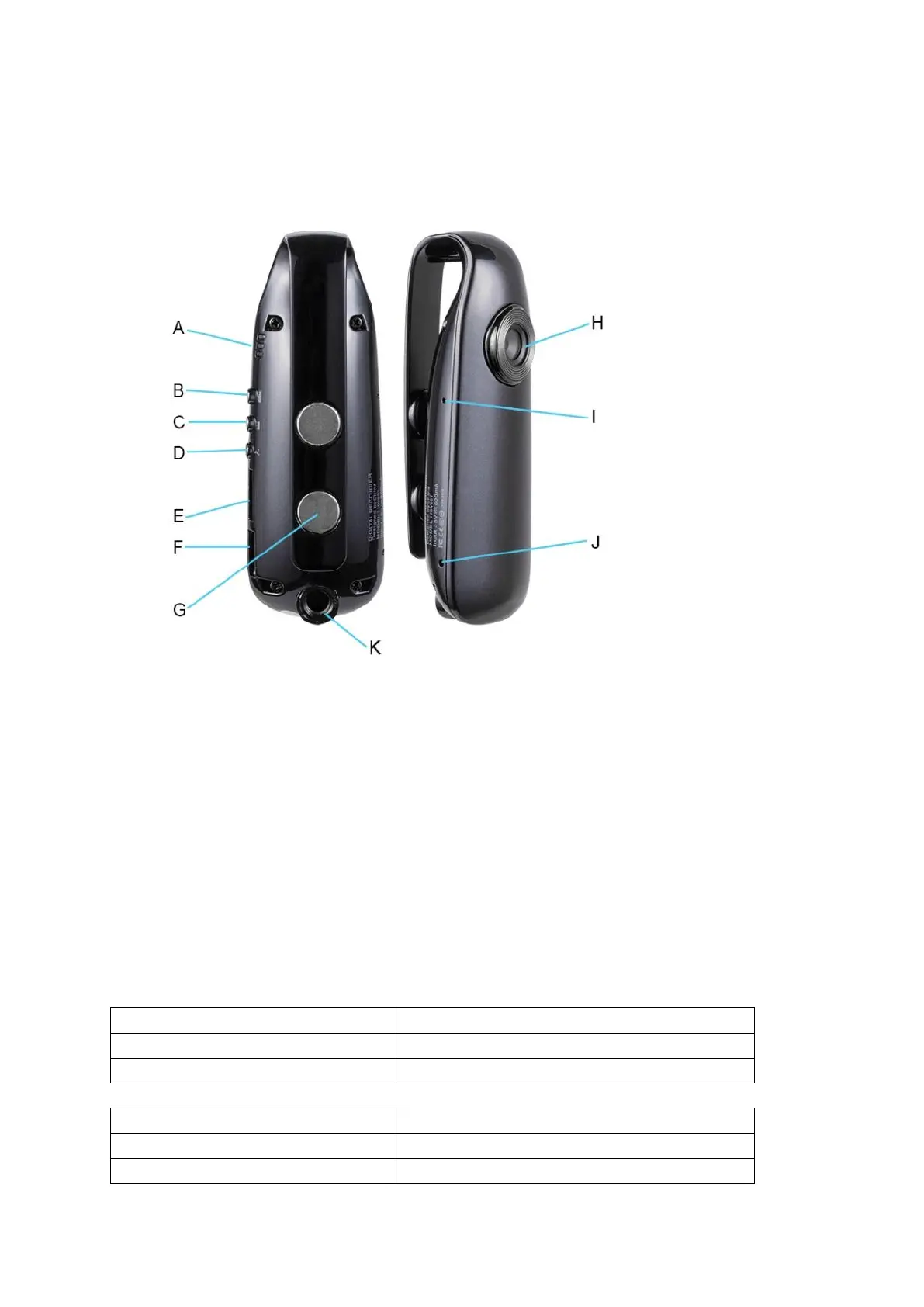
CAMERA STRUCTURE
A – LED indicator B – Power / Video Recording
CAudio Recording / Indicator Switch D – Photograph / Motion Detection
E – SD Card Slot F – USB Port
G – Magnet H – Camera Lens
I – Reset Hole J – Microphone
K – M6 Screw Hole
About Charging
Before using the camera for the first time, please fully charge the camera. You can connect the
camera to a USB charger or computer / laptop with USB cable for charging.
If the camera without micro SD card:

LED Indicator Status
Charging Status
Blue and red light is flashing
Charging
Red light off and blue light is flashing
Fully charged
If you have inserted a micro SD card into the camera:
LED Indicator Status
Charging Status
Blue and red light is solid on
Charging
Red light off and blue light is solid on
Fully charged