
 Need help?
Do you have a question about the Lenofocus 007 and is the answer not in the manual?
Essential safety guidelines for handling the camera, including protection from drops, moisture, and temperature extremes.
Specifications and recommendations for micro SD cards, including speed class and brand.
List of items included in the camera package, with instructions for missing items.
Information regarding the proper disposal of the product's lithium-ion polymer battery.
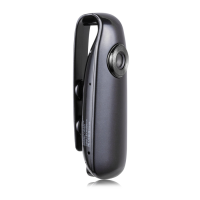
Identification of key components and ports of the camera through a labeled diagram.
Instructions for charging the camera using a USB connection, including LED indicator status.
Steps for inserting a micro SD card, including format requirements and data backup.
Guide to turning the camera on and off, and understanding standby mode indicators.
Instructions on how to start and stop video recording, including segment storage.
Instructions on how to start and stop audio recording, including segment storage.
Procedure for capturing still images using the camera's photograph button.
How to activate and use the motion detection recording feature.
Method to turn off the LED indicator light while recording.
Instructions on how to reset the camera to its default settings using the reset button.
Various ways to mount or attach the camera using its clip, magnet, or screw hole.
How to configure video resolution, loop recording, and time stamp via a settings file.
Procedure for setting the camera's date and time by editing a file on the SD card.
Instructions for connecting the camera to a computer as a mass storage device.
Detailed specifications including resolution, format, battery, and dimensions.
Solution for the camera failing to power on, typically related to battery charge.
Troubleshooting steps for recording problems, including SD card reformatting and reset.
Guidance for when the computer does not recognize the camera or recorded footage.
Advice for playing recorded video and resolving miscellaneous operational errors.
 General
| Brand | Lenofocus |
|---|---|
| Model | 007 |
| Category | Digital Camera |
| Language | English |

 To Next Page