6.ConnectthefrontWi-FiantennacabletotheWi-Ficardmodule.See“ReplacingtheWi-Fiunits”on
page174.
Whattodonext:
•Toworkwithanotherpieceofhardware,gototheappropriatesection.
•Tocompletetheinstallationorreplacement,goto“Completingthepartsreplacement”onpage186.
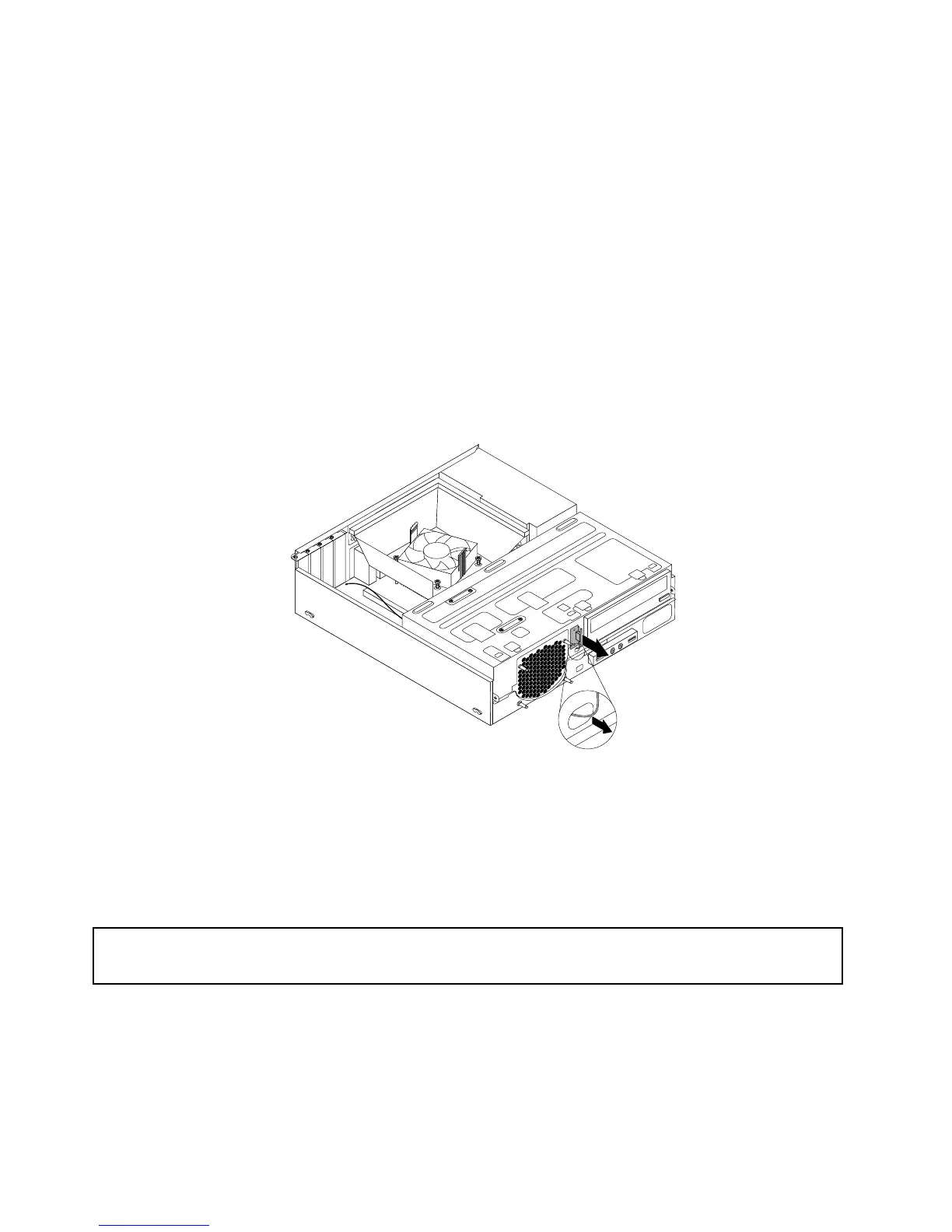
RemovingthefrontWiFiantenna
ToremovethefrontWiFiantenna,dothefollowing:
1.Turnoffthecomputeranddisconnectallpowercordsfromelectricaloutlets.
2.Removethecomputercover.See“Removingthecomputercover”onpage136.
3.Removethefrontbezel.See“Removingandreinstallingthefrontbezel”onpage136
4.DisconnectthefrontantennacablefromtheWiFicardmodule.
5.Removethefrontantennaandcablefromthefrontofthecomputer.
Figure136.RemovingthefrontWiFiantenna
Whattodonext:
•Toworkwithanotherpieceofhardware,gototheappropriatesection.
•Tocompletetheinstallationorreplacement,goto“Completingthepartsreplacement”onpage186
.
Replacingthekeyboard
Attention:
Donotopenyourcomputerorattemptanyrepairbeforereadingandunderstandingthe“Importantsafetyinformation”
onpage1.
Thissectionprovidesinstructionsonhowtoreplacethekeyboard.
Toreplacethekeyboard,dothefollowing:
1.Disconnecttheoldkeyboardcableormousecablefromthecomputer.
184ThinkCentreM73HardwareMaintenanceManual




 To Next Page