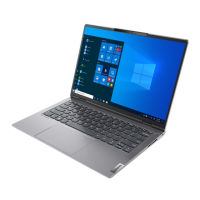
This document is the Hardware Maintenance Manual for the ThinkPad P1 Gen 6, specifically for machine types 21FV and 21FW. It provides comprehensive service and reference information for trained service technicians familiar with ThinkPad products, intended to be used in conjunction with advanced diagnostic tests for effective troubleshooting.
Function Description:
The ThinkPad P1 Gen 6 is a notebook computer designed for various applications. This manual details the procedures for maintaining and servicing its hardware components. It covers general safety guidelines, important service information, general checkout procedures, related service information, keyboard shortcuts, and detailed instructions for locating, removing, and replacing Field Replaceable Units (FRUs).
Important Technical Specifications:
The manual does not explicitly list detailed technical specifications such as processor type, RAM capacity, or storage size in a dedicated section. However, it implicitly refers to several components and their characteristics:
- Machine Types: 21FV and 21FW.
- Storage: Supports M.2 solid-state drives (SSD1, SSD2). Mentions NVMe password for storage drives.
- Memory: Refers to memory modules and memory retraining during POST.
- Display: Mentions LCD panel, TFT LCD technology, OLED LCD unit with factory color calibration, and LCD-related symptoms.
- Graphics: Differentiates between models with hybrid graphics (P-GPU) and RTX models, indicating different system board assemblies and thermal fan assemblies. Specifically mentions NVIDIA RTX A1000 6GB Laptop (QN20-P2), NVIDIA RTX 2000 Ada generation Laptop (WN21-X4), and NVIDIA GeForce RTX 4050 Laptop (GN21-X2).
- Power: Utilizes an AC power adapter and a built-in battery. Also includes a coin-cell battery.
- Connectivity: Features USB-C (Thunderbolt 4) connectors, USB-A 3.2 Gen 1 connectors, HDMI connector, audio connector, SD card reader, Nano-SIM-card tray (for selected models), Wireless WAN card (for selected models), and NFC card (for selected models).
- Input Devices: Includes a keyboard, trackpad, TrackPoint® pointing stick, and power button with fingerprint reader.
- Cooling: Mentions thermal fan assembly, thermal pads for M.2 SSD and wireless WAN card, and liquid metal thermal interface material for RTX models.
- Security: Discusses power-on password, NVMe password, supervisor password, and system management password, all stored in the UEFI BIOS/EEPROM.
Usage Features:
- Keyboard Shortcuts: Provides a comprehensive list of Fn key combinations for various functions such as enabling/disabling speakers/microphones, adjusting volume/display brightness, managing external displays, enabling/disabling airplane mode, opening notification center, answering/declining Microsoft Teams calls, customizing Vantage app functions, opening Snipping Tool, toggling keyboard backlight, pausing operations, scrolling contents, sending system requests, entering sleep mode, and navigating to the beginning/end of documents.
- Power Management: Supports sleep mode and hibernation mode to reduce power consumption.
- Diagnostic Tools: Preinstalled UEFI diagnostic program and downloadable bootable diagnostic programs (from Lenovo Support Web site) for troubleshooting hardware issues. Lenovo SmartBeep technology for decoding beep errors using a smartphone app.
- Recovery Options: Instructions for resetting or restoring Windows using Lenovo recovery options or Windows recovery options.
- Color Calibration: For FCC (Factory Color Calibration) panels, procedures to re-install the factory color profile after SSD replacement using the X-Rite Color Assistant app.
Maintenance Features:
- Safety Information: Detailed guidelines on general safety, electrical safety, safety inspection, handling electrostatic discharge (ESD) sensitive devices, and grounding requirements. Includes multilingual safety notices with DANGER and PERIGO warnings for various components like batteries, LCD, and inverter cards.
- FRU Replacement Strategy: Emphasizes installing all software fixes, drivers, and UEFI BIOS downloads before replacing FRUs. Advises reinstalling original FRUs if a replacement doesn't fix the problem and replacing only the FRU that changes symptoms.
- M.2 Solid-State Drive Replacement: Specific strategy includes running a low-level format before replacement (with data loss warning) and careful handling due to sensitivity.
- System Board Handling: Warnings against dropping or applying excessive force to the system board, especially due to the accelerometer and sensitive microprocessor. Specific instructions for handling RTX model system boards with liquid metal thermal interface material.
- Password Management: Procedures for removing power-on, NVMe, and system management passwords. Notes on supervisor password overriding other passwords and the implications of forgotten passwords (system board replacement).
- Serial Number and UUID Retention: Steps to restore the system unit's serial number and create a new Universally Unique Identifier (UUID) after system board replacement using a Maintenance Key.
- ECA Information: Procedures for reading and writing Engineering Change Announcements (ECA) information to the EEPROM of the system board.
- Service Tool Kit: A list of common and consumable tools required for servicing, including Phillips-head screwdriver, conductive tweezers, pry tool, silicone grease, polyamide tape, Mylar tape, eraser, electrical tape, double-sided tape, conductive tape, and clickpad jig.
- Screw Notices: Information on special nylon-coated screws for tight connections and instructions for tightening screws (plastic to plastic, logic card to plastic).
- Disabling Built-in Battery: Essential step before replacing any FRU/CRU to ensure safety.
- SD Card Removal: Instruction to remove the SD card before servicing.
- Detailed FRU Removal/Replacement: Step-by-step illustrated procedures for removing and installing major FRUs like the base cover assembly, Nano-SIM-card tray, Wireless WAN card, memory module, speaker assembly, thermal fan assembly, built-in battery, NFC card and cable, coin-cell battery, M.2 solid-state drive, DC-in bracket and cable, keyboard subcard and cable, LCD unit, combined system board assembly (for RTX models), trackpad and cable, and power button with fingerprint reader assembly. Includes screw quantities, colors, and torque specifications where applicable.
- FRU Identification: Instructions to use the Lenovo Support Web site (https://support.lenovo.com/partslookup) to find detailed FRU information.
- Warranty Information: Clarification on what is and is not covered under warranty, including damage caused by misuse or unauthorized alterations.

 Need help?

 To Next Page
 General