Chapter 1. Getting to know your computer
4
Using the keyboar
d
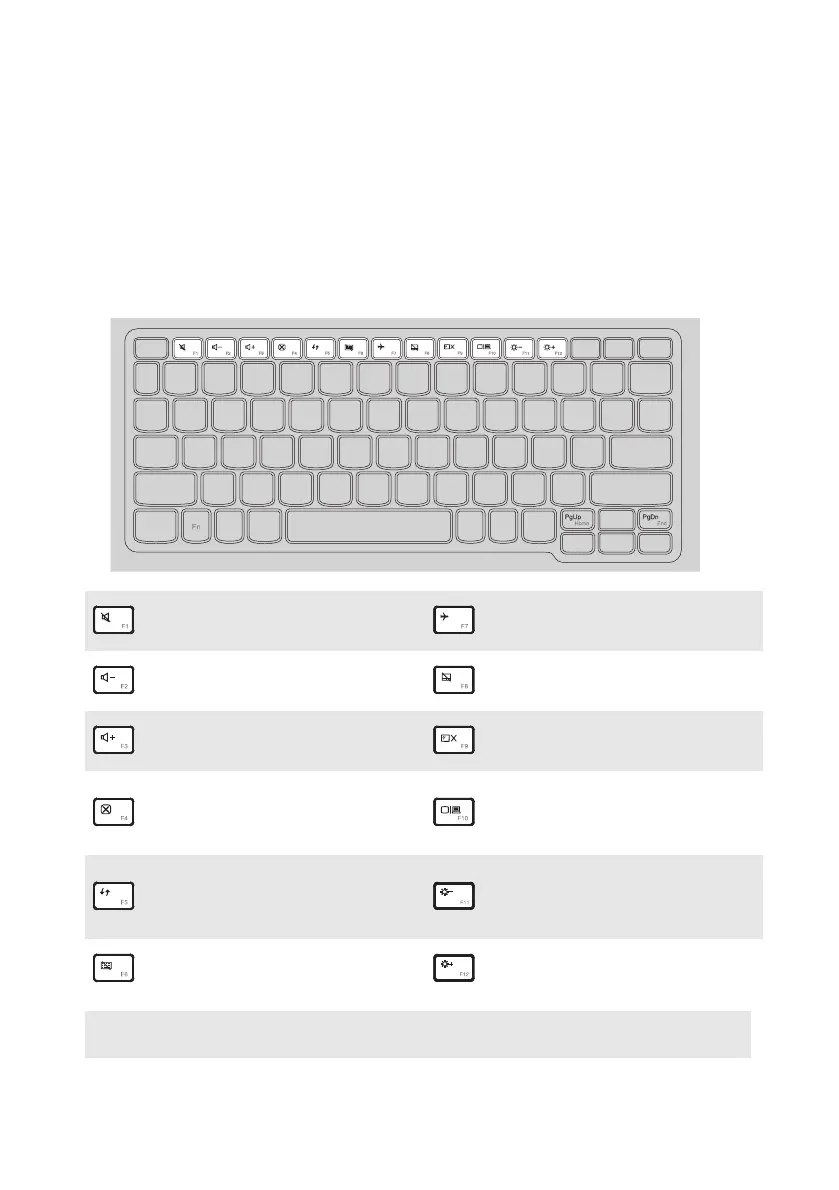
Hotkeys
Youcanaccesscertainsystemsett ingsquicklybypressingtheappropriate
hotkeys.
:
Mutes/unmutesthesound.
:
Enables/disablesairplane
mode.
:
Decreasesthevol
ume
level.
Enables/disablesthetouch
pad.
:
Increasesthevolumelevel.
:
Turnson/offthebacklight
oftheLCDscreen.
:
Closesthe curr
entlyactive
window.
:
Togglesthedisplay
betweenthecomputerand
anexternaldevice.
:
Refreshesthedesktopor
thecurrentlyactive
window.
:
Decreasesdisplay
brightness.
Enable/disablesthe
keyboard.
:
Increasesdi
splay
brightness.
Note: IfyouchangedtheHotkeyModefromEnabledtoDisabledintheBIOSsetuputility,
youwillneedtopresstheFnkeyincombinationwiththeappropriatehotkey.



 To Next Page