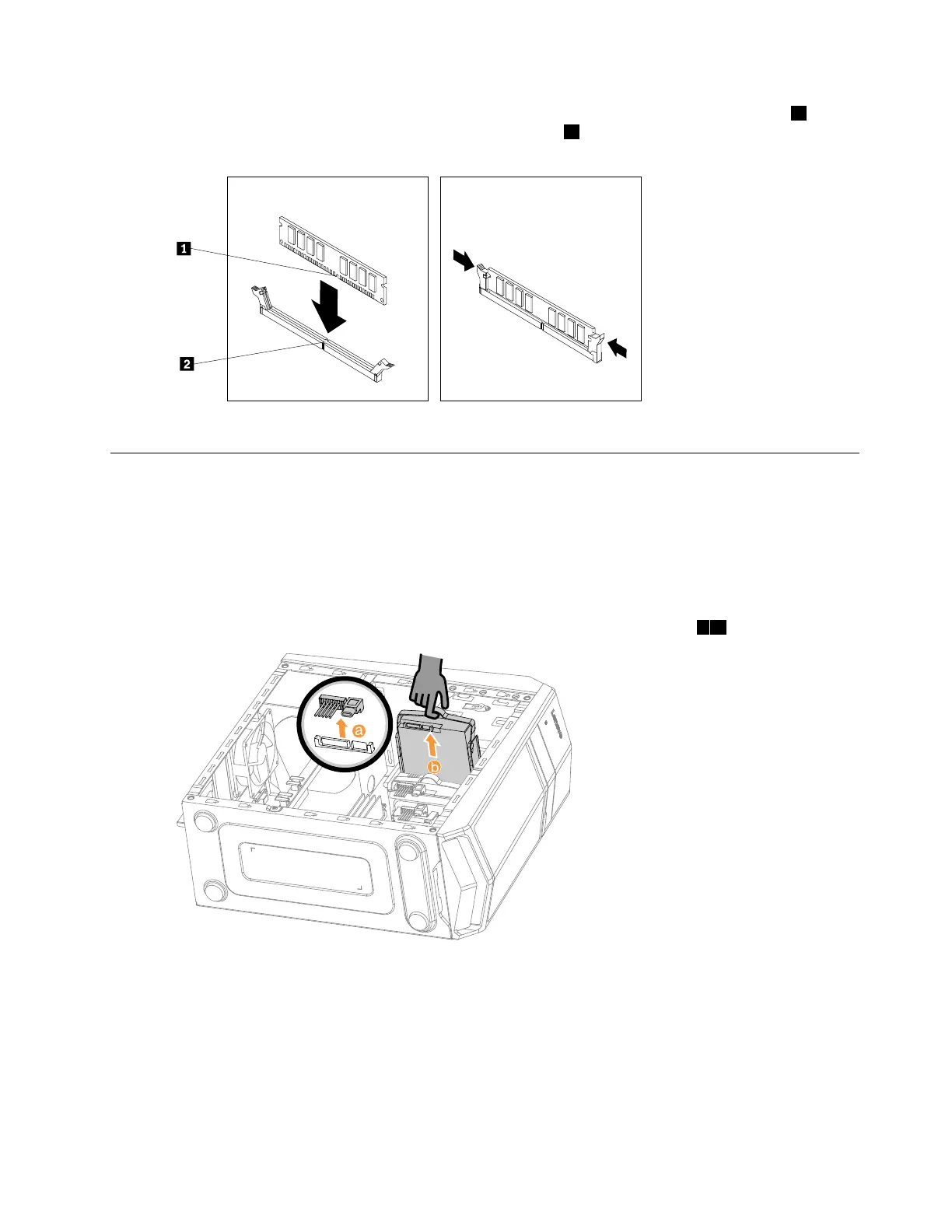
Step4.Positionthenewmemorymoduleoverthememoryconnector.Makesurethatthenotch1onthe
memorymodulealignscorrectlywiththeconnectorkey
2onthesystemboard.Pushthememory
modulestraightdownintotheconnectoruntiltheretainingclipsclose.
Step5.Reattachthecomputercover.
Replacingaharddiskdrive
Note:Forthisprocedure,ithelpstolaythecomputerflat.
Toreplaceaharddiskdrive:
Step1.Removethecomputercover.Referto“Removingthecomputercover”.
Step2.Disconnectthedataandpowercablesfromtheharddiskdrive.
Step3.Liftuptheplastichandleandslidetheharddiskdriveoutofthedrivebay.12
Chapter8.Replacinghardware29






 To Next Page