3
Installing the Nano-SIM & microSD cards
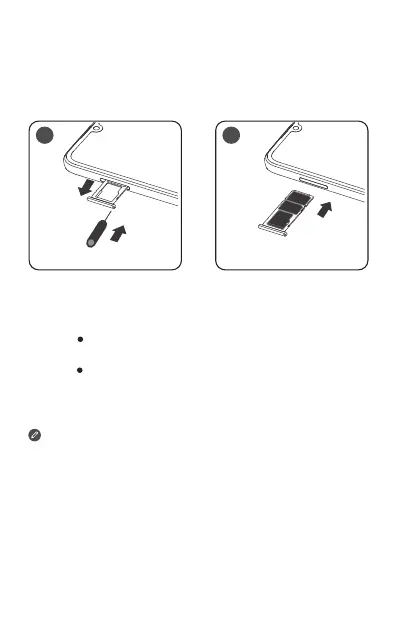
A Nano-SIM card provided by your carrier is required in
order to use cellular services
①
. A microSD card is
required to store data. Install the Nano-SIM cards and
the microSD card as shown
②
.
Insert the eject tool that comes with your
smartphone into the hole in the card tray. Pull out
the card tray and install the cards as follows
Position a Nano-SIM card in Slot 1 and/or
another Nano-SIM card in Slot 2
③
;
Position a microSD card in Slot 3.
Carefully insert the tray with the installed cards
back into the slot.
① Only Nano-SIM cards work with your smartphone.
② Always turn o your smartphone first before you insert
or remove a Nano-SIM card. Insert or remove a
Nano-SIM card with your smartphone on may damage
your Nano-SIM card or smartphone permanently.
③ When two SIM cards are inserted, both SIM card slots
support 4G/3G service. But you can enable only one
Nano-SIM card for data connection at a time. If you
want to change the Nano-SIM card used for data
connection, go to Settings > Network & Internet >
Mobile networks & SIM.
Step 1.
Step 2.
1 2


 To Next Page