Chapter 2. Using your computer
35
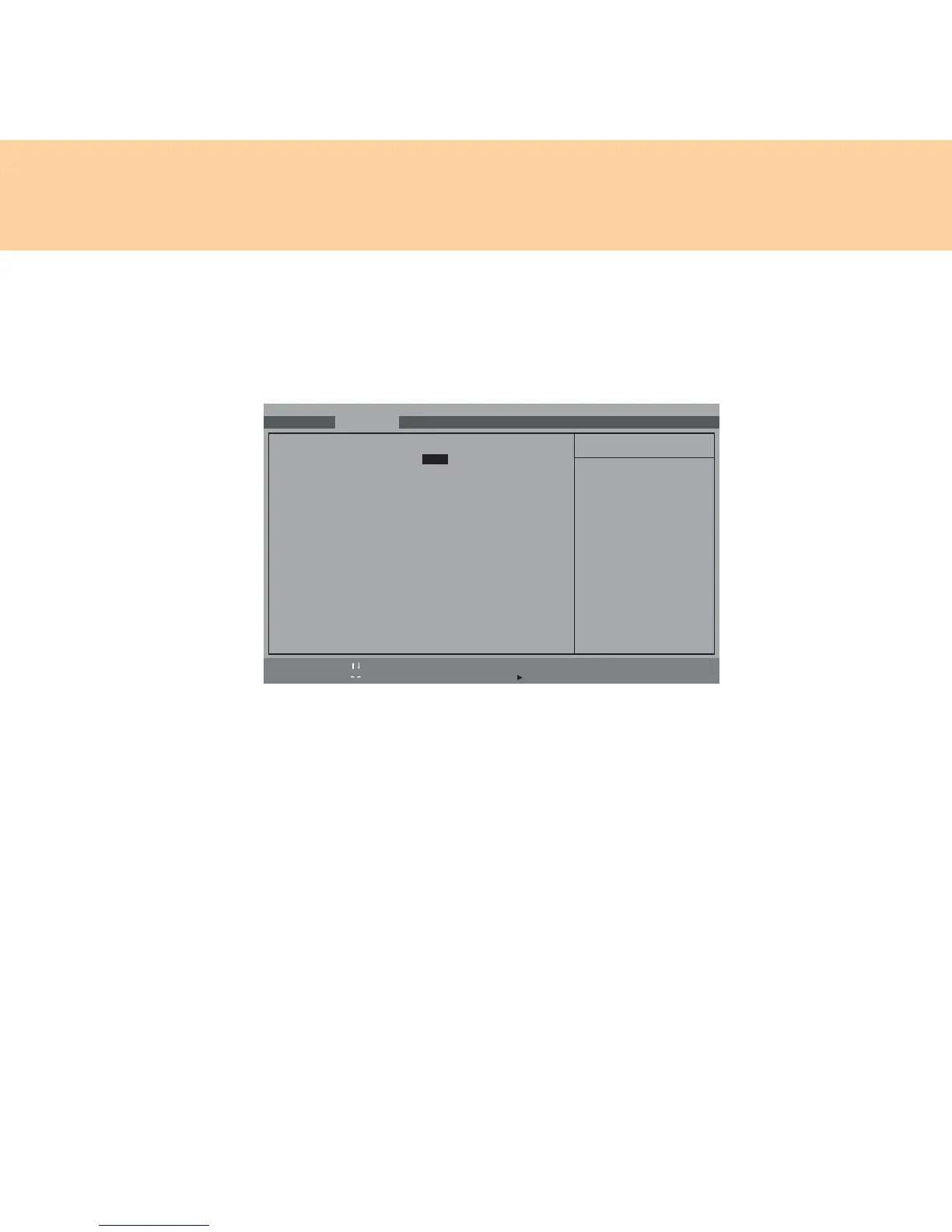
5 In the initial screen display, press F2 to enter the BIOS Setup Utility.
After that use the cursor keys, and select Advanced. Set up the AHCI
mode in SATA Mode Selection , and press F10 to save settings and
exit.
6 Turn on the computer and enter Windows XP system. Install the left
driver in the supplied drive disc, and thus complete the installation of
the OS and all the drivers.
Main Advanced Security
Phoenix SecureCore(tm) Setup Utility
Boot Exit
Determines how SATA
controller(s) operate.
F1 Help Select Item
-
/+ Change Values F9 Setup Defaults
Esc Exit Select Menu Enter Select Sub-Menu F10 Save and Exit
Item Specific Help
Legacy OS Boot: [Enabled]
SATA Mode Selection: [AHCI]
Modem Device: [Enabled]
WLAN Device: [Enabled]
LAN Device: [Enabled]
WWAN Device: [Enabled]
Express Card Device: [Enabled]
1394 Device: [Enabled]
Media slot Device: [Enabled]
PC Card Device: [Enabled]
Serial Port Device: [Enabled]
Bluetooth Device: [Enabled]
USB Port Device: [Enabled]
USB Port Device: [Enabled]
USB Port Device: [Enabled]
E-SATA Device: [Enabled]









 To Next Page