
 Need help?
Do you have a question about the Lenovo HA-100 and is the answer not in the manual?
Explains the meaning of different light ring and microphone LED states.
Lists Lenovo tablets compatible with the device and their connector types.
Provides examples of voice commands to interact with the device.
Instructions on how to carefully detach the tablet connector.
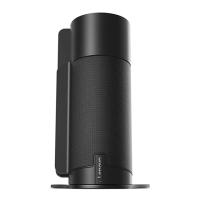
This document describes the Lenovo Home Assistant (HA-100), a device designed to integrate with various Lenovo tablets, transforming them into smart home assistants with Alexa voice control.
The Lenovo Home Assistant acts as a dock and an extension for compatible Lenovo tablets, providing enhanced audio capabilities through built-in speakers and enabling hands-free voice control via Alexa. When a tablet is connected, the device allows users to interact with Alexa for various tasks, such as checking the time, getting weather updates, playing music, managing shopping lists, and checking appointments. The device features a rotating top, which houses the speakers and a light ring, indicating its operational status. It also includes a microphone for voice input and a rotating button for adjusting the rotating top.
The device is compatible with a range of Lenovo tablets, categorized by their model and build number. Compatibility is crucial for proper function, and users are advised to check their tablet's model and ensure it meets the minimum build number requirements.
USB Type-C Connector Compatibility:
Micro-USB Connector Compatibility:
The device requires a power adapter for operation, which should be plugged into a power outlet. The light ring on the device serves as an indicator for its status:
The device is designed for use in specific regions, including the United Kingdom, the United States, Germany, Japan, and India.
Initial Setup:
Settings > About tablet > System Updates to install the necessary software. The Home Assistant app can also be downloaded from the Google Play Store.Adjusting the Rotating Top: The rotating top, which houses the speakers, can be adjusted, particularly for tablets with 8-inch screens.
Voice Control with Alexa: To interact with the device, users simply say "Alexa" to get its attention, followed by a command or question. Examples include:
The device's light ring provides visual feedback on Alexa's status, indicating when it is listening, thinking, or if there is an exception. The microphone can also be turned off, indicated by a red light on the light ring, to ensure privacy.
Removing the Connector: If the connector needs to be removed from the tablet, it should be loosened gently with a tool and then carefully removed. This suggests a design where the connector is securely fitted and may require a slight leverage for detachment, preventing accidental disconnections while ensuring a firm connection during use.
Software Updates:
Maintaining the tablet's software is crucial for the Home Assistant's functionality. Users are advised to regularly check for and install system updates on their tablet via Settings > About tablet > System Updates. This ensures compatibility with the latest features and bug fixes for the Home Assistant app and Alexa services.
Environmental Responsibility: The document includes a "Reduce | Reuse | Recycle" logo, indicating Lenovo's commitment to environmental responsibility and encouraging users to dispose of the product responsibly at the end of its life cycle.
Support Information: For network service and billing support, users should contact their mobile network operator. For device usage and technical specifications, users can visit http://support.lenovo.com/. This centralized support portal provides comprehensive information for troubleshooting and maximizing the device's potential.
The Lenovo Home Assistant HA-100 is designed to enhance the smart home experience by leveraging the capabilities of Lenovo tablets, offering a hands-free, voice-controlled interface for daily tasks and entertainment.
 General
| Brand | Lenovo |
|---|---|
| Model | HA-100 |
| Category | Home Automation |
| Language | English |

 To Next Page