2
1
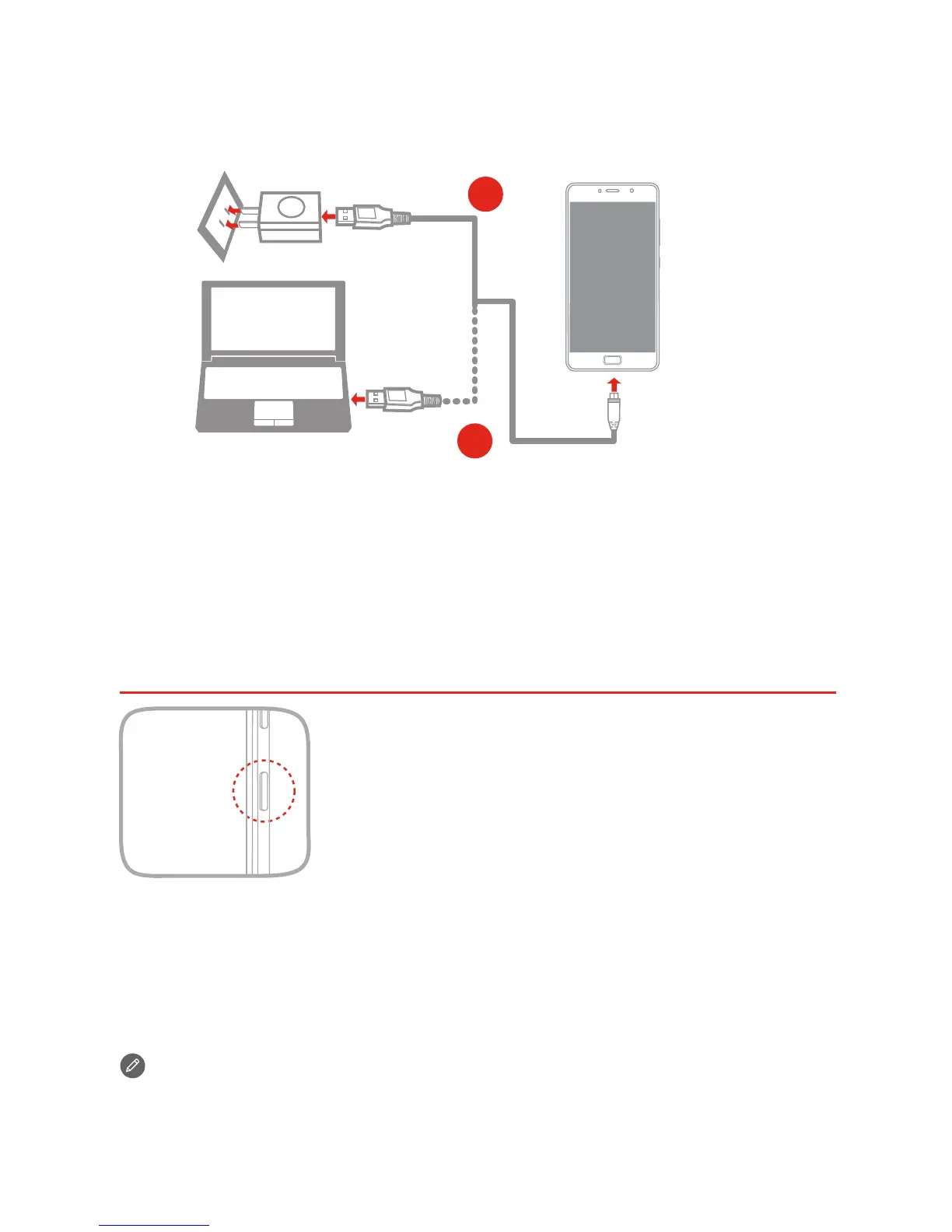
Charge the battery as shown.
Method 1.
Method 2.
Connect your smartphone to a power outlet using the
cable and USB power adapter that come with your
smartphone.
Connect your smartphone to a computer using the cable
that comes with your smartphone.
Charging the battery
Your smartphone has a built-in rechargeable battery. For more
information about battery safety, see the “Built-in rechargeable
battery notice” section. The battery in this product cannot be easily
replaced by yourself.
Turning on or turning off your smartphone
Turn on: Press and hold the On/Off button until
the Lenovo logo appears.
Turn off: Press and hold the On/Off button for a
few seconds, then tap Power off.
Restart: Press and hold the On/Off button for
about 10 seconds.
New features
Your phone has some new features, such as Fingerprint, NFC, etc. To
learn more about these features, see “New features” section in User
Guide.
4


 To Next Page