EasyManua.ls Logo

Lenovo SE-631 TWC - User Manual

Lenovo SE-631 TWC
14 pages
Print Icon
To Next Page IconTo Next Page
Loading...
Pair
To Clear The Pairing Record Of
The Earbuds
Take the earbuds out of the charging case, tap any of the earbuds
touch panel 7 times to enter Bluetooth pairing mode, then tap the
earbuds touch panel 4 times to clear the pairing list and restore to
the factory settings.
Bluetooth pairing (automatic pairing when taking out
the headset from the charging box)
1. The earbuds switch on automatically when taken out of the
charging case.
2. The earbuds enter pairing mode after 2 seconds, rapidly flashing
white/red.
3. Select "Lenovo SE-631TWC" in the Bluetooth list of the mobile
device, and pair with the device.
4. Once successfully paired, the white light of the indicator will flash slowly.
Charging
Ear buds Charge
Charging starts after insert the earbuds into the charging box, the red
Earbuds LED Indicator will breath slowly while charging, and the red
light will turn off after charging is complete.
Touch Function
To play/pause
Tap the touch panel of the left/right earbuds twice
To Pick/Hang up call
Tap the touch panel of the left/right earbuds twice
To Reject call
Press the left/right earbud touch panel and hold 2s
To next song/previous
Press the left earbud touch panel and hold 2s to previous song
Press the right earbud touch panel and hold 2s to next song
Activate voice assistant
Tap the touch panel of the left/right earbuds 3 times
Bluetooth disconnected into pairing mode
Tap the touch panel of the left/right earbuds 7 times
Reset the earbuds if you can only hear music/voice on one side
after pairing with your mobile device.
How to manually reset the earbuds.
1. Turn off the Bluetooth on your mobile device, and insert both
earbuds into the charging case.
2. Remove one earbud from the charging case.
3. Tap the touch panel 7 times to enter paring mode
(Earbud light rapid flash white/red).
4. Tap the touch panel 6 times to reset pairing (Earbud light flash white
3 times then shut off), then place the earbud into the charging case.
5. Repeat steps 2-4 for the 2nd earbud.
6. Remove both earbuds from the charging case, and the earbuds will
be paired automatically within 3 seconds.
7. Reconnect / re-pair with your mobile device.
Auto reconnect
After the pairing is recorded, unplug the earbuds from the charging
case, and the earbuds will automatically reconnect to a recently
connected mobile phone.
Note: The Bluetooth of the mobile phone needs to be turned on, and the mobile
phone is within the effective Bluetooth connection range of the earbuds.
Before using and operating the device, read and follow the
precautions below to ensure that the equipment performs
optimally and avoids dangerous or illegal conditions
Regulatory and important safety information
1. Do not use this device in dusty, humid, dirty environment or places
near magnetic field to avoid malfunction of the internal circuit of
the device.
2. Do not cover, seal or put other items on the device.
Ear Tips
x4
Ear Buds
x1
What's In The Box
Choose Your Ear Tips
Wearing Demonstration
Ear tips x6 (Size S/M/L)
Note: The size M ear tips are attached to the ear buds in-box
Remove the protective film on the earbuds when taking
them out of the charging case for the first time.
1. Choose the eartips that fit your ears the best.
2. Insert the earbuds into your ears.
3. Rotate and lock the earbuds.
Charging Cable
USB-C To USB-A
x1
User Guide
x1
Charging Case
x1
1. Charging Case
3. Touch Panel 4. Charging Case LED Indicator
2. Earbuds LED Indicator
5. Type -C Connector
* Before using it for the first time, please tear off the isolation film on the headset,
put the earbuds into the charging box, and the red indicator light of the earbuds
lights up to the charging state to indicate the activation is completed.
True Wireless
Earbuds
Lenovo
American English
Safety, Warranty
&Quick Start Guide
2-15
16-27
28-39
40-51
52-63
64-75
Deutsch
Español
Français
Italiano
Nederlands
SE-631 TWC
CONTENTS
To turn on/off earbuds manually
When the earbuds are not in the charging box
Press and hold for 5s to turn on and 8s to turn off
Charge the charging case
Charging starts after insert a powered USB cable into the charging
box, the Charging Case LED indicator is always on while the power
is connected;
Notes: Power less than 25%; One flashing LED light
Power less than 50%; One solid, one flashing LED light
Power less than 75%; Two solid, one flashing LED light
Power less than 100%; Three solid, one flashing LED light
Charging Complete; Four solid LED light
How to choose applicable charger
It is recommended to use the power adapter that complies with
applicable national/regional regulations or one or more of the following
standards: EN301389-34,IEC 62684, or other applicable interoperablity
standards of power adapters. Only use an adapter that complies with
international and regional safety standards(including IEC 60950/
IEC 62368) for charging. Do not use an adapter rated at more than
5.25V or less than 0.5 A as this may damage the device.Other
adapters may not comply with applicable safety standard,and using
such adapters to charge may result in injury or death.
Specifications
Model: Lenovo SE-631TWC
Product size: 61x25x33mm
Product weight: 4.1g (single ear bud), 36.2g (two ear buds
and charging case.)
Driver: 5.8mm bio-diaphragm speaker
Input: 5V d.c.0.2A
Audio decoding: SBC
Frequency response range: 20-20kHz (Bluetooth)
Sensitivity: 93dB±3dB
Connection method: USB-C to USB-A charging cable
Support modes: BT 5.0, HSP v1.2, HFP v1.7, A2DP v1.3, AVRCP v1.6
Bluetooth frequency: 2.402-2.480GHz
Bluetooth power: <8.0dBm
Bluetooth range: 10m
Battery Specifications: Rechargeable polymer lithium ion
battery (ear buds: 3.7V, 43mAh charging box: 3.7V, 210 mAh)
Battery charge: 2 hours
Play time: 4 hours for earbuds, 10 hours of use for earbuds with the
charging case.
Waterproof level: IPX5 for the earbuds, charging case is not waterproof.
Product Illustration
3.
2.
1.
4.
5.
2 3 4 5 6 7
Question and Answer IconNeed help?

Do you have a question about the Lenovo SE-631 TWC and is the answer not in the manual?

Summary

Whats In The Box

Ear Buds

List of items included in the product packaging, specifically the earbuds.

Charging Case

List of items included in the product packaging, specifically the charging case.

Ear Tips

List of items included in the product packaging, specifically the ear tips.

Charging Cable

List of items included in the product packaging, specifically the charging cable.

User Guide

List of items included in the product packaging, specifically the user guide.

Product Illustration

Choose Your Ear Tips

Ear tip sizes

Details on the included ear tips and their available sizes (S/M/L).

Wearing Demonstration

Pairing and Connection

Bluetooth Pairing Process

Instructions for automatic Bluetooth pairing when removing earbuds from the charging case.

Touch Controls Overview

Guide to using touch controls for playback, calls, voice assistant, and pairing.

Manual Power Control

Instructions for manually turning the earbuds on or off when not in the charging box.

Troubleshooting and Reset

Clearing Pairing Records

Steps to clear Bluetooth pairing records and restore factory settings.

Manual Reset Procedure

Detailed steps for manually resetting the earbuds, including single-earbud issues.

Automatic Reconnection

Explanation of how earbuds automatically reconnect to a previously paired device.

Charging Information

Earbud Charging

Information on how the earbuds charge and indicator light behavior.

Charging Case Charging

Instructions for charging the case and interpreting LED indicator lights.

Charger Compatibility

Recommendations and warnings regarding compatible power adapters for charging.

Specifications

Regulatory and Safety Information

General Safety Precautions

Essential safety guidelines for optimal device performance and avoiding hazardous conditions.

General Recycling Statement

Lenovo's commitment to responsible IT equipment recycling and available programs.

Medical Facility Usage

Rules for using wireless devices in medical and health care facilities.

Medical Device Interference

Information on how radio waves may affect implantable or personal medical devices.

Medical Device Proximity

Maintain a minimum distance of 15cm from implanted medical devices.

Power Supply Hazards

Warnings about using unauthorized power supplies, chargers, or batteries.

Plastic Bag Hazard

Warning about the danger of plastic bags to babies and children.

Customer Information Notes

EU Battery and WEEE Information

Guidance on proper disposal and recycling of batteries and electronic waste in the EU.

FCC Compliance Statement

Statement regarding compliance with FCC rules for digital devices and radio frequency energy.

Regulatory Directives Compliance

RoHS Directive Compliance

Lenovo products meet EU RoHS Directive requirements for hazardous substances.

RE Directive Compliance

Declaration of conformity with the EU Radio Equipment Directive (RED).

Trademarks

Warranty and Support

Lenovo Limited Warranty

Details on the Lenovo Limited Warranty (LLW) applicable to this product.

Checking Warranty Status

How to check warranty status and find support via Lenovo's website.

Important Warnings

Critical Safety Advisories

Safety warnings regarding pacemaker proximity, electric sockets, and listening volume.

Lithium Battery Hazards

Hazards associated with improper battery replacement and handling of lithium batteries.

Accidental Battery Ingestion

Risks and immediate actions required if a small lithium battery is swallowed.

Additional User Information

California Perchlorate Notice

Information for California users regarding manganese dioxide and perchlorate in batteries.

General Usage Advice

General advice on volume control, wireless compliance, and regulatory notices.

Overview

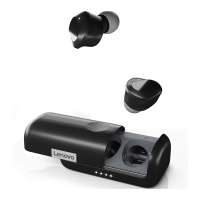
The Lenovo SE-631 TWC are True Wireless Earbuds designed for audio playback and communication, offering a blend of convenience and essential features for everyday use. This device comes with a charging case, ear tips in various sizes (S/M/L), a USB-C to USB-A charging cable, and a user guide.

Function Description:

The SE-631 TWC earbuds are primarily designed for wireless audio playback and hands-free calling. They connect to mobile devices via Bluetooth, allowing users to listen to music, podcasts, and other audio content, as well as make and receive phone calls. The earbuds feature touch-sensitive panels for controlling various functions, including play/pause, answering/rejecting calls, skipping tracks, and activating voice assistants. The accompanying charging case not only protects the earbuds but also recharges them on the go, extending their usage time.
Important Technical Specifications:

  • Model: Lenovo SE-631TWC
  • Product Size: 61x25x33mm
  • Weight: 4.1g (single earbud), 36.2g (two earbuds and charging case)
  • Driver: 5.8mm bio-diaphragm speaker
  • Input: 5V d.c.0.2A
  • Audio Decoding: SBC
  • Frequency Response Range: 20-20kHz (Bluetooth)
  • Sensitivity: 93dB±3dB
  • Connection Method: USB-C to USB-A charging cable
  • Bluetooth Version: BT 5.0
  • Support Modes: HSP v1.2, HFP v1.7, A2DP v1.3, AVRCP v1.6
  • Bluetooth Frequency: 2.402-2.480GHz
  • Bluetooth Power: <8.0dBm
  • Bluetooth Range: 10m
  • Battery Specifications: Rechargeable polymer lithium-ion battery
    • Earbuds: 3.7V, 43mAh
    • Charging Box: 3.7V, 210mAh
  • Battery Charge Time: 2 hours
  • Play Time: 4 hours for earbuds, 10 hours total with charging case
  • Waterproof Level: IPX5 for earbuds (charging case is not waterproof)

Usage Features:

  • Automatic Pairing: The earbuds automatically switch on and enter pairing mode when removed from the charging case. They can be paired by selecting "Lenovo SE-631TWC" from the Bluetooth list on a mobile device.
  • Touch Controls:
    • Play/Pause: Tap the left/right earbud touch panel twice.
    • Pick/Hang up call: Tap the left/right earbud touch panel twice.
    • Reject call: Press and hold the left/right earbud touch panel for 2 seconds.
    • Next Song/Previous Song: Press and hold the left earbud touch panel for 2 seconds for the previous song; press and hold the right earbud touch panel for 2 seconds for the next song.
    • Activate Voice Assistant: Tap the left/right earbud touch panel 3 times.
    • Bluetooth Disconnected into Pairing Mode: Tap the left/right earbud touch panel 7 times.
    • Manual On/Off: When not in the charging box, press and hold for 5 seconds to turn on, and 8 seconds to turn off.
  • Ear Tip Selection: Six ear tips (Size S/M/L) are provided to ensure a comfortable and secure fit. The size M ear tips are pre-attached.
  • Wearing Demonstration: Users are instructed to choose the best-fitting ear tips, insert the earbuds into their ears, and then rotate and lock them for optimal fit.
  • Charging:
    • Earbuds: Charging begins when inserted into the charging box. A red LED indicator on the earbuds breathes slowly during charging and turns off when complete.
    • Charging Case: Charging starts when a powered USB cable is inserted. The Charging Case LED indicator remains on while connected. The LED indicators on the charging case provide a visual representation of the battery level:
      • Less than 25%: One flashing LED.
      • Less than 50%: One solid, one flashing LED.
      • Less than 75%: Two solid, one flashing LED.
      • Less than 100%: Three solid, one flashing LED.
      • Charging Complete: Four solid LEDs.
  • Auto Reconnect: After initial pairing, the earbuds will automatically reconnect to a recently connected mobile phone when removed from the charging case, provided Bluetooth is enabled on the phone and it's within range.

Maintenance Features:

  • Clearing Pairing Record: To clear the pairing list and restore factory settings, take the earbuds out of the charging case, tap any earbud touch panel 7 times to enter Bluetooth pairing mode, then tap the earbud touch panel 4 times.
  • Manual Reset: If only one side of the earbud produces sound, a manual reset can be performed:
    1. Turn off Bluetooth on the mobile device and place both earbuds in the charging case.
    2. Remove one earbud.
    3. Tap its touch panel 7 times to enter pairing mode (earbud light flashes white/red rapidly).
    4. Tap its touch panel 6 times to reset pairing (earbud light flashes white 3 times then shuts off), then place the earbud back into the charging case.
    5. Repeat steps 2-4 for the second earbud.
    6. Remove both earbuds from the charging case; they should pair automatically within 3 seconds.
    7. Reconnect/re-pair with the mobile device.
  • General Care:
    • Avoid dusty, humid, dirty environments or places near magnetic fields to prevent circuit malfunction.
    • Do not cover, seal, or place other items on the device.
    • Keep away from heat sources or bare fire (electric heaters, microwave ovens, stoves, water heaters, candles).
    • Do not use external heating appliances (hair dryer, microwave) to dry the device.
    • Avoid striking the device or accessories against hard objects.
    • Wipe with a clean, dry, soft cloth.
    • Store and use within a temperature range of 0°C to 45°C.
    • Keep in a ventilated, cool environment away from direct sunlight.
    • The device contains a non-removable rechargeable battery that should only be replaced by an authorized service center.
  • Charger Selection: It is recommended to use a power adapter that complies with national/regional regulations or standards like EN301389-34, IEC 62684, or other interoperability standards. Only use adapters compliant with international and regional safety standards (IEC 60950/IEC 62368). Do not use adapters rated at more than 5.25V or less than 0.5A, as this may damage the device or cause injury/death.
  • Safety Precautions:
    • Ensure earbuds are not worn within 15 cm of a pacemaker.
    • Do not insert jack plugs into electric sockets.
    • Avoid listening at high volume levels for extended periods to prevent hearing damage.
    • High volume while driving can distract attention and cause accidents.
    • Small parts may be a choking hazard for children; adult supervision is required.
    • Dispose of used batteries according to local laws and regulations.
    • Lithium batteries can cause suffocation or burns if swallowed; keep out of reach of children and seek immediate medical attention if swallowed.
    • Do not replace the battery if it is wet, immersed in water, or placed in high-temperature environments above 100°C (212°F).
    • Do not repair or disassemble the device yourself.
    • Avoid extremely low or high air pressure/temperature environments.
    • Do not flatten, pierce, cut, or burn the device.
  • Regulatory Compliance: The device complies with FCC Part 15 regulations and EU RoHS and RE Directives. Information on battery recycling for the US, Canada, and EU is provided.

Lenovo SE-631 TWC Specifications

General IconGeneral
BrandLenovo
ModelSE-631 TWC
CategoryHeadphone
LanguageEnglish

Related product manuals