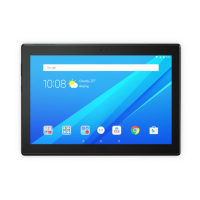
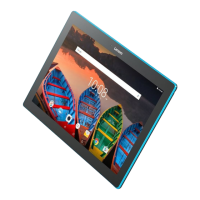
This document serves as a Safety, Warranty & Quick Start Guide for the Lenovo Tab M10 FHD Plus (Lenovo TB-X606V), offering essential information for its safe and effective use. It covers regulatory compliance, device overview, initial setup, safety warnings, and support details.
The Lenovo Tab M10 FHD Plus is a mobile device designed for various functions, including communication, entertainment, and productivity. It features a touchscreen interface for intuitive interaction and is equipped with wireless communication capabilities, allowing it to connect to networks for internet access and other services. The device supports both WLAN and LTE versions, providing flexibility in connectivity options depending on the model.
Function Description
The device is primarily a tablet computer, offering a portable platform for digital activities. Its core functions include:
- User Interaction: The device is operated through a touchscreen, allowing for direct manipulation of on-screen elements. Physical buttons are also present for volume control and power management.
- Audio Capabilities: It includes a microphone for audio input and speakers for audio output, facilitating communication, media consumption, and recording. A headset connector is provided for private listening or hands-free communication.
- Imaging: The tablet features both front-facing and rear cameras, enabling users to capture photos and videos, as well as participate in video calls.
- Connectivity: Beyond wireless communication (WLAN/LTE), the device offers a USB-C connector for charging and data transfer. A Smart Connector is also integrated, allowing the device to interface with specific Lenovo accessories, which may vary by region.
- Sensors: A light sensor is included, likely for automatic screen brightness adjustment, enhancing user experience and battery efficiency.
- Storage Expansion: The device supports external storage via a card tray, which can accommodate a microSD card. Some versions also support a Nano-SIM card for cellular connectivity.
Usage Features
The guide emphasizes several key usage features and considerations:
- Ease of Setup: The quick start guide outlines a straightforward process for installing cards (Nano-SIM and microSD) and charging the device. Powering on is as simple as pressing and holding the Power button until the Lenovo logo appears.
- Regulatory Compliance: The device is designed to comply with radio frequency and safety standards in regions where it is approved for wireless use. For models with a telecom modem, it also meets requirements for connection to telephone networks. Users are advised to consult the Regulatory Notice for country-specific information.
- Support Access: Lenovo provides multiple avenues for support. Users can access a detailed User Guide online, obtain technical specifications, and find information on network services and billing by contacting their wireless network operator. The Lenovo support website and forums are also available for assistance.
- Accessory Integration: The Smart Connector allows for enhanced functionality through compatible Lenovo accessories, expanding the device's utility for different tasks and environments.
- Eye Protection: The device has received TÜV Rheinland's "Low Blue Light" certification, indicating a design consideration for user eye health during extended use.
Maintenance Features
The guide provides crucial information regarding device maintenance, particularly focusing on safety and battery care:
- Card Installation/Removal: Users are instructed to power off the device before inserting or removing any cards (Nano-SIM or microSD) to prevent potential damage.
- Charging: The device is charged using the provided USB cable and power adapter, connecting to a power outlet.
- Battery Safety and Longevity:
- Internal Rechargeable Battery Warning: Users are explicitly warned against attempting to replace, disassemble, or modify the internal lithium-ion battery due to risks of explosion, excessive heat, or fluid leakage. Replacing the battery with an incompatible type is also highlighted as dangerous.
- Disposal: Proper disposal of the battery and the device itself is emphasized, adhering to local ordinances and regulations. Batteries should not be disposed of in municipal waste and should be treated separately through designated collection frameworks.
- Environmental Protection: The guide advises against exposing the battery pack to open flames, heat sources, water, rain, corrosive liquids, or environments with extremely high or low air pressure. Short-circuiting the battery pack should also be avoided.
- Storage and Charging Recommendations: To extend battery life, it is recommended to charge the battery to 30-50% capacity each time and recharge it every three months to prevent over-discharge.
- General Safety:
- Plastic Bag Notice: Plastic bags used in packaging should be kept away from babies and children to prevent suffocation.
- High Volume Usage Caution: Warnings are provided regarding exposure to loud noise, which can affect hearing. Users are advised to limit high-volume headset/headphone use, avoid turning up volume to block noise, and turn down volume if unable to hear others speak. If hearing discomfort occurs, users should stop listening and seek medical advice.
- Parental Supervision: For children using the device, parents and adult supervisors are advised to caution them about potential hazards, inspect the device periodically for damage (including the power adapter and small parts), and ensure it is working properly and safely.
- Recycling Information: Lenovo encourages responsible recycling of IT equipment. Information on recycling programs and country-specific details (Japan, Taiwan, US & Canada, European Union) are provided, aligning with directives like RoHS (Restriction of Hazardous Substances) and WEEE (Waste Electrical and Electronic Equipment). The EurAsia compliance mark (EAC) is also noted.
This comprehensive guide ensures that users can safely operate, maintain, and dispose of their Lenovo Tab M10 FHD Plus while adhering to regulatory standards and maximizing the device's lifespan.

 Need help?
 General

 To Next Page