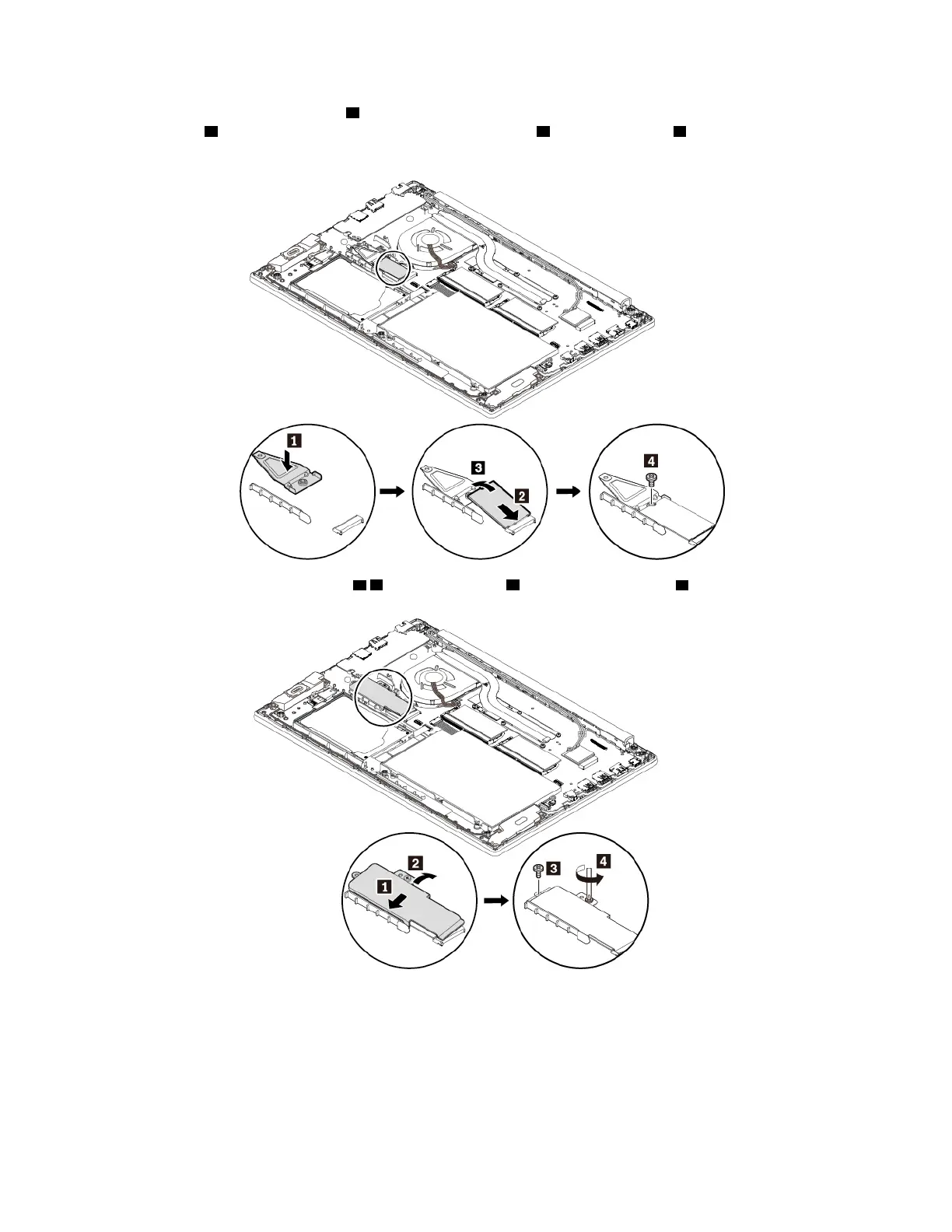
8. Install the short bracket in place 1 . Insert the new M.2 solid-state drive into the slot at an angle of about
20 degrees
2 and pivot the M.2 solid-state drive downward 3 . Install the screw 4 to secure the M.2
solid-state drive.
9. Install the long bracket as shown 1 2 . Install the screw 3 and tighten the screw 4 .
10. Reinstall the base cover assembly.
11. Turn the computer over. Connect the ac power adapter and all cables to the computer.
12. If you install a new Intel Optane memory, enable the Intel Optane memory by doing the following:
a. Restart your computer. When the logo screen is displayed, immediately press F1 to enter the UEFI
BIOS menu.
b. Select Config ➙ Storage ➙ Controller mode. Ensure that RST mode is selected.
98
E580 User Guide














 To Next Page