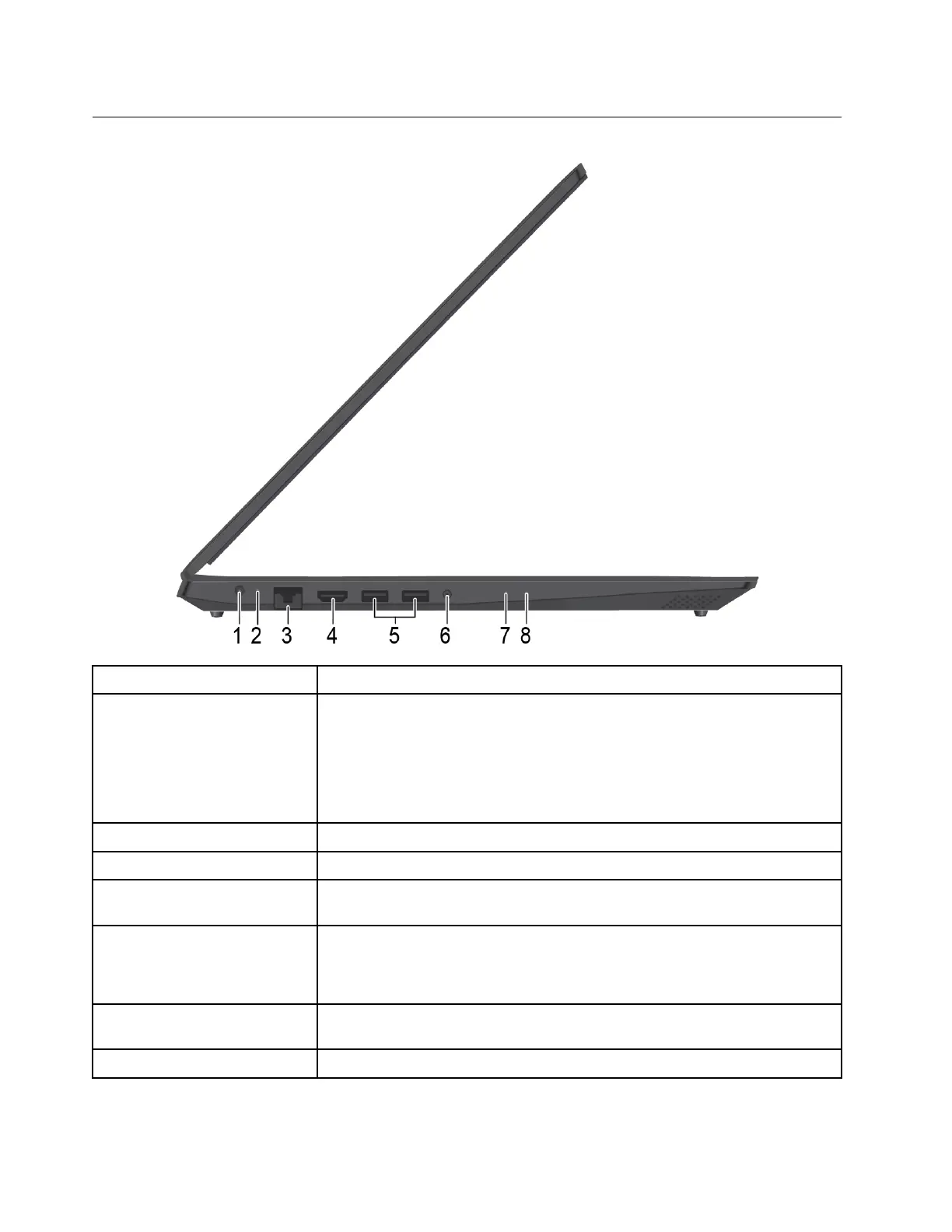
Left
1. Power connector
Connect to ac power through an ac power adapter.
2. Battery/Charging status
indicator
Indicates the ac power and battery power status of the computer.
White: connected to ac power (battery power 91%–100%)
Amber: connected to ac power (battery power 1%–90%)
Off: not connected to ac power
3. Ethernet connector Connects your computer to a local network.
4. HDMI™ connector
Connect to a compatible digital audio device or video monitor, such as an HDTV.
5. USB 3.1 connector Gen 1 Connect USB-compatible devices, such as a USB keyboard, USB mouse, USB
storage device, or USB printer.
6. Audio connector Connect headphones or a headset with a 3.5-mm (0.14-inch), 4-pole plug to listen
to the sound from the computer.
Note: The conventional microphone is not supported.
7. Novo button When the computer is off, press this button to start the System Recovery or the
BIOS setup utility, or to enter the boot menu.
8. Power LED Indicates whether the computer is on, off, or on sleep mode.
4 Lenovo V155–15API User Guide



 To Next Page