506305-01Page 32 of 36 Issue 0938
SYSTEM SENTRY™ CONTROL DIAGNOSTICS
Troubleshooting
The following visual checks should be made before
troubleshooting:
1. Check to see that the power to the furnace and the
integrated ignition/blower control board is on.
2. The manual shutoff valves in the gas line to the furnace
must be open.
3. Make sure all wiring connections are secure.
4. Review the Sequence of Operation (see page 27).
Start the system by setting the thermostat above the room
temperature. Observe the system’s response. Then use
the information provided in this section to check the system’s
operation.
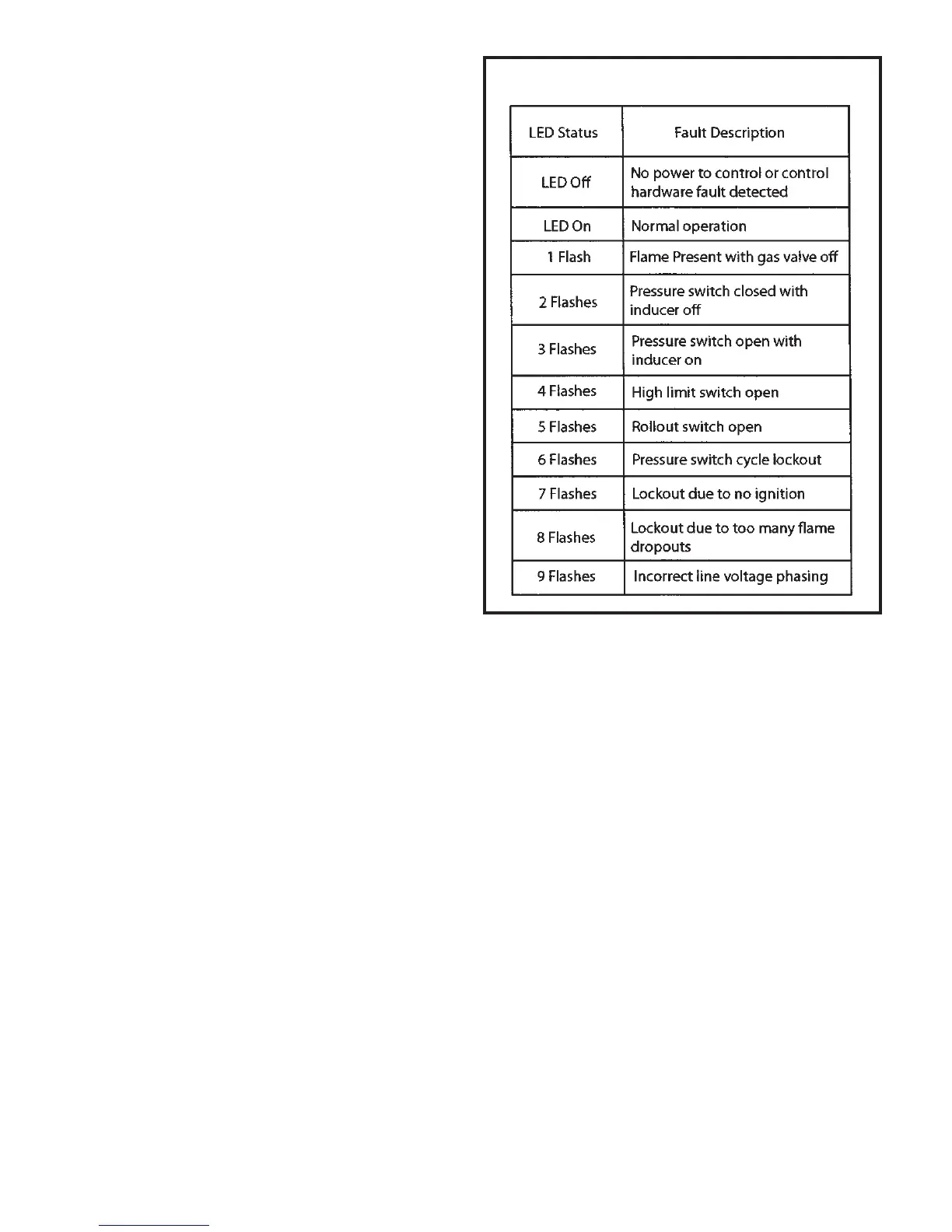
The furnace has a built-in, self-diagnostic capability. If a
system problem occurs, a fault code is shown by an LED on
the control board. The control continuously monitors its own
operation and the operation of the system. If a failure occurs,
the LED will indicate the failure code. The flash codes are
presented in Table 5.
Fault Code History Button
The control stores the last five fault codes in memory. A
pushbutton switch is located on the control (see Figure 40
on page 33). When the pushbutton switch is pressed and
released, the control flashes the stored fault codes. The
most recent fault code is flashed first; the oldest fault code
is flashed last.
To clear the fault code history, press and hold the pushbutton
switch in for more than 5 seconds before releasing.
Failure Codes
Table 5



 To Next Page