EasyManua.ls Logo

Lenz Digital plus LS100 - User Manual

Lenz Digital plus LS100
24 pages
Print Icon
To Next Page IconTo Next Page
Loading...
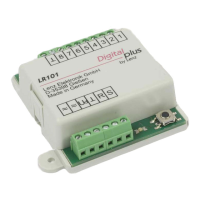
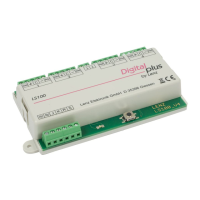
Accessory Decoder LS 100/110 1
DIGITAL plus
Accessory decoders are the link between your NMRA DCC
system and your function devices (that is turnouts, signals,
uncouplers, etc.) on your model train layout.
Accessory decoders receive commands sent from the command
station via the power station and activate the drives of turnouts
or other switching devices. For DIGITAL plus systems these
switching commands are activated from input devices, such as,
hand held controller LH100, tower cab LW100, interface LI100 or
translation module LC100 (in connection with another,
compatible digital system).
+Dimensions: approximately 3.5 x 3.5” (90 x 90 mm)
LS100/110
Accessory DCC Decoder
Art. Nr. 11100 / 11110
January 1999
upgraded version 2.2
Submitted for NMRA
Conformance testing

Questions and Answers

  • R
    Raven FlynnAug 11, 2025
    Why doesn't my Lenz Media Converter turnout throw, and the LED isn't flickering?
    • B
      Brittany PetersAug 11, 2025
      There are several possible reasons why your Lenz Media Converter turnout isn't throwing and the LED isn't flickering: * The turnout address entered might be incorrect. * There could be a break in the connection between the command station and power station, or between the power station and accessory decoder. * A power station may have turned off due to a short circuit or an EMERGENCY OFF. * The external power supply might not be connected to the appropriate terminals.
  • S
    stephaniebergAug 16, 2025
    What to do if I get 'ERR 02' when programming my Lenz Digital plus LS100 Media Converter?
    • E
      Erin FullerAug 16, 2025
      If you receive an “ERR 02” message on the hand-held controller when programming your Lenz Media Converter from the command station's programming output, it could be due to these reasons: * The command station cannot test for successful programming because no load is connected to the output of the LS100/LS110. * The connection between the programming output of the command station (terminals P and Q) and the LS100/LS110 is incorrect.
  • N
    Nicole NormanAug 22, 2025
    What to do if my Lenz Media Converter turnout doesn't throw but the LED flickers?
    • B
      Benjamin GentryAug 22, 2025
      If your Lenz Media Converter turnout isn't throwing, but the LED flickers when a switching command is sent, the turnout or signal drive may not be correctly connected, or it might be defective.
  • A
    Anna JacksonAug 29, 2025
    How to fix a Lenz Digital plus LS100 LS100 not showing as feedback capable?
    • R
      Robert PorterAug 29, 2025
      If a called up LS100 is not shown as a feedback capable decoder (no R shows in the LH100 display) on your Lenz Media Converter, the feedback bus is either not connected, or the wires R and S are switched.
  • S
    smithtrevorSep 4, 2025
    Why does my Lenz Digital plus LS100 Media Converter show the wrong display when calling up LS100/LS110?
    • M
      Mary LongSep 4, 2025
      If, when calling up an LS100/LS110 on the LH100, the display is incorrect on your Lenz Media Converter, the entered address is likely occupied by a feedback encoder instead of an accessory decoder.

Lenz Digital plus LS100 Specifications

General IconGeneral
BrandLenz
ModelDigital plus LS100
CategoryMedia Converter
LanguageEnglish

Related product manuals