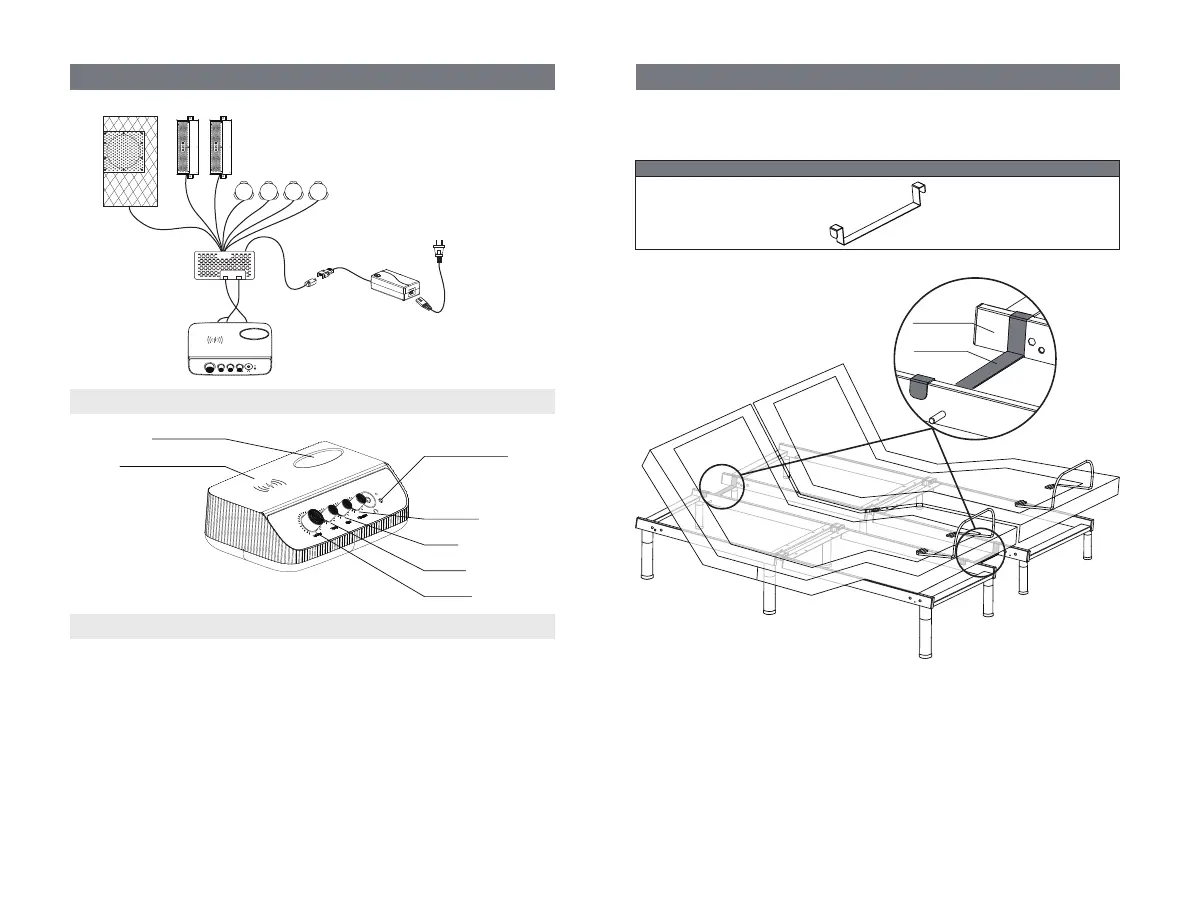
Install two spacing connectors to ensure the gap between the two
adjustable bases is consistent.
Spacing
Connector
Bed Frame
Bed Frame
Spacing Connector for TXL/T/CKS (Optional)
(2) SPACING CONNECTOR (TXL/T/CKS ONLY)
Lift the head and foot end of the bed by remote control. Install the spacing
connector as shown.
Audio Controller Instructions
Immersive Audio System
Wireless Charging
Area
Storage Box
Vibration
Bass
Treble
Volume
Play Music
AC Power Cord
of Audio System
Power Supply
of Audio System
DC Power Cord
of Audio System
Low Frequency Vibrator
(2 for TXL)
SpeakerSubwoofer
Audio Controller
Audio Control Box
Pairing Button
Make sure your mobile devices has the pairing function for the immersive
audio system to work correctly.
STEP 1: Turn the “Volume” knob clockwise more than half a turn to open the
audio controller.
STEP 2: Turn on the pairing function on your mobile device.
STEP 3: Press and hold the pairing button on the audio controller until the
light above the button flashes.
STEP 4: Select the device named "Moto Media System" on your mobile
device, and You will hear "Connected".
STEP 5: Turn the “Vibration”, “Bass”, “Treble” and ”Volume” knob to adjust
the sound effect.


 To Next Page