
 Need help?
Do you have a question about the Letscom JDL-201 and is the answer not in the manual?
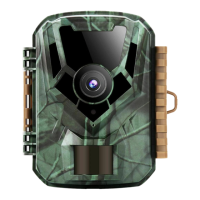
Explains the camera's functionality, detection, power consumption, and weather resistance.
Lists various uses for hunting, wildlife observation, security, and general surveillance.
Instructions for inserting four AA batteries correctly into the camera's battery slots.
Steps for inserting and formatting an SD card for saving photos and videos.
Explains the three basic operational modes: OFF (safe), ON (live surveillance), and SETUP (configuration).
Covers entering menus, using keys for navigation, and shortcut functions within SETUP mode.
Guides on how to review captured photos and videos directly on the camera's LCD screen.
Configure camera mode, photo resolution, and the number of photos taken in a series.
Adjust video resolution, length, enable/disable audio, set shot lag, and motion sensor sensitivity.
Set time/date, select display language, and choose photo stamp options like date or time.
Manage password protection, beep sound, format memory card, set serial number, and reset settings.
Instructions for securely mounting the camera on a tree using the strap or via the tripod socket.
Test the camera's motion detection range and angle to determine optimal placement.
Steps for powering on the camera, PIR initialization, and essential pre-operation checks.
Discusses factors affecting battery life and offers tips for extending it, such as optimizing recording time.
Troubleshooting guide for common issues preventing the camera from capturing photos or videos.
Addresses common quality issues like image darkness, brightness, color cast, and motion streaks.
Explains the importance of saving settings in SETUP mode and how to ensure changes are applied.
Step-by-step instructions for correctly inserting an SD memory card into the camera slot.
Crucial safety guidelines for handling, operating, and maintaining the camera to prevent damage or injury.
 General
| Video Resolution | 1080P |
|---|---|
| Waterproof Rating | IP66 |
| Night Vision | Yes |
| Battery Type | 8 x AA |
| IR Flash Range | 20m |
| Detection Distance | 20m |
| Memory Card Support | Up to 32GB |
| Operating Temperature | -20°C to 60°C |

 To Next Page