Wall Mounng
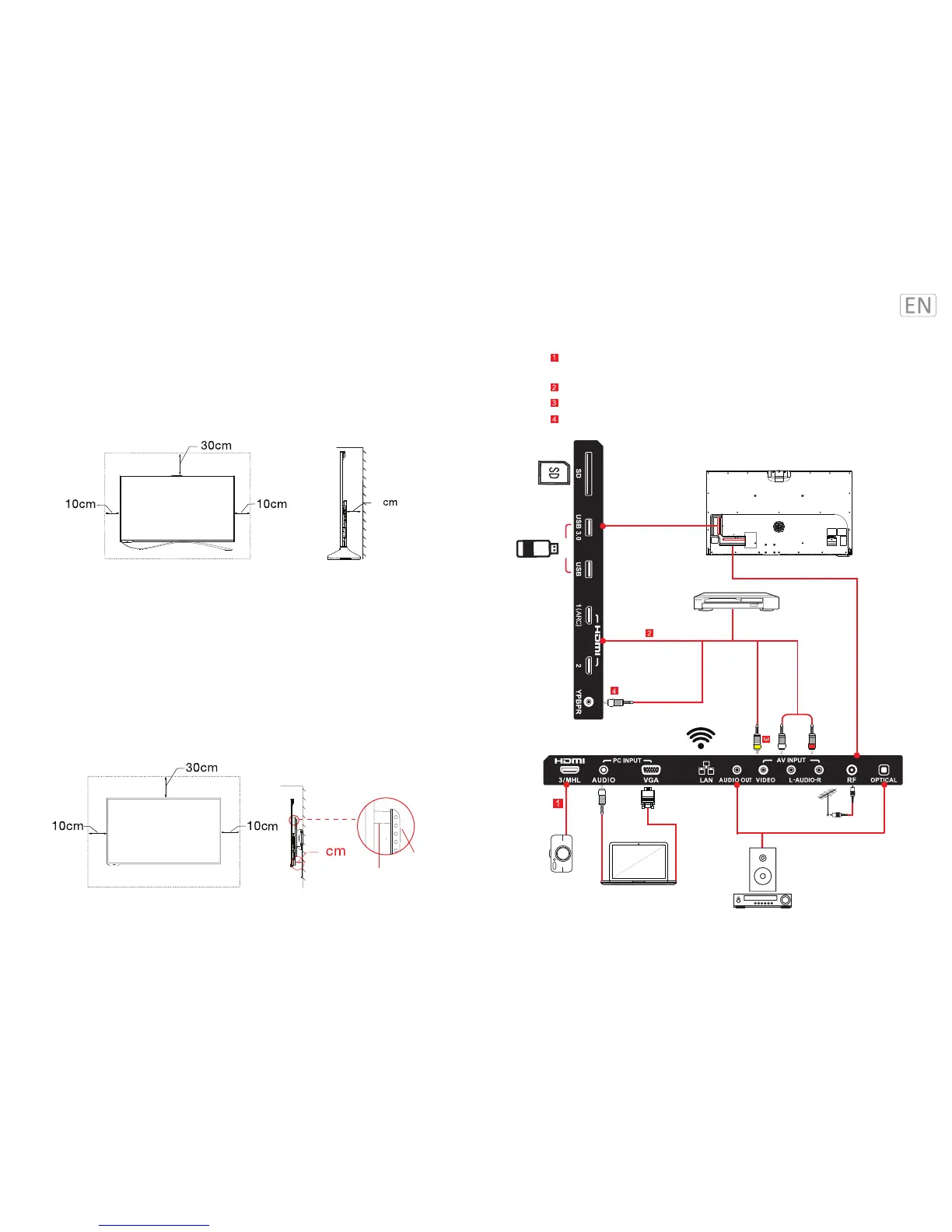
Please reserve enough space as suggested below for proper installaon.
Mounng Hole Paern: 400 x 400mm
Wall Mount: It is advised to use the wall mount accessories recommended by Letv on its official
website for guarantee premium sound effects.
Please install the mounng bracket with the specified M6 x 40mm coach screws.
Base Mounng
Please reserve enough space as suggested below for proper installaon.
Installaon Guide
15
Zoom-in view
8
Mounng bracket
Mounng sleeve
Audio cable
Video cable
Antenna Connector
USB
USB port (Camera port)
MHL is for connecons with mobile devices (cellphones, digital cameras, digital
video cameras, and portable mulmedia players)
Connect to devices with HDMI port (DVD set-top box, etc.)
Connect to devices with AV port (DVD set-top box, etc.)
Connect to devices with YPbPr/YCbCr output port (DVD or set-top box)
TV Ports


 To Next Page