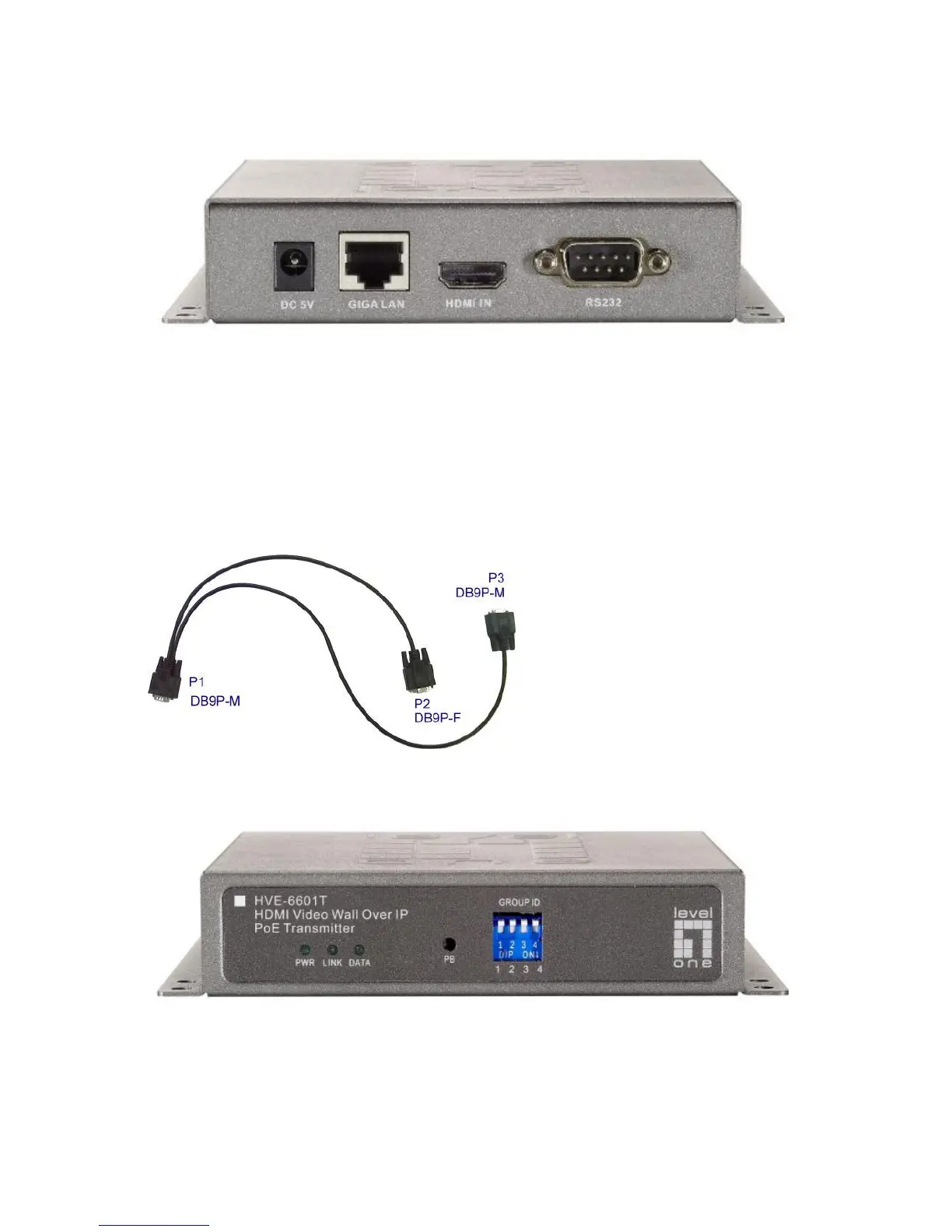
Installation:
HVE-6601T Transmitter (Video Wall)
1. DC5V: Connect it to the external AC adapter which plugs into an electrical
outlet. Or via 802.3af PoE PSE to GIGA LAN port.
2. GIGA LAN: Connect directly to a Receiver or to a GIGA(1000Mbps) Ethernet
Switch using CAT5e/6 cable.
3. HDMI IN: Connect to an HDMI source device with an HDMI M-M cable. Use an
HDMI --> DVI adapter if the source is DVI.
4. RS232: Used Y Cable to separate S0(RS232 port) and S1(Debug console port)
for Video Wall system solutions.
Y Cable
P1: Connect to RS232
port of HVE-6601T.
P2(S0): Connect to next
device’s P3(S1) of Y
cable.
P3(S1): Connect to
previous device’s P2(S0)
of Y cable.
LEDs , button and Group ID setting
1. POWER LED Blinking: power on and the unit is booting up.
2. POWER LED On: power on and the unit is active.
3. LINK LED Off: LAN is not connected.
4. LINK LED On: LAN is connected.
5. DATA LED Blinking: if Transmitter is connecting with LAN, or the HDMI



 To Next Page