Product Diagram
English
Hardware Installation
Step 1: Connection to Power over Ethernet Switch
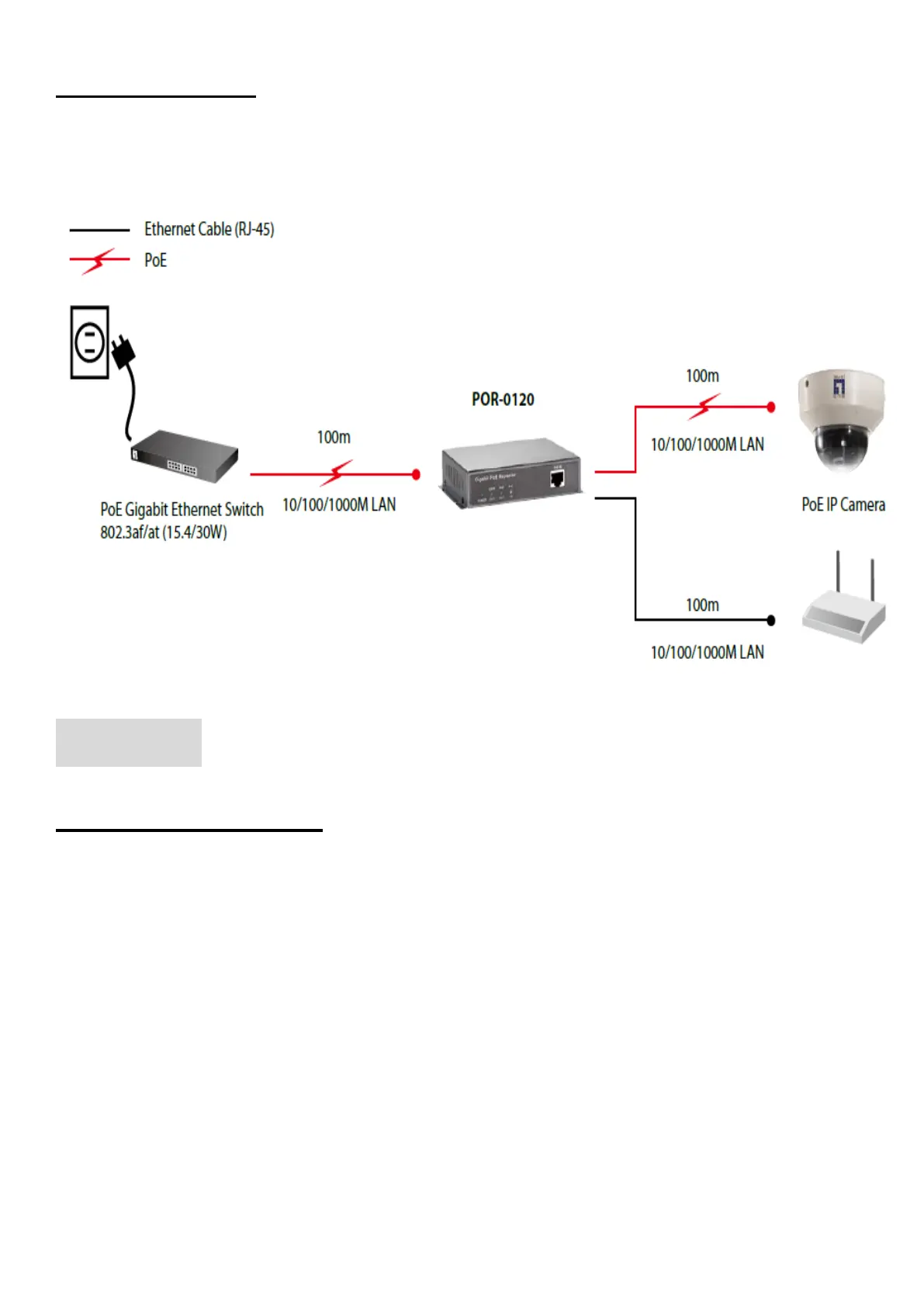
A. Connect one of the Ethernet Switch port with PoE power supply to the PoE IN port of
POR-0120/0122 as the following connection.
B. The LED indicators “POWER” and “PoE IN” will turn on indicating the PoE and Ethernet
connection.
C. The LED indicators “PoE IN” will flash to indicate Ethernet data activity.
Step 2: Connection to PoE PD
D. Connect the“PoE OUT” port of POR-0120/0122 to power up the PD device as the following
connection.
E. The LED indicators “PoE OUT” will turn on indicating the PoE and Ethernet connection.
F. The LED indicators “PoE OUT” will flash to indicate Ethernet data activity.
** Note: If the Ethernet cable is not standard CAT5 cable, the POR-0120/0122 may be working for
shorter length than 100 meter.


 To Next Page
 Loading...