
 Need help?
Do you have a question about the Levenhuk Atom Digital DNB100 and is the answer not in the manual?
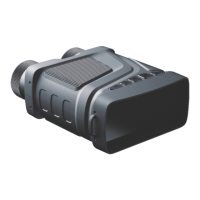
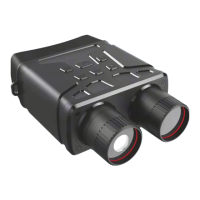
The Levenhuk Atom Digital DNB100 Night Vision Binoculars are a versatile optical device designed for observation in various lighting conditions, including complete darkness. This device combines optical and digital magnification, allowing for flexible viewing options.
The Levenhuk Atom Digital DNB100 functions as a digital night vision binocular, capable of capturing both still images and video recordings. It features an infrared (IR) illuminator for enhanced visibility in low-light or no-light environments. The device offers three primary modes: photo mode for still image capture, video mode for recording moving footage, and playback mode for reviewing saved media. A focusing wheel allows for precise adjustment of the image clarity. The IR UP and IR DOWN buttons control the brightness level of the infrared illumination and can also be used for digital zoom (in/out) with a long press. A dedicated MENU button provides access to various settings, including resolution, night vision sensitivity, language, date, auto power-off, date stamping on media, memory card formatting, and file management. The SHOT button serves multiple purposes: taking pictures in photo mode, starting and stopping video recording in video mode, and entering sub-menus within the settings.
The device is powered by 6 AA batteries, which should be installed according to polarity marks. For charging and continuous operation, the device can be connected to an AC power supply using a USB cable and a DC adapter (not included). It's important to note that the voltage from a computer's USB port is insufficient for proper operation. The Levenhuk Atom Digital DNB100 supports microSD memory cards (Class 10, up to 128GB) for storing captured photos and videos. Users are advised to format the memory card before initial use to ensure compatibility. The POWER button is pressed and held for 3 seconds to turn the device on or off. The focusing wheel is used to adjust image clarity. When operating in low light or at night, the IR illuminator can be activated by pressing the IR UP button, which will switch the image from color to black and white. The IR brightness level can be adjusted from 1 to 7 using the IR UP and IR DOWN buttons. Long pressing these buttons enables digital zoom. The device offers multiple language settings for user convenience.
To ensure the longevity and optimal performance of the Levenhuk Atom Digital DNB100, several maintenance guidelines should be followed. The device should never be exposed to direct sunlight, as this can pose a fire hazard. Optical surfaces should not be scratched or touched with fingers. Before cleaning, the batteries must be removed. Only dry, lint-free cloths should be used to wipe the outer parts of the device; cleaning fluids should be avoided to prevent damage to electronic components. For lenses, a soft cloth should be used without applying excessive pressure. The device should be kept away from dust and water and stored in a bag or box when not in use. If the device is to be stored for an extended period, the batteries should be removed to prevent leakage and damage. Battery safety instructions emphasize using the correct size and type of batteries, replacing all batteries at once, cleaning contacts, and ensuring correct polarity. Batteries should not be short-circuited, heated, or disassembled. Used batteries should be disposed of according to local regulations. The manufacturer reserves the right to make changes to product specifications without prior notice. Levenhuk offers an international lifetime warranty against defects in materials and workmanship for its optical products, with accessories covered by a two-year warranty.
 General
| Brand | Levenhuk |
|---|---|
| Model | Atom Digital DNB100 |
| Category | Binoculars |
| Language | English |



 To Next Page