
 Need help?
Do you have a question about the Leviton 95A03-1 and is the answer not in the manual?
Read and follow all instructions, warnings marked on the product, and safety guidelines.
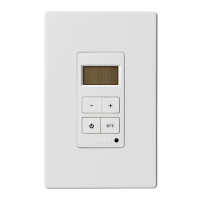
The Hi-Fi 2 VSC is a 4-button keypad for audio zones and sources with an IR receiver.
Connect VSC keypads to Hi-Fi2 Main Assembly using Cat 5 UTP, EIA/TIA 568A wiring scheme.
Procedure to change the VSC faceplate color, including steps for removing and attaching new parts.
Configure audio zone by pressing SRC, then use + or - buttons to select zone number (1-16).
Equipment tested and found to comply with Class B digital device limits per FCC Rules, Part 15.
Contact Leviton Canada for warranty information and product returns via mail or telephone.
Details warranty periods for various Leviton products, limitations, and conditions for repair or replacement.
Document content protected by copyright; all rights reserved by Leviton Manufacturing Co., Inc.
The Leviton Volume-Source Control (VSC), Cat. No. 95A03-1, is a sophisticated 4-button keypad designed to serve as an interface for Leviton's Hi-Fi2 audio systems. This device allows users to manage audio zones and select audio sources within their home, providing a centralized control point for their audio entertainment. Each VSC unit is equipped with an integrated IR receiver, enabling remote control of the Hi-Fi2 system and connected audio sources from any audio zone in the house. This feature enhances convenience, allowing users to adjust their audio experience without needing to be physically present at the main control unit.
The VSC is designed for direct connection to the Hi-Fi2 Main Assembly using Cat 5 unshielded, twisted pair (UTP) cabling. This type of cabling is standard for communications and ensures reliable data transmission between the VSC and the main audio system. Proper termination of the Cat 5 cable is critical for the system's optimal operation, and it must adhere to the standard EIA/TIA 568A wiring scheme. Each end of the Cat 5 cable is terminated with an RJ45 connector, which plugs into designated jacks on both the VSC and the Hi-Fi2 Main Assembly. Specifically, one RJ45 connector inserts into an audio zone input jack (1-8) under "Volume Source Control / IR In" on the Hi-Fi2 Main Assembly, while the other end connects to the "Zone Control" jack on the VSC.
Installation guidelines emphasize the importance of cable length, stating that the total distance of Cat 5 cabling between the Hi-Fi2 Main Assembly and the VSC units should not exceed 2000 feet. Furthermore, it is recommended that no single run of Cat 5 cable exceeds 250 feet to maintain signal integrity and system performance. These guidelines are crucial for ensuring the stability and responsiveness of the audio control system.
Upon initial power-up, the VSC requires configuration to specify which audio zone it will control. This process involves a simple on-screen prompt: "Select Zone Zone 1." Users can configure the audio zone by pressing the "src" button on the VSC. To adjust the zone number, the "+" button increases the zone number, and the "–" button decreases it. The audio zone settings range from 1 to 16, offering flexibility for various home audio setups. A notable feature is the ability to configure multiple VSCs to a single audio zone, which is particularly useful in large rooms where several control points are desired. When multiple VSCs are assigned to the same zone, they will mimic each other's functions, providing synchronized control. The Hi-Fi2 system supports a maximum of 16 VSC keypads, allowing for extensive coverage across different areas of a home.
Maintenance and customization features are also integrated into the VSC design. The device's aesthetic can be tailored to complement interior décor through its changeable color components. The VSC is supplied with a white faceplate, rubber keypad, and insert as standard. Additional colors are available and can be obtained through Leviton distributors. Changing the color of the VSC involves a straightforward process: first, remove the faceplate. Then, using a small-blade screwdriver, gently depress the latches on one side of the insert while lifting it up, and repeat for the other side to remove the insert. After removing the rubber keypad, the new rubber keypad is inserted by aligning its latches with the openings on the VSC and gently snapping it into place. Finally, the new faceplate is attached. This modular design allows for easy personalization and ensures the VSC can seamlessly blend into various interior styles.
The VSC adheres to FCC Compliance standards, having been tested and found to comply with the limits for a Class B digital device, as per part 15 of the FCC Rules. This compliance ensures that the equipment provides reasonable protection against harmful interference in a residential installation. The device generates, uses, and can radiate radio frequency energy, and proper installation according to instructions helps prevent harmful interference to radio communications. In cases where interference does occur, users are advised to reorient or relocate the receiving antenna, increase the separation between the equipment and receiver, connect the equipment to an outlet on a different circuit, or consult a dealer or an experienced radio/TV technician for assistance.
Leviton provides a limited warranty for its products, including the VSC, ensuring they are free from defects in material and workmanship for a specified period. For the OmniPro II and Lumina Pro series, the warranty is three years from installation or 42 months from manufacture date. For OmniLT, Omni IIe, and Lumina, it's two years from installation or 30 months from manufacture date. Thermostats and accessories have a two-year warranty from installation or 30 months from manufacture date. Rechargeable batteries included in products are warranted for ninety days from the date of purchase, while primary (non-rechargeable) batteries are not warranted. Products with Windows® Operating Systems are covered for the warranty period, during which Leviton will restore corrupted operating systems to factory default at no charge, provided the product was used as originally intended. Installation of non-Leviton software or modification of the operating system voids this warranty.
Leviton's warranty obligation is limited to the repair or replacement, at Leviton's option, of products that fail due to defects in material or workmanship. Leviton reserves the right to replace products under this Limited Warranty with new or remanufactured products. The warranty does not cover labor costs for removal or reinstallation of the product. Repaired or replaced products are then warranted for the remainder of the original Limited Warranty period or ninety days, whichever is longer. This Limited Warranty specifically excludes PC-based software products and does not cover conditions or applications beyond Leviton's control. Leviton is not responsible for issues related to improper installation, including failure to follow written installation and operation instructions, normal wear and tear, catastrophe, fault or negligence of the user, or other problems external to the product. For complete warranty information and instructions for returning a product, users can visit www.leviton.com.
The document also includes copyright and trademark information, stating that all its contents are protected by international copyright and intellectual property rights and are the property of Leviton Manufacturing Co., Inc., its subsidiaries, affiliates, and/or licensors. © 2013 Leviton Manufacturing Co., Inc. All rights reserved. The use of third-party trademarks, service marks, trade names, brand names, and/or product names is for informational purposes only and does not imply affiliation, sponsorship, or endorsement. No part of the document may be reproduced, transmitted, or transcribed without the express written permission of Leviton Manufacturing Co., Inc. For technical assistance, users can call 800-824-3005 or visit www.leviton.com.
 General
| Voltage | 120 VAC |
|---|---|
| Model Number | 95A03-1 |
| Color | White |
| Load Type | Incandescent, LED, CFL |
| Installation | Wall Mount |
| Warranty | 5-Year Limited |


 To Next Page