Basic operation
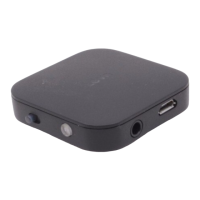
1. powe r on :
In off sta te , press MFB a round 3 seconds, Blue LED flashes twice, BTI-020V is powered on. (I f BTI-020V did not
connect with any devi ce , it could ente r into pai ring mode qui ckl y with Blue LED flashes a fte r powe r on)
2. Power off :
In on s ta te , press MFB a round 3 se conds, Red LED flashes twice ( if release after Red LED immediately, Red LED
ma y onl y flashes once ), BTI -020V power off. Please re-power on the uni t a fte r powe r off the uni t 3 se conds la te r
since the vol tage of the chipse t ma y not disappea r totally.
3. Pai ring mode :
Powe r on the uni t, double cli ck the MFB, the Blue LED flashes quickl y to ente r pai ring mode , i t will be in
connecti ve s tandby mode i f no connections in 2 minutes .
4. Clear up the pairing list :
Power off with the current working mode(TX or RX), 3 seconds la te r, swi tch to the othe r working mode , then
power on, the pairing information for the former mode will be cleared up.
5. Conne ct with all the conne cted devi ce :
Powe r on the uni t ( usin g two connections simul taneously ), short press MFB to conne ct all the connected de vi ce
automa ti cally, but i t onl y support two de vi ces conne ction simultaneously, pri ori tize the lates t two conne cted
devi ces, successfull y connected, BTI-020V is solid blue. If BTI-020V could not connect wi th any devi ce in 22
seconds (This is up to how many paire d devi ce BTI-020V stored), it will enter into pairing mode. When used as
Bluetooth tra nsmi tter, it support two connected de vi ces transfer Audio simul taneousl y.
6. Power off automatically
The BTI -020V will power off automatically when the ba tte ry vol ta ges lo we r tha n 3.1V .
7. LED indi ca tor in transmitte r mode :
BTI-020V Working as a Bluetooth receiver
Switch the TX or RX button to chose the unit in Bluet oot h transmitter mode ,or in Bluet ooth receiver
mode.
When in power off state,switch the butt on t o RX side, then long press MFB butt on to turn on it, all the
paired devices record will be cleared. Please don’t switch TX or RX mode immediately in 3 seconds after unit


 To Next Page
 Loading...