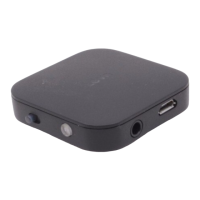
Preparati on bef ore using
1, Before going to use BTI-020V, please full cha rge BTI-020V ,Walkman, mobile , TV,Compute r ,e ct whi ch support
3.5MM AUX devi ces.
Operation
1, BTI-020V charging:
For the first using, please fully charged the model BTI-020V.
Please charge when in low batte ry:
When the devi ce is in working mode, if the RED LED flashes three ti mes continuousl y (not include Red LED
flashes on ce for su ccessfull y connection), means the unit is working in low vol tage, please cha rge the uni t.
A, Please conne ct the cha rging cable to the adapter ( USD output port) or compute r
B, Then using Mi cro USB cha rging cable connecting with BTI -020V
C, In charging mode , Red LED on, will off when full charging
D, The entire charging time around 2 hours
Worked as a Bluetooth t ransmitter
Function opti on for BTI-020V
Cha nge di fferent working mode through the Slide option button.
When the unit in off s ta te , please slide the button to “TX” side, then press MFB to power on the uni t, all the
paired device information in RX mode will be deleted after power on.
Please don’t swi tch TX or RX mode i mmediatel y in 3 seconds afte r unit turn off , be cause the uni t is still
ha vi ng power, if switching to TX or RX mode i mmediatel y, i t will ente r into the pre vious powe r off mode to
re-turn on .
• Note : when worked as the Blue tooth transmi tte r, i t onl y could sta y 4 de vi ce re cords and these devi ces
will be taken ove r by the lates t pai red devi ce .(Be cause the unit supports “automatically
• Re -connection “ function,if staying too much devices record, the re-pairing time will be lasting longer ).
BTI -020V automatically Re-conne ction ti me :
In 7 seconds for the uni t has 1 paired re cord
In 12 seconds for the unit has 2 paire d re cords
In 17 seconds for the unit has 3 paire d re cords
In 22 seconds for the unit has 4 paire d re cords


 To Next Page
 Loading...