EasyManua.ls Logo

Levoit Core LAP-C161-WUS - User Manual

Levoit Core LAP-C161-WUS
12 pages
Print Icon
To Next Page IconTo Next Page
Loading...
Levoit Core
TM
Mini Air Purifier
Models: LAP-C161-WUS, LAP-C161-KUS
Questions or Concerns?
Please contact us MonFri, 9:00 am5:00 pm PST/PDT
at support@levoit.com or at 888 7268520.
USER MANUAL

Questions and Answers

Summary

Specifications

Power Supply

Specifies the voltage and amperage for the power adapter.

Rated Power

Indicates the power consumption of the air purifier in watts.

Ideal Room Size

Defines the recommended room area for optimal air purification performance.

Operating Conditions

Outlines the acceptable temperature and humidity ranges for operation.

Noise Level

Details the decibel range of sound produced by the air purifier during operation.

Air Purifier Dimensions

Provides the physical measurements of the air purifier unit.

Air Purifier Weight

States the weight of the air purifier for handling and placement.

Power Adapter Specifications

Details the input and output specifications of the AC power adapter.

Safety Information

General Safety Precautions

Provides essential precautions for safe and proper use of the air purifier.

Power Adapter & Cord Safety

Details safety guidelines for using the power adapter and its cord.

Electromagnetic Fields (EMF) Compliance

Explains the air purifier's compliance with electromagnetic field standards.

Getting to Know Your Air Purifier

Components Overview

Identifies and labels the main parts and connections of the air purifier.

Getting Started

Initial Setup Guide

Guides through the process of unboxing, assembling, and plugging in the air purifier.

Using Your Air Purifier

Operation and Fan Speed Control

Explains how to turn on, operate, and adjust fan speeds using the control button.

Essential Oils Usage Guide

Provides instructions and warnings regarding the use of essential oils for aromatherapy.

Adding Essential Oils

Details the specific steps for adding essential oils to the aroma pad.

Humidity and Filter Care

Advises on optimal humidity levels to prevent filter damage and mold growth.

3-Stage Filtration System Explained

Describes the function and benefits of the 3-stage filtration system.

Care and Maintenance

Cleaning the Air Purifier

Provides instructions for cleaning the exterior and interior of the air purifier unit.

Filter Indicator Guide

Explains the function of the filter indicator light and when to check the filter.

Resetting the Filter Indicator

Details the procedure to reset the filter indicator after maintenance.

Cleaning the Pre-Filter

Outlines the method for cleaning the pre-filter to maintain performance.

Filter and Aroma Pad Maintenance

Filter Replacement Guidelines

Guides on determining when the air purifier filter needs replacement based on usage and indicators.

Replacing the Air Purifier Filter

Provides step-by-step instructions for removing and replacing the air purifier filter.

Cleaning the Aroma Pad

Details the process for cleaning the aroma pad used for aromatherapy.

Replacing the Aroma Pad

Explains when and how to replace the aroma pad if it becomes damaged.

Storage Recommendations

Offers guidance on proper storage of the air purifier when not in use.

Troubleshooting Common Issues

Power and Control Button Problems

Lists common issues and solutions for a non-responsive air purifier.

Reduced Airflow Solutions

Provides troubleshooting steps for decreased airflow from the air purifier.

Unusual Noise Troubleshooting

Offers solutions for abnormal noises produced by the air purifier during operation.

Poor Air Purification Quality

Details troubleshooting steps to improve the air purification effectiveness.

Advanced Troubleshooting and Compliance

Strange Odor Diagnosis

Addresses potential causes and solutions for unusual odors emitted by the air purifier.

Check Filter Indicator Reset Issues

Explains how to resolve the issue of the filter indicator remaining on post-replacement.

FCC Interference Statement

Provides regulatory information regarding Federal Communication Commission compliance.

Warranty and Customer Support

Warranty Terms and Policy

Outlines the conditions, limitations, and duration of the product warranty.

Customer Support Contact Information

Provides contact information and hours for customer service assistance.

Customer Support Hours

Specifies the available times for contacting customer support for inquiries.

Summary

Specifications

Power Supply

Specifies the voltage and amperage for the power adapter.

Rated Power

Indicates the power consumption of the air purifier in watts.

Ideal Room Size

Defines the recommended room area for optimal air purification performance.

Operating Conditions

Outlines the acceptable temperature and humidity ranges for operation.

Noise Level

Details the decibel range of sound produced by the air purifier during operation.

Air Purifier Dimensions

Provides the physical measurements of the air purifier unit.

Air Purifier Weight

States the weight of the air purifier for handling and placement.

Power Adapter Specifications

Details the input and output specifications of the AC power adapter.

Safety Information

General Safety Precautions

Provides essential precautions for safe and proper use of the air purifier.

Power Adapter & Cord Safety

Details safety guidelines for using the power adapter and its cord.

Electromagnetic Fields (EMF) Compliance

Explains the air purifier's compliance with electromagnetic field standards.

Getting to Know Your Air Purifier

Components Overview

Identifies and labels the main parts and connections of the air purifier.

Getting Started

Initial Setup Guide

Guides through the process of unboxing, assembling, and plugging in the air purifier.

Using Your Air Purifier

Operation and Fan Speed Control

Explains how to turn on, operate, and adjust fan speeds using the control button.

Essential Oils Usage Guide

Provides instructions and warnings regarding the use of essential oils for aromatherapy.

Adding Essential Oils

Details the specific steps for adding essential oils to the aroma pad.

Humidity and Filter Care

Advises on optimal humidity levels to prevent filter damage and mold growth.

3-Stage Filtration System Explained

Describes the function and benefits of the 3-stage filtration system.

Care and Maintenance

Cleaning the Air Purifier

Provides instructions for cleaning the exterior and interior of the air purifier unit.

Filter Indicator Guide

Explains the function of the filter indicator light and when to check the filter.

Resetting the Filter Indicator

Details the procedure to reset the filter indicator after maintenance.

Cleaning the Pre-Filter

Outlines the method for cleaning the pre-filter to maintain performance.

Filter and Aroma Pad Maintenance

Filter Replacement Guidelines

Guides on determining when the air purifier filter needs replacement based on usage and indicators.

Replacing the Air Purifier Filter

Provides step-by-step instructions for removing and replacing the air purifier filter.

Cleaning the Aroma Pad

Details the process for cleaning the aroma pad used for aromatherapy.

Replacing the Aroma Pad

Explains when and how to replace the aroma pad if it becomes damaged.

Storage Recommendations

Offers guidance on proper storage of the air purifier when not in use.

Troubleshooting Common Issues

Power and Control Button Problems

Lists common issues and solutions for a non-responsive air purifier.

Reduced Airflow Solutions

Provides troubleshooting steps for decreased airflow from the air purifier.

Unusual Noise Troubleshooting

Offers solutions for abnormal noises produced by the air purifier during operation.

Poor Air Purification Quality

Details troubleshooting steps to improve the air purification effectiveness.

Advanced Troubleshooting and Compliance

Strange Odor Diagnosis

Addresses potential causes and solutions for unusual odors emitted by the air purifier.

Check Filter Indicator Reset Issues

Explains how to resolve the issue of the filter indicator remaining on post-replacement.

FCC Interference Statement

Provides regulatory information regarding Federal Communication Commission compliance.

Warranty and Customer Support

Warranty Terms and Policy

Outlines the conditions, limitations, and duration of the product warranty.

Customer Support Contact Information

Provides contact information and hours for customer service assistance.

Customer Support Hours

Specifies the available times for contacting customer support for inquiries.

Overview

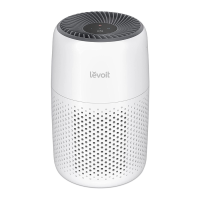
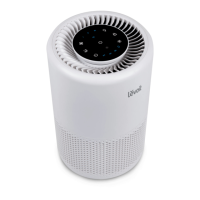
The Levoit Core Mini Air Purifier is a compact and efficient device designed to improve indoor air quality. Its primary function is to filter airborne particles, odors, and fumes, creating a cleaner and healthier environment. The purifier utilizes a 3-stage filtration system, which includes a pre-filter, a Personal HEPA filter, and an activated carbon filter, to ensure comprehensive air purification.

Function Description

The Levoit Core Mini Air Purifier works by drawing in ambient air through its air inlets, passing it through a multi-stage filtration system, and then releasing purified air through the air outlet. The filtration process begins with the pre-filter, which captures larger particles such as dust, lint, fibers, hair, and pet fur. This initial stage is crucial for maximizing the life of the subsequent filters by protecting them from premature clogging. Following the pre-filter, the air moves through the Personal HEPA filter. This advanced filter is designed to trap at least 97% of airborne particles as small as 0.3 microns, including fine dust, smoke particles, and common allergens like pollen and pet dander. The final stage of filtration involves the activated carbon filter, which is highly effective at physically adsorbing smoke, various odors, and harmful fumes, leaving the air fresh and clean. The device is controlled by a single button, allowing users to easily turn it on/off and adjust fan speeds between three settings (I, II, and III). An integrated Check Filter Indicator reminds users when it's time to inspect or replace the filter, ensuring continuous optimal performance. Additionally, the air purifier features an aroma box with an aroma pad, allowing users to add essential oils for a pleasant scent in the purified air.

Usage Features

To begin using the Levoit Core Mini Air Purifier, users must first remove all packaging, including any tape on the aroma box, and ensure the plastic wrap is removed from the filter, which comes pre-installed. The AC power adapter is stored inside the air purifier and should be retrieved during setup. The device's top and bottom halves rotate counterclockwise to separate, allowing access to the filter and adapter. After removing the plastic from the filter and placing it back, the halves are reassembled by rotating clockwise to secure them. The AC power adapter is then connected to the air purifier and plugged into an outlet. For optimal air circulation, it is recommended to maintain at least 15 inches (38 cm) of clearance on all sides of the air purifier.

Operating the air purifier is straightforward: a tap of the Control Button turns the device on. Subsequent presses of the Control Button cycle through the three fan speeds (I, II, and III) and also turn the unit off. The display lights automatically turn off after 60 seconds of inactivity to conserve energy and reduce light pollution.

A unique feature of the Levoit Core Mini is its aromatherapy capability. Essential oils (not included) can be added to the aroma pad located within the aroma box. To do this, the aroma box is pushed in and pulled out, 5-7 drops of essential oil are added to the pad, and the box is then reinserted. It's important not to add essential oils directly to the filter or fan, as this can damage the filter and cause an unpleasant smell. Users should also avoid mixing different essential oil blends without cleaning the aroma pad first.

The air purifier is designed for household use and should not be used outdoors or in excessively humid areas, as moisture can damage the filter and promote mold growth. It should also be kept away from heat sources, combustible gases, and areas where oxygen is being administered.

Maintenance Features

Regular maintenance is key to ensuring the longevity and efficiency of the Levoit Core Mini Air Purifier. Before any cleaning or servicing, the device must be unplugged. The exterior of the air purifier can be wiped with a soft, dry cloth, or a damp cloth followed by immediate drying if necessary. A vacuum hose with a crevice attachment can be used to clean the inside of the air purifier. Abrasive chemicals or flammable cleaning agents should not be used.

The outer pre-filter requires cleaning every 2-4 weeks to maintain efficiency and extend the filter's life. This can be done using a soft brush or a vacuum hose to remove accumulated hair, dust, and large particles. The filter itself should not be cleaned with water or other liquids.

The Check Filter Indicator light serves as a reminder to check the filter, typically turning on after 4-6 months of use. While it indicates a need for inspection, immediate replacement might not always be necessary. The indicator light can be reset after replacing the filter by pressing and holding the Control Button for 3 seconds while the air purifier is plugged in and the fan is off. If the filter was changed before the indicator lit up, the same reset procedure can be followed.

The 3-stage filter should be replaced every 4-6 months, though this timeframe can vary based on usage frequency and environmental pollution levels. Signs that a filter needs replacement include increased noise, decreased airflow, unusual odors, or a visibly clogged filter. Only official Levoit filters should be used to maintain performance.

The aroma pad also requires maintenance for effective aromatherapy. It should be cleaned before using a new essential oil blend. To clean, the aroma box is removed, the pad is rinsed under warm running water, dried with a clean cloth, and then placed back into the aroma box and reinserted into the air purifier. Liquid cleaners or detergents should not be poured into the aroma pad or box. If the aroma pad becomes deformed or damaged after repeated washing, it may need to be replaced with an official Levoit aroma pad.

For long-term storage, both the air purifier and the filter should be wrapped in plastic packaging and stored in a dry place to prevent moisture damage.

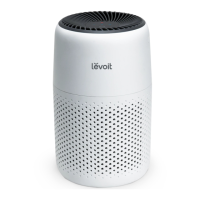
Levoit Core LAP-C161-WUS Specifications

General IconGeneral
ModelLAP-C161-WUS
TypeAir Purifier
Filter TypeHEPA
FiltrationTrue HEPA Filter
Fan Speeds3
Power Consumption26W
Voltage120 V
ColorWhite
Wattage26 W
Coverage Area219 sq. ft.
Noise Level24 dB
Weight6.6 lbs
Power SupplyAC
Room Size219 sq ft

Related product manuals