2
How to Install Custom Vertical Valance
DESIGNLINE
™
OUTSIDE- AND INSIDE-MOUNT INSTALLATION
TAILORED EDGE
STEP 1
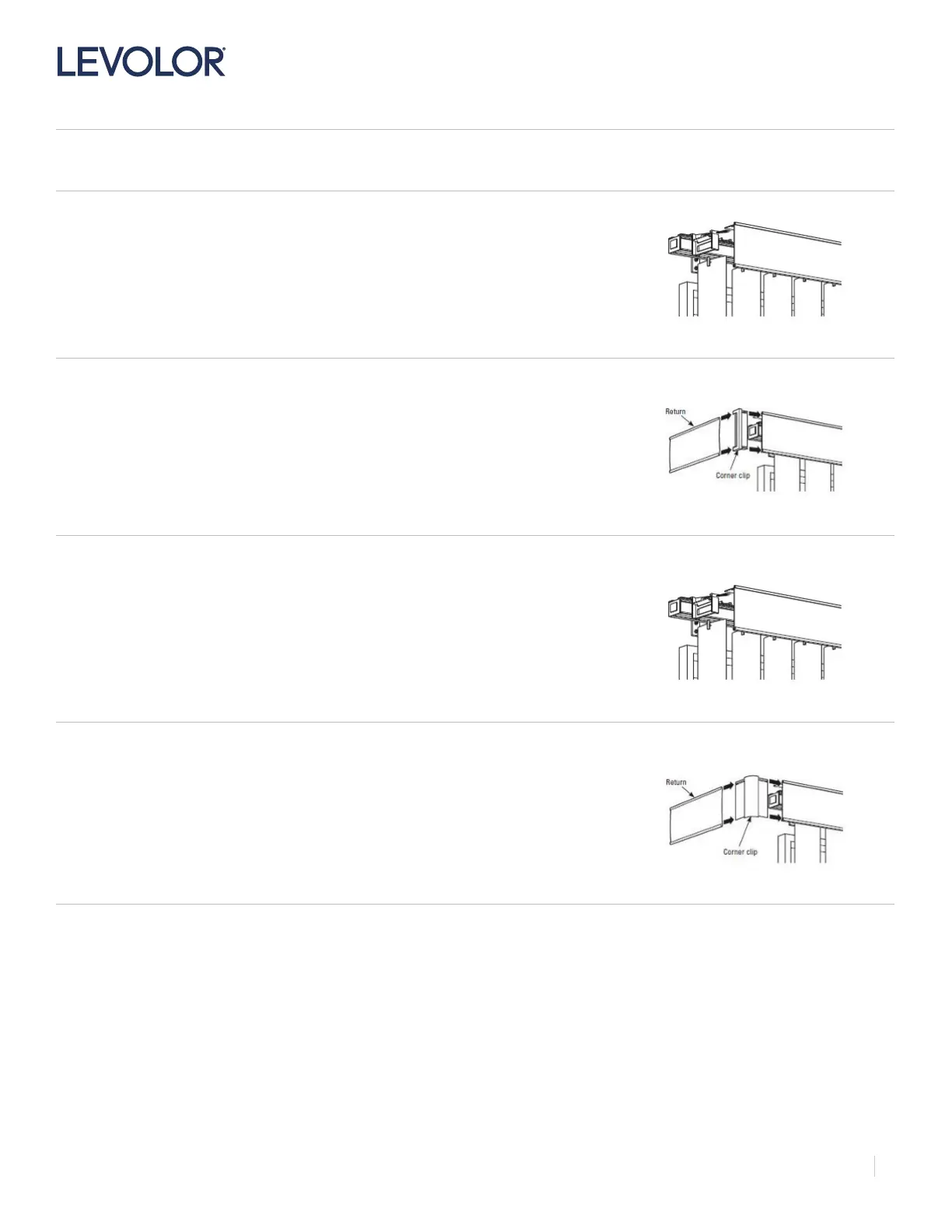
Attach the valance to the headrail
• Center the front panel with the headrail.
• Slide the mounting tab on the front valance panel into the valance clips until they
click into place.
STEP 2
Assemble the returns (outside-mount)
• Slide the end of the return into the pocket of the corner clip, as shown.
• Slide the corner clip onto the end of the front panel. The top notch will slide over
the mounting tab; the lower lip on the bottom notch will slide into the channel on
the back of the lower front panel trim.
• Repeat for the other return.
ROUND EDGE
STEP 1
Attach the valance to the headrail
• Center the front panel with the headrail.
• Slide the mounting tab on the front valance panel into the valance clips until they
click into place.
STEP 2
Attach the returns (outside-mount)
• Slide the end of the return into the pocket of the corner clip, as shown.
• Slide the corner clip onto the end of the front panel. The top notch will slide over
the mounting tab; the lower lip on the bottom notch will slide into the channel on
the back of the lower front panel trim.
• Repeat for the other return.


 To Next Page
 Loading...