27
ENGLISH
OPERATION (CONTINUED)
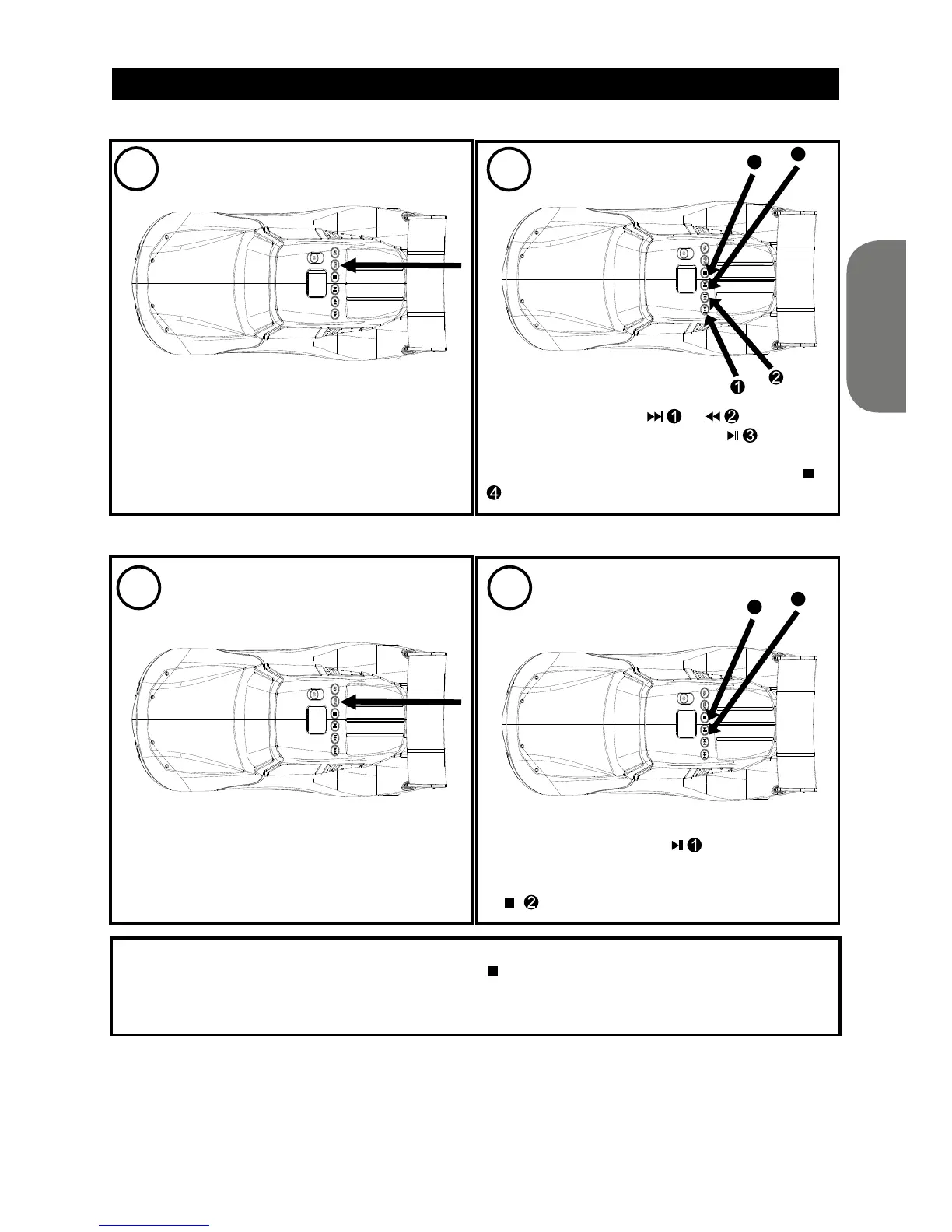
TO REPEATEDLY PLAY BACK ONE TRACK
While either in CD Stop or Playback mode,
press the REPEAT button once; “REP 1” is
displayed on the LCD display.
Press the SKIP button
or to select a
track and press the PLAY/PAUSE button
to start playback and the unit will play the
selected track over and over until the STOP ( )
button is pressed.
While either in CD Stop or Playback mode,
press the REPEAT button twice; “REP ALL” is
displayed steadily on the LCD screen.
Press the PLAY/PAUSE
button to start
playback and the unit will then play all the
tracks on the CD over and over until the STOP
( ) button is pressed.
TO CANCEL OR STOP REPEAT PLAYBACK:
• TO STOP REPEAT PLAYBACK, press the STOP (
) button once.
• TO CANCEL REPEAT PLAYBACK, press the REPEAT button several times until “REP 1/REP ALL”
disappears from the LCD display.
TO REPEATEDLY PLAY BACK ALL TRACKS
1
2
1 2
3
1
4
2


 To Next Page