1
2
OPERATION (CONTINUED)
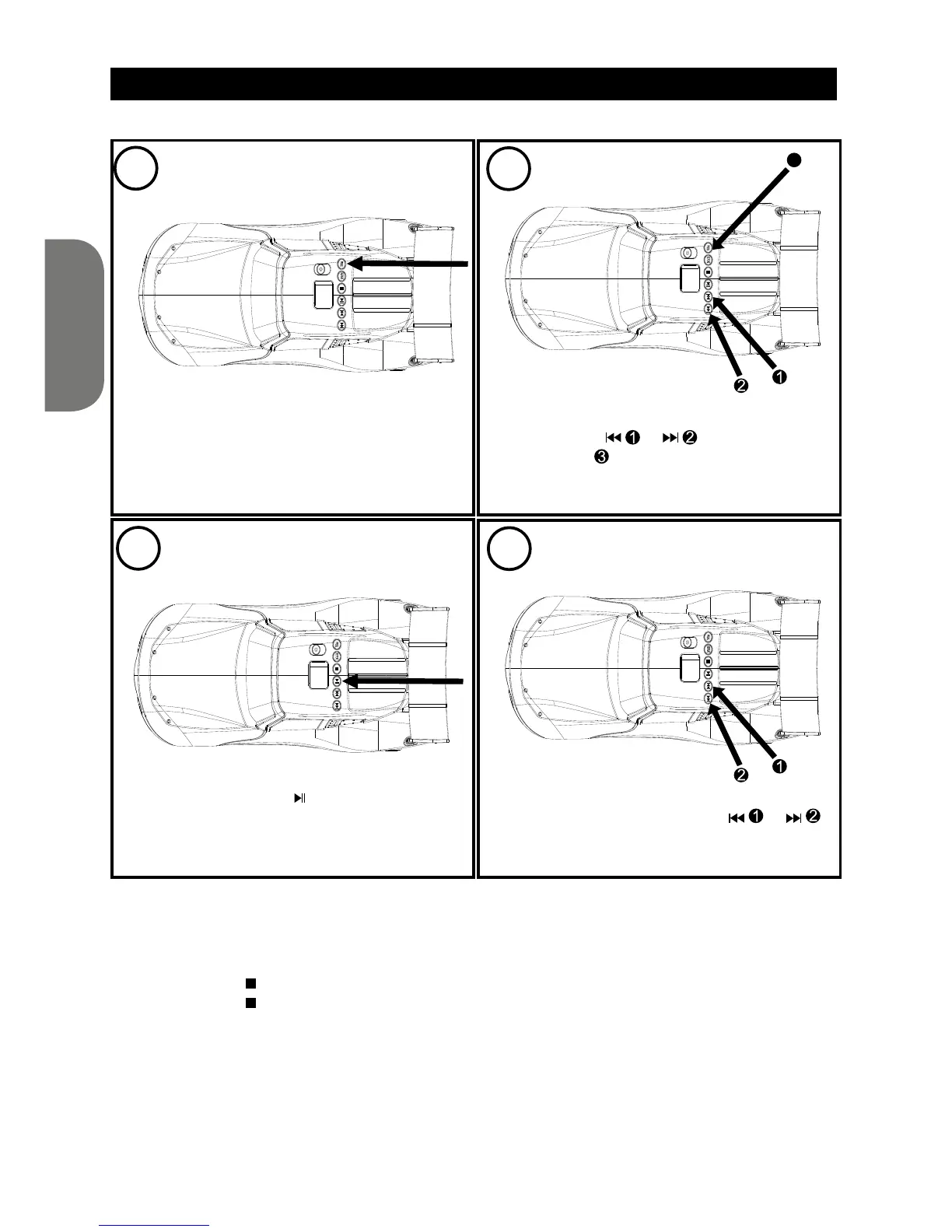
TO PROGRAM THE MEMORY (UP TO 20 TRACKS)
While in CD Stop mode, press the PROG.
button; “PROG” and “1” (the program number)
will blink on the LCD display and “01”
(the program number) will blink.
Select the rst track to be played back using
the SKIP button
or , then press the
PROG. button again. Repeat this step to
program additional tracks (up to 20 tracks).
Press the PLAY/PAUSE
button to begin
programmed playback. Adjust the VOLUME
control as desired.
To skip forward or backward through the
programs, press the SKIP button
or .
When the disc is through playing, it will stop.
NOTES:
• Programming is the ability to preselect the order in which a series of tracks will be played.
• Press the REPEAT button twice during Programmed playback to activate Repeat All (all the tracks in
the program will repeat continuously); “REP ALL” is displayed steadily on the LCD screen.
• Press the STOP (
) button to stop the disc before it is nished.
• Press the STOP ( ) button while in the Stop mode to clear the program.
3
4
3


 To Next Page